Amazon Product Comparison Table
Feature | Best Seller  Apple AirPods Pro 3 |  Samsung Galaxy Buds4 Pro |  Google Pixel Buds Pro 2 |
Price | $249 | $249.99 | $229 |
Best For | iPhone Users | Samsung Users | Android Users |
Noise Cancellation | Yes | Yes | Yes |
Battery Life | Up to 8 hrs | Up to 7 hrs | Up to 8 hrs |
Total Battery with Case | Up to 24 hrs | Up to 30 hrs | Up to 30 hrs |
Water Resistance | IP57 | IP57 | IP54 |
Spatial Audio | |||
Wireless Charging | |||
Weight per Earbud | 5.5 g | 5.1 g | 4.7 g |
Colors | White | White, Black, Apricot | Porcelain, Hazel, Wintergreen, Peony |
Rating | |||
Best Feature | Advanced ANC | Hi-Fi Audio | Google AI Features |
Buy Now |
Amazon Product Comparison Table
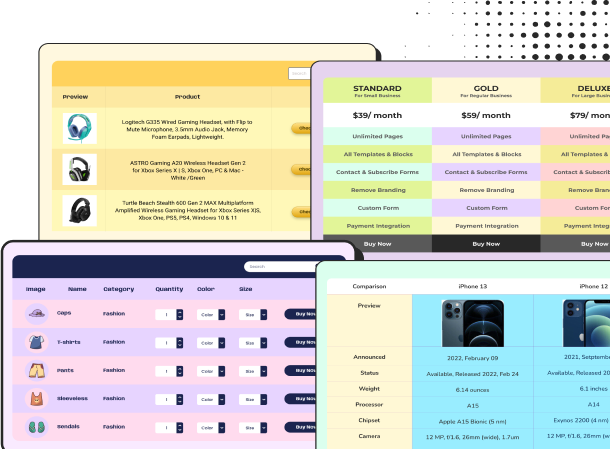
Help shoppers compare multiple Amazon products side by side with this Amazon Product Comparison Table. Designed for detailed product comparisons, it lets you showcase product images, pricing, specifications, features, ratings, and key differences in one easy-to-scan layout. The dedicated Buy on Amazon buttons make it simple for visitors to move from comparison to purchase.
This template is ideal for affiliate marketers, product review websites, technology blogs, eCommerce publishers, deal websites, and niche affiliate sites. Businesses and publishers can use it to compare similar products, highlight the strengths of each option, help readers make informed purchasing decisions, and create a clear path to Amazon through customizable CTA buttons.
The table combines product images, full specification comparisons, checkmark icons, ratings, highlighted rows, product-specific features, best-seller tag, and Buy on Amazon buttons to make product information both visually appealing and actionable. With Ninja Tables, you can easily customize these fields while keeping the table responsive and easy to navigate across devices.
How to use this Amazon comparison table:
The layout is fully customizable using Ninja Tables, allowing you to easily modify product specs, pricing, images, links, and call-to-action buttons. Just follow these steps to utilize this comparison tool fully:
- Install and activate Ninja Tables on your WordPress dashboard.
- Go to Ninja Tables → Tables → Import Table.
- Select the JSON file, and in the import format section, choose: JSON- Exported From Ninja Tables Drag and Drop.
- Click on the Import button and wait for the confirmation message.
After getting the success message, you can edit your table as you wish. Add or remove columns, rows, and features. Change the colors, fonts, and styles.
When you are done, save your table and copy the shortcode to your clipboard. You can paste it on any page or post where you want to display the table. Enjoy!
***This table may include some Pro features. Get Ninja Tables Pro for all-access fun!
You May Also Like
-
Real Estate Listing
Showcase your property listings with a simple, easy-to-scan table template.
-
WP Posts Table
WordPress posts, pages, author, etc. can be shown in a WP Posts table.
-
Amazon Product Table
Showcase products in a customized table for your business.
Craft Responsive Data Tables Fast!
Ninja Tables is the best table plugin to show data in an organized table format.