
FluentPlayer Is Here: And WordPress Video Embedding Will Never Be the Same

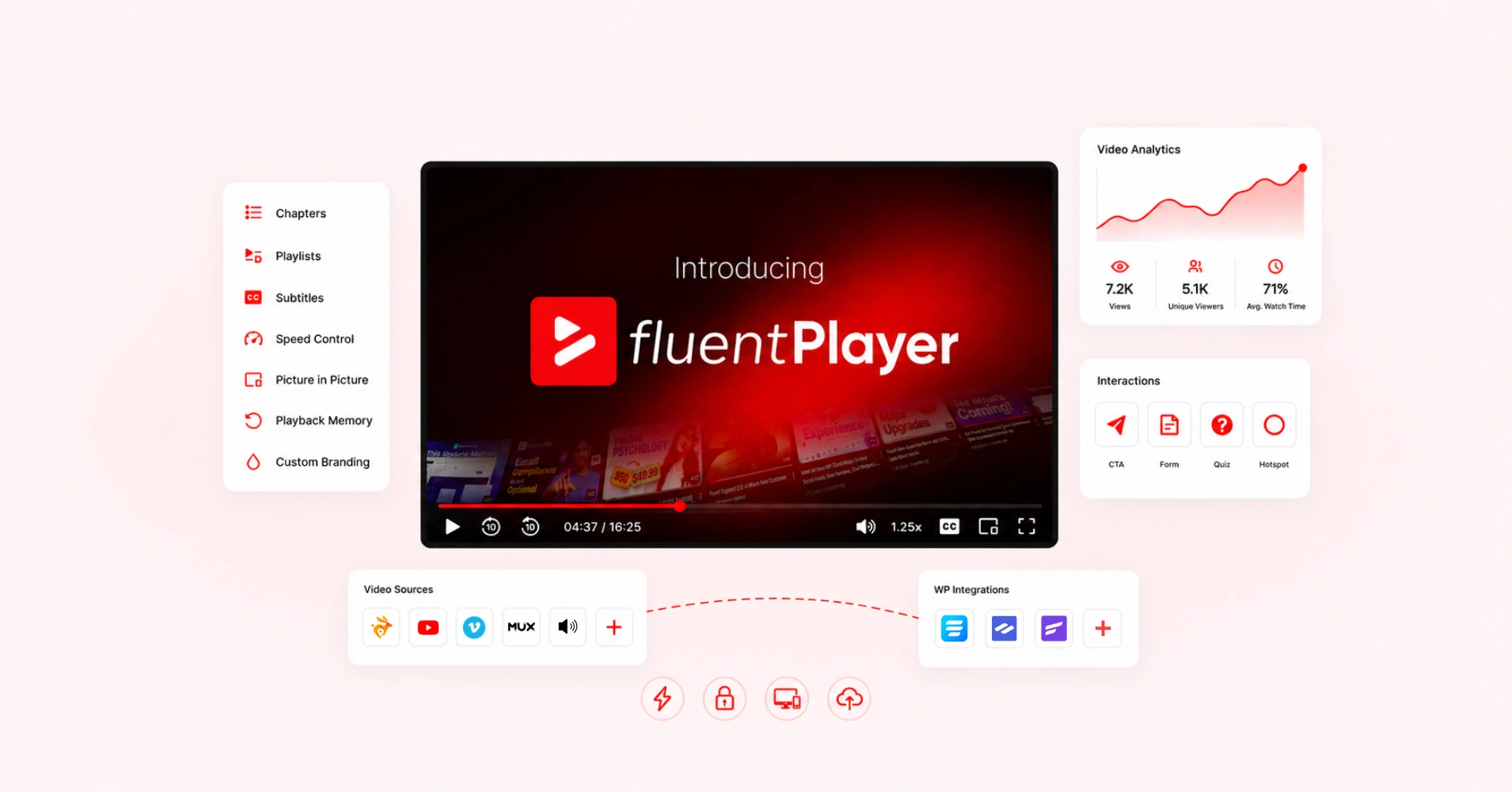
Most WordPress sites handle video the same way: paste a YouTube or Vimeo embed, move on. It works well enough until it doesn’t. Until you need the viewer to stay on your page, to know how far into the video they actually watched, trigger a lead form or CTA at the right moment, or stop YouTube from handing your audience off to someone else at the end. That’s when a basic embed stops being good enough and leaves you looking for a real solution.
WordPress has never had a video player that does what FluentPlayer does. A compact WordPress plugin from WPManageNinja that gives you full control over video delivery, viewer interaction, and the actions that happen around playback, while fitting into the rest of the Fluent ecosystem. If you use video for courses, demos, lead generation, membership content, or podcasting on WordPress, this post is a first look at what FluentPlayer does, how its features connect, and why it fills a gap other plugins have left open for far too long.
What YouTube and Vimeo Embeds Cannot Do
Before getting into what FluentPlayer does, it’s worth being specific about the problem, because “basic embeds have limitations” goes nowhere, and the limitations are actually very concrete to overlook.
A YouTube or Vimeo iframe on a WordPress page plays a video. That’s the complete list of things it does for you out of the box.
With YouTube, you get no control over what appears after the video ends, no playback position memory for returning viewers, no way to trigger a form or CTA at a specific timestamp, no analytics inside WordPress, and no branding on the player. The iframe loads the full player whether or not the viewer ever touches it.
Vimeo is a different story. The features exist: a branded player, analytics, privacy controls, and no suggested videos after playback. But they sit behind paid tiers, and the higher you go, the more you’re paying for capabilities that live on Vimeo’s platform, not yours. Your player configuration, your analytics, your viewer data — all of it is inside Vimeo’s dashboard. If you stop paying or Vimeo changes its pricing, you lose access to the setup you built around it.
That’s the real limitation. Not that these platforms are incapable, but that the capability comes at a recurring cost, and none of it belongs to you. The viewer experience, the data, the engagement layer- it’s all rented.
FluentPlayer moves that control into WordPress. Same video sources, including YouTube and Vimeo, but the player behavior, the analytics, and the engagement layer live inside your site, on your terms, regardless of what either platform decides to do with their pricing.
What FluentPlayer Does
FluentPlayer is a WordPress video player plugin. It installs like any other plugin, adds a Gutenberg block to the editor, and wraps your video source in a configurable player you control entirely.
It supports self-hosted files, BunnyCDN Stream, BunnyCDN Storage, Mux, YouTube, Vimeo, external URLs, HLS streams, and audio files. The video source does not change how the player behaves. The same chapters, interactive layers, analytics, and playback controls work regardless of whether the video is on BunnyCDN or YouTube. Everything is configured inside WordPress. There is no external dashboard.
The plugin is organized around four connected areas: playback control, content navigation, interactive layers, and video analytics. They are not independent features. They are designed to work as a system.
| Features | Specifics | Plan Needed |
|---|---|---|
| Autoplay | Muted/With Sound | Free |
| Inline Mobile Playback | Free | |
| Player Presets | Ambient | Premium |
| Default, Modern, Simple, Minimal, Floating, Standard | Free | |
| Customizable Player Presets | Premium | |
| Video Chapters | Free | |
| Remember Playback Position | Premium | |
| Picture-in-Picture | Free | |
| Multiple Media Sources | Self-Hosted Video, YouTube, Vimeo, Audio | Free |
| Multiple Media Sources | BunnyCDN Stream, BunnyCDN Storage, Mux | Premium |
| Speed Control | Free | |
| Timed Content | Premium | |
| Subtitles | Premium | |
| Language Switching | Free | |
| Shortcodes | Free | |
| Load Strategy | Free | |
| AJAX Compatibility | Premium | |
| Interactive Layers | Forms (Fluent Forms), Email Capture | Free |
| Interactive Layers | CTA Banner, Hotspot, Ad, Shortcode | Premium |
| Condition Support for Interactive Layers | Premium | |
| Custom Branding | Logo, Brand Color, Control Bar Color | Free |
| Video Analytics | Premium | |
| Custom Thumbnail Image | Free | |
| Aspect Ratio | Free | |
| Text/Button Overlays | Premium | |
| Title Overlay | Free | |
| Video Playlist | Premium | |
| Playlist Layout Customization | Standard, Grid | Premium |
| Playlist Appearance Customization | Color, Border, Typography, Box Shadow | Premium |
| Migration | Presto Player | Free |
| Media Tagging | Premium | |
| Copy URL at Current Time | Free | |
| YouTube Subtitle Import | Premium |
Here is what that system looks like in a real use case: a viewer lands on a course lesson. The player loads with your branding, speed controls, and autoplay behavior already applied from a saved preset. The video has chapters, so the viewer jumps to the section they need. At the 4-minute mark, an email capture layer appears on top of the video. The viewer submits their email. It goes directly into FluentCRM with a tag. The analytics record that this viewer reached chapter 3, watched 7 minutes, and converted. When they return the next day, the player resumes from where they stopped.
That is one page, one plugin, and one connected flow from playback to CRM.
FluentPlayer Pricing | ||
Personal 1 sites For your own site & a side project. | Freelancer 5 sites Covers today's clients, and next year's. | Studio 25 sites For growing studios & multi-brand sites. |
$199/ one time lifetime license | $399/ one time lifetime license | $599/ one time lifetime license |
All features included | All features included | All features included |
Future updates included | Future updates included | Future updates included |
Lifetime priority support | Lifetime priority support | Lifetime priority support |
Agency (Exclusive to early bird campaign only) | ||
Agency 50 Sites One license for every client, forever. | Pay Monthly | |
One Time Payment | ||
What FluentPlayer Adds on Top of Your Existing Video Setup
To understand what FluentPlayer actually adds, it helps to break it into parts. Some of it is about giving you better control over playback, some of it is about making long videos easier to navigate, and some of it is about adding interactions that a standard embed simply cannot handle. Then there’s the analytics and Fluent ecosystem side, where video stops being a standalone asset and starts becoming part of a larger workflow. So let’s break those layers down, starting with the playback controls.
Player Presets and Playback Control
The first operational problem with managing video at scale on WordPress is configuration repetition. Every new video means setting the same autoplay behavior, the same controls layout, the same branding, and the same speed options again. If the logo changes or the default speed needs updating across 40 videos, that becomes a manual job.
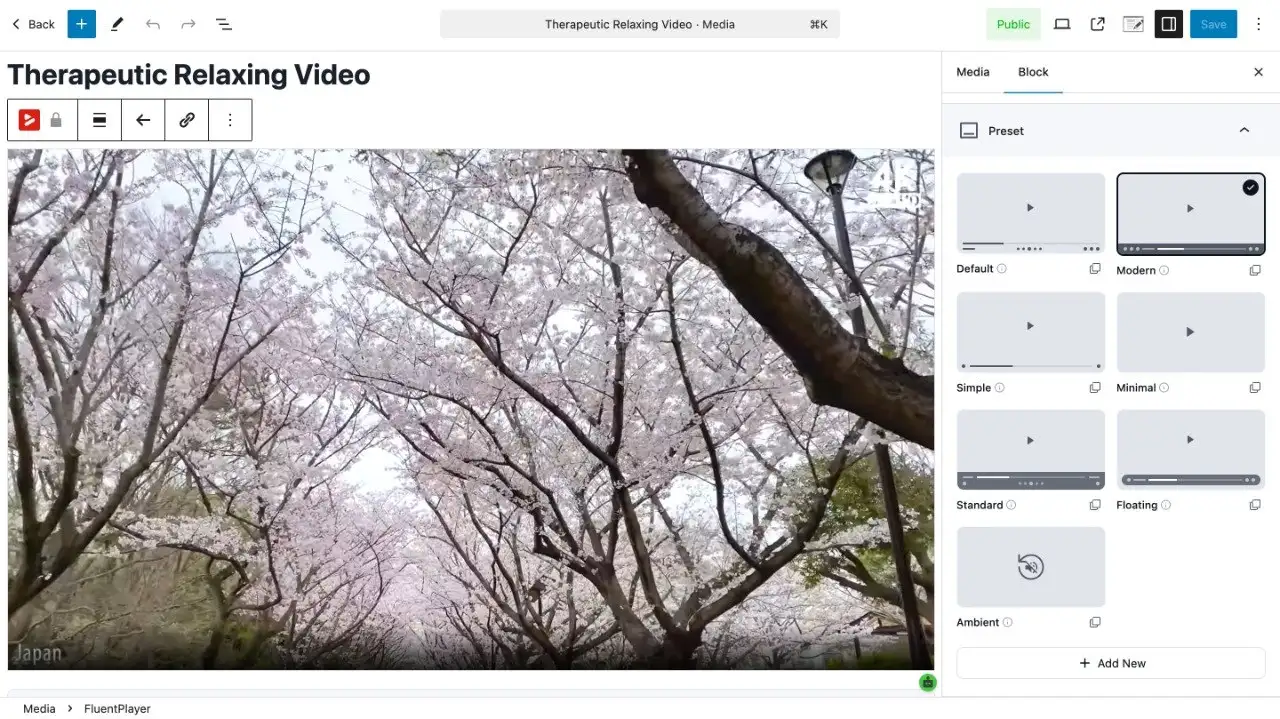
FluentPlayer solves this with custom player presets. A preset stores: which controls are visible, autoplay behavior (muted or with sound), inline mobile playback settings, picture-in-picture availability, speed control options, brand logo, and color settings. Assign a preset to a player block, and it inherits everything. Update and customize the preset, and every video using it updates automatically.
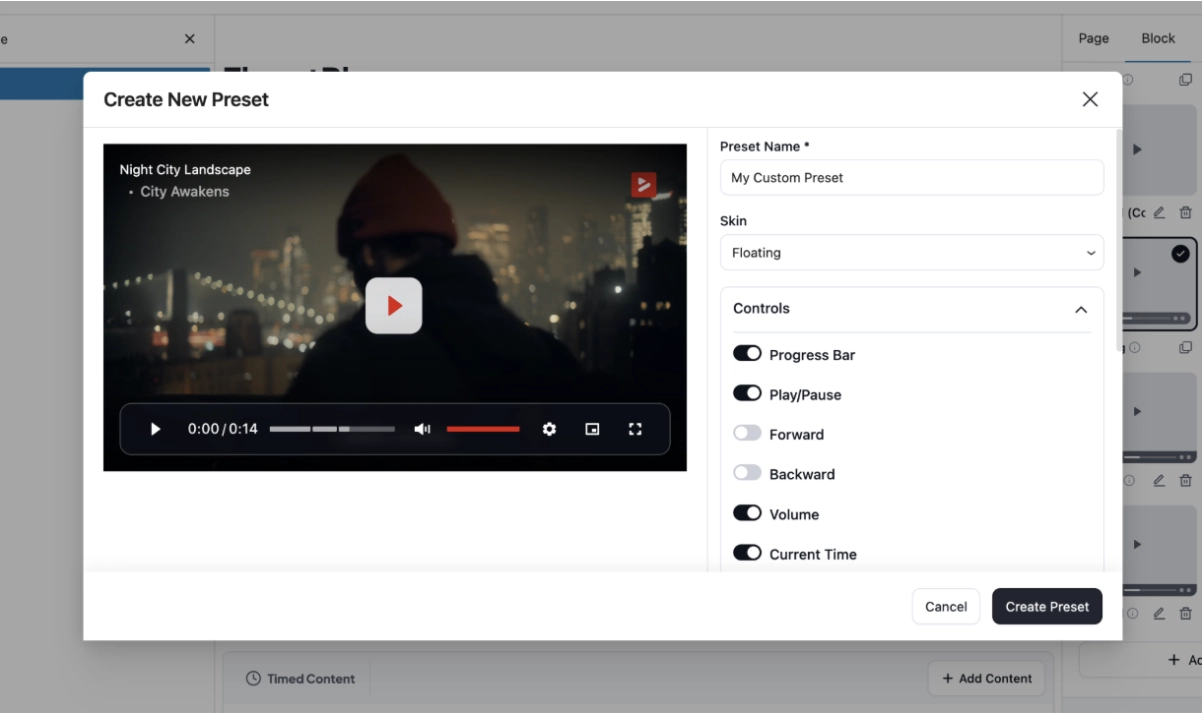
The individual playback controls available are: autoplay (muted or unmuted), adjustable playback speed, picture-in-picture for HTML5 video, inline mobile playback to prevent forced full-screen on mobile browsers, a progress bar, and playback position memory. Playback position memory requires no opt-in or manual tracking. The player stores where the viewer stopped and resumes from that point on return. For any video running longer than 15 minutes, this directly affects how many viewers finish it.
Multi-source support means one preset governs players across different video hosts consistently. A site with BunnyCDN content and YouTube embeds running side by side uses the same preset, same branding, and same controls on both.
Video Chapters, Playlists, and Subtitles
Long-form video without navigation is a drop-off problem. A viewer who loses their place in a 45-minute course lesson has to scrub manually or leave. A series of related videos without sequential playback means the viewer decides whether to find the next one, and often doesn’t.
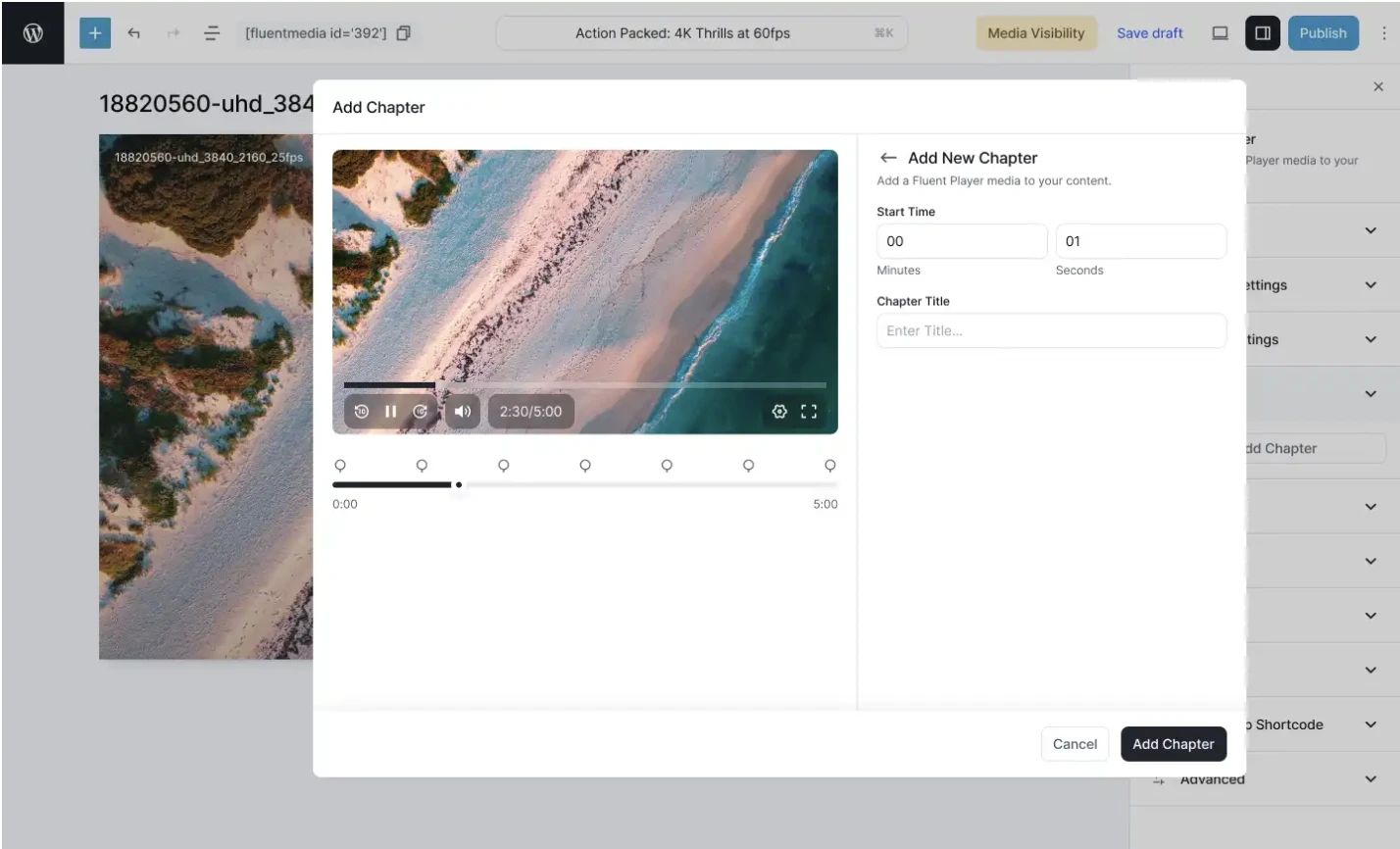
FluentPlayer handles content navigation with three features that work together. Video chapters let you define named timestamp markers within a video. They appear in the player UI as a clickable chapter menu. Viewers jump directly to the section they need. This works on all supported sources, including self-hosted and BunnyCDN content where YouTube’s chapter system does not apply.
Video playlists group multiple videos into an ordered sequence with autoplay between videos and resume position maintained across the full set. A viewer who stops in the middle of video 3 returns to that exact point, not the beginning of the playlist. The playlist layout supports standard and grid views. Colors, borders, typography, and box shadow are all configurable to match your site design.
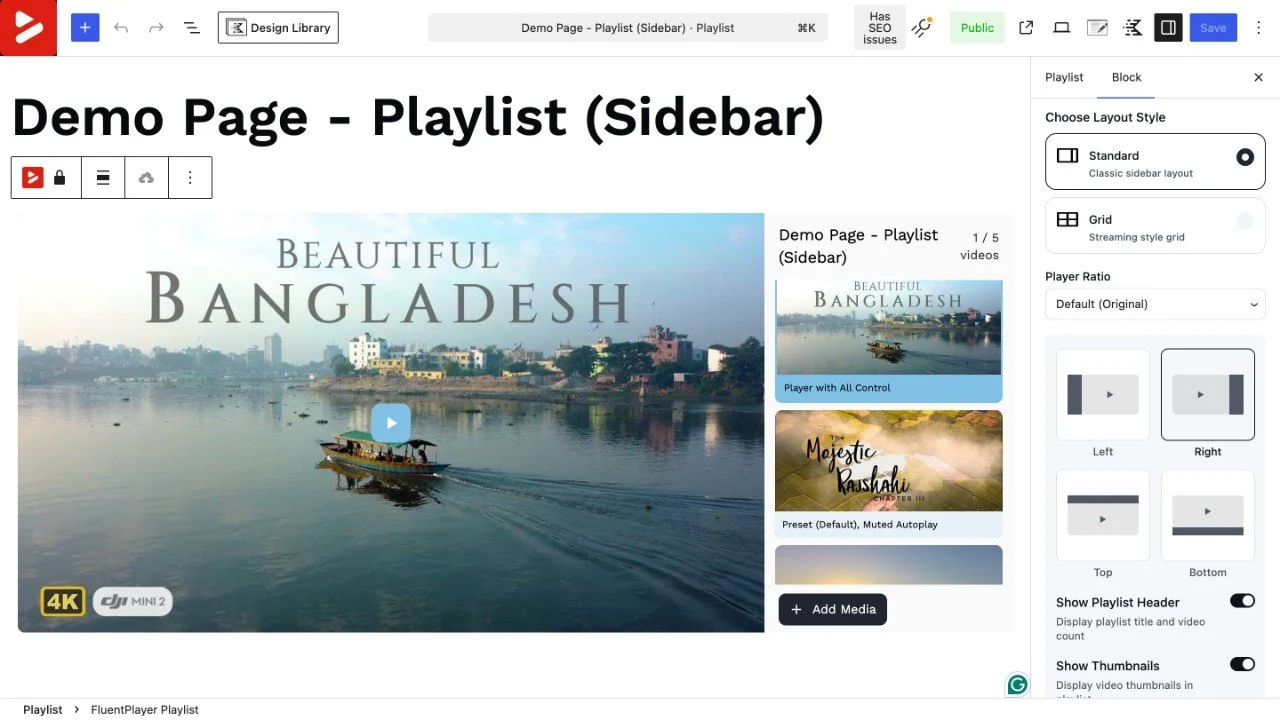
Subtitles support multiple caption tracks per video with in-player language switching. Each track is uploaded separately and labeled by language. The viewer switches from inside the player.
Timestamp-Triggered Interactive Layers
This is where FluentPlayer goes furthest beyond what any basic embed can offer.
Interactive layers are elements placed on top of the video frame with individually defined start and end timestamps. Each layer appears and disappears independently. A form overlay can appear at 90 seconds and close at 2 minutes. A hotspot can be visible only during the portion of the video where the relevant product is on screen. A CTA banner can appear at the exact moment in a sales video where a viewer is most likely to act.
The layer types available are:
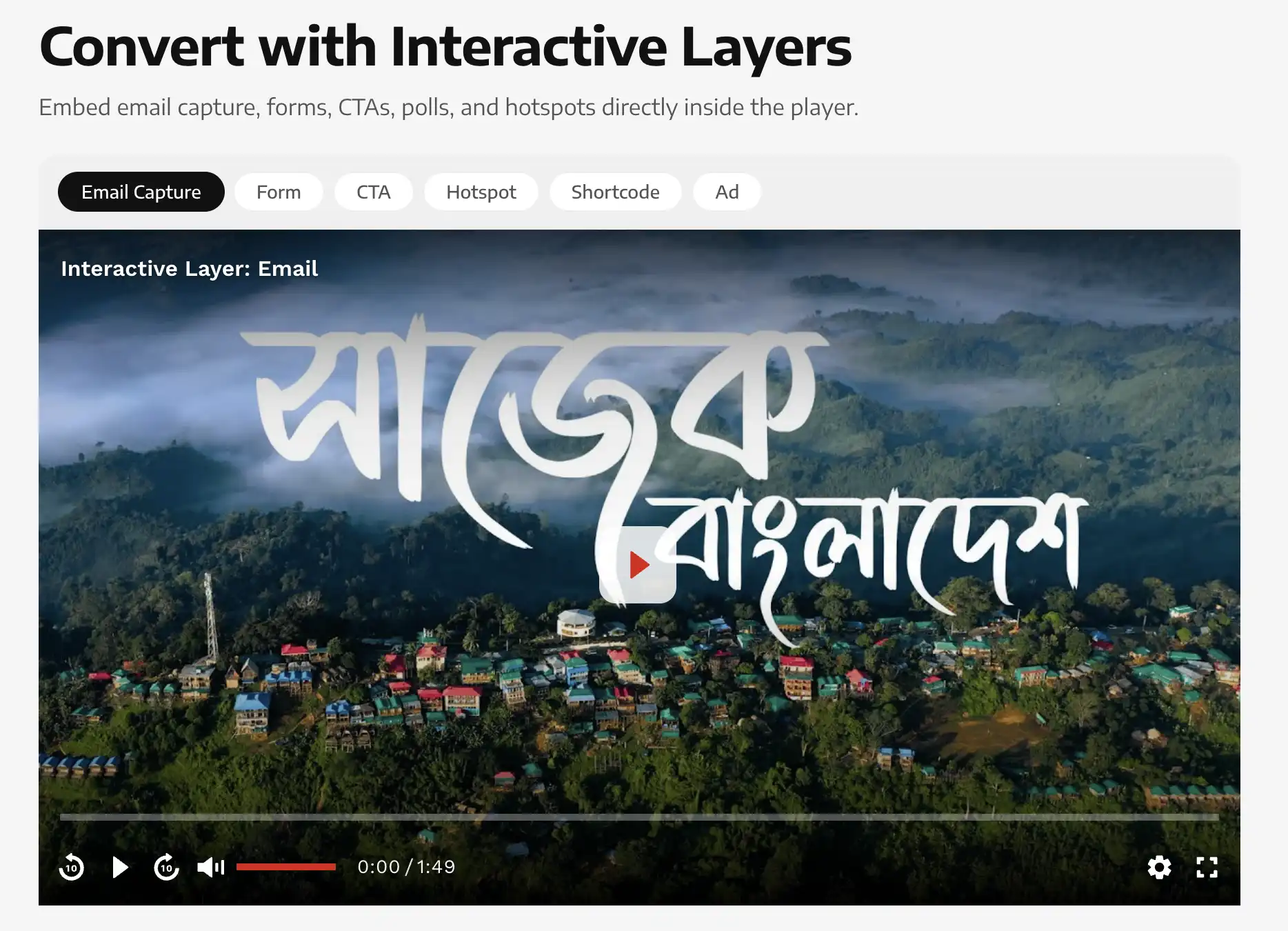
CTA Banners – Text overlays with a link, positioned on the video frame at a timestamp. Used for driving clicks to product pages, related content, or external resources at contextually relevant moments.
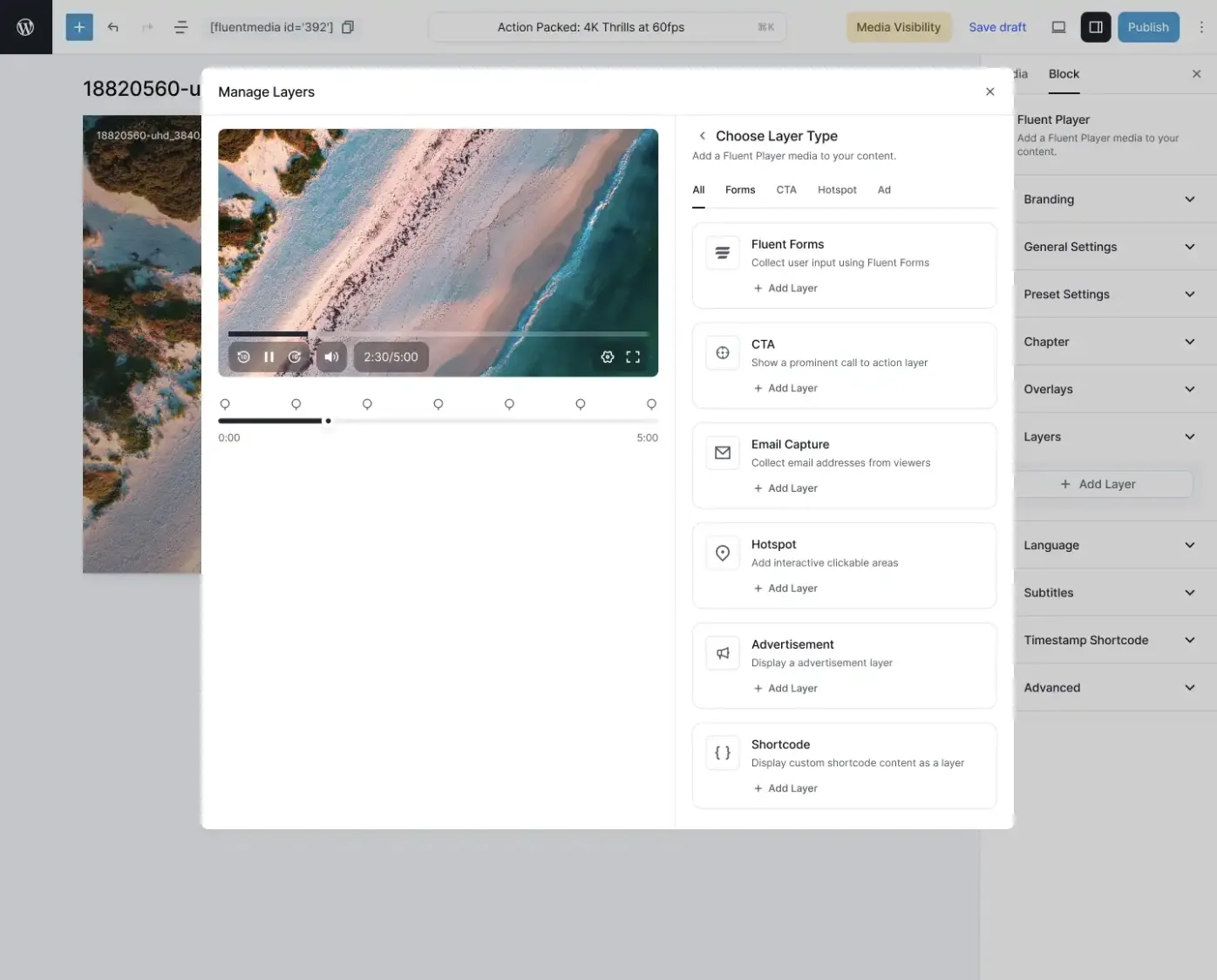
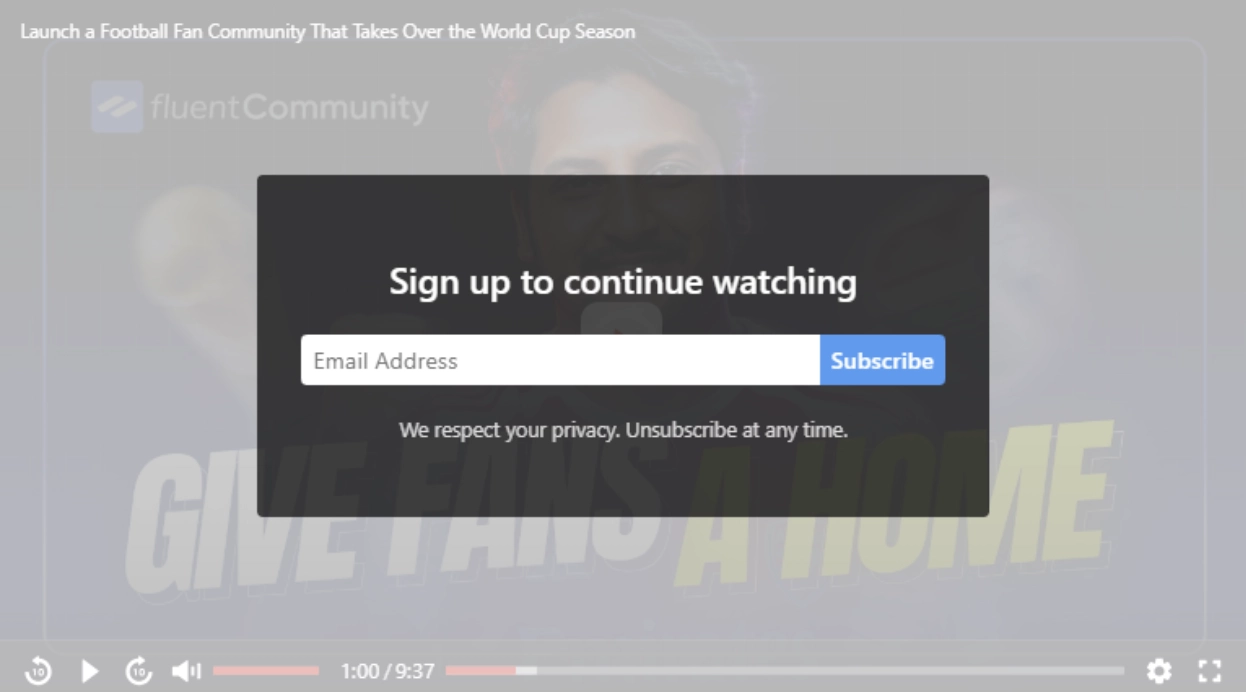
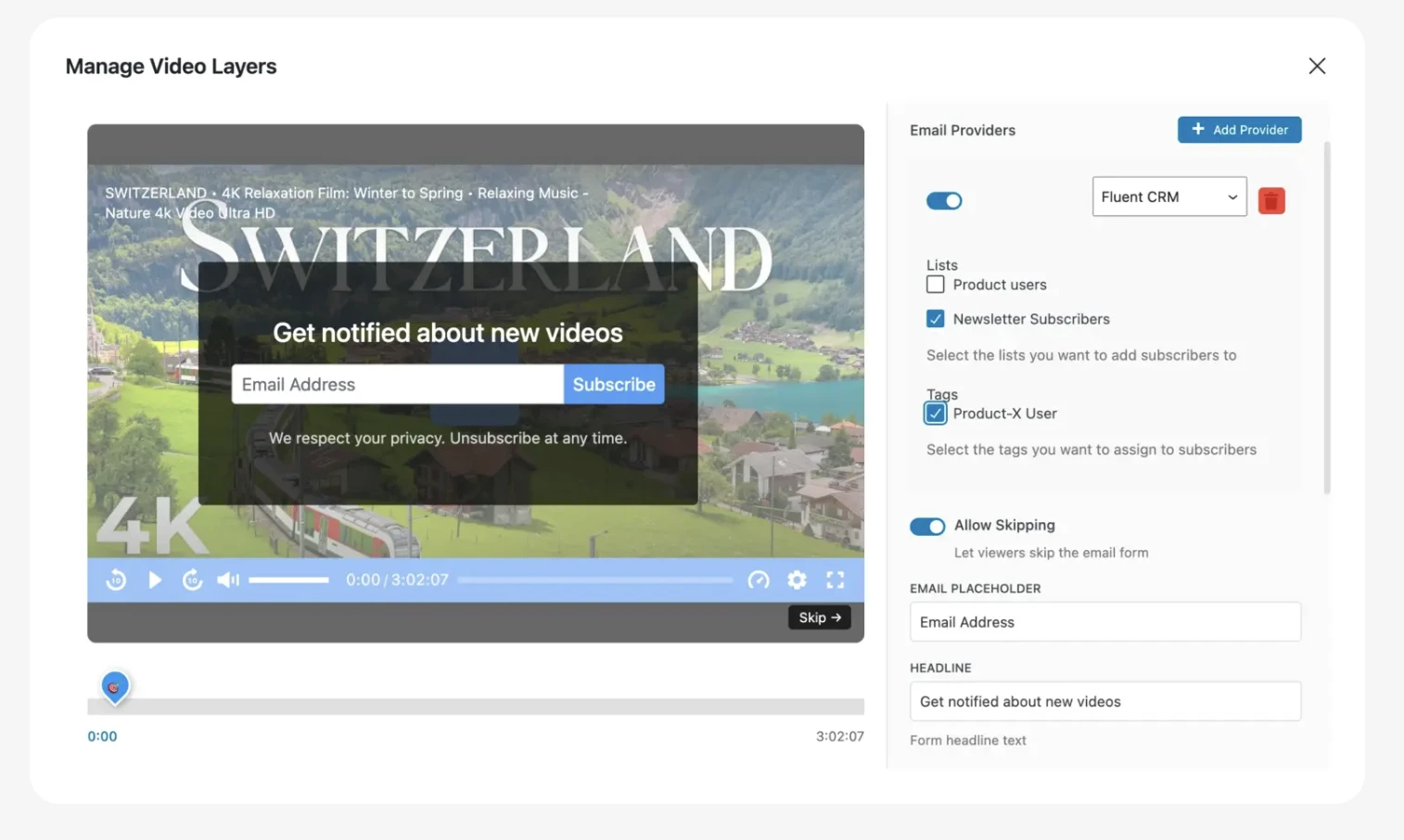
Email Capture – A form overlay that collects email addresses from inside the video. Connected to FluentCRM and Mailchimp (Premium plan). The submission is processed at the moment of capture without any intermediate redirect.
Fluent Forms Embeds – Full Fluent Forms instances placed inside the video at a timestamp. Includes payment forms, multi-field lead capture, conditional logic forms, surveys, and quizzes. A viewer can complete a purchase, submit a lead form, or respond to a survey without leaving the video.
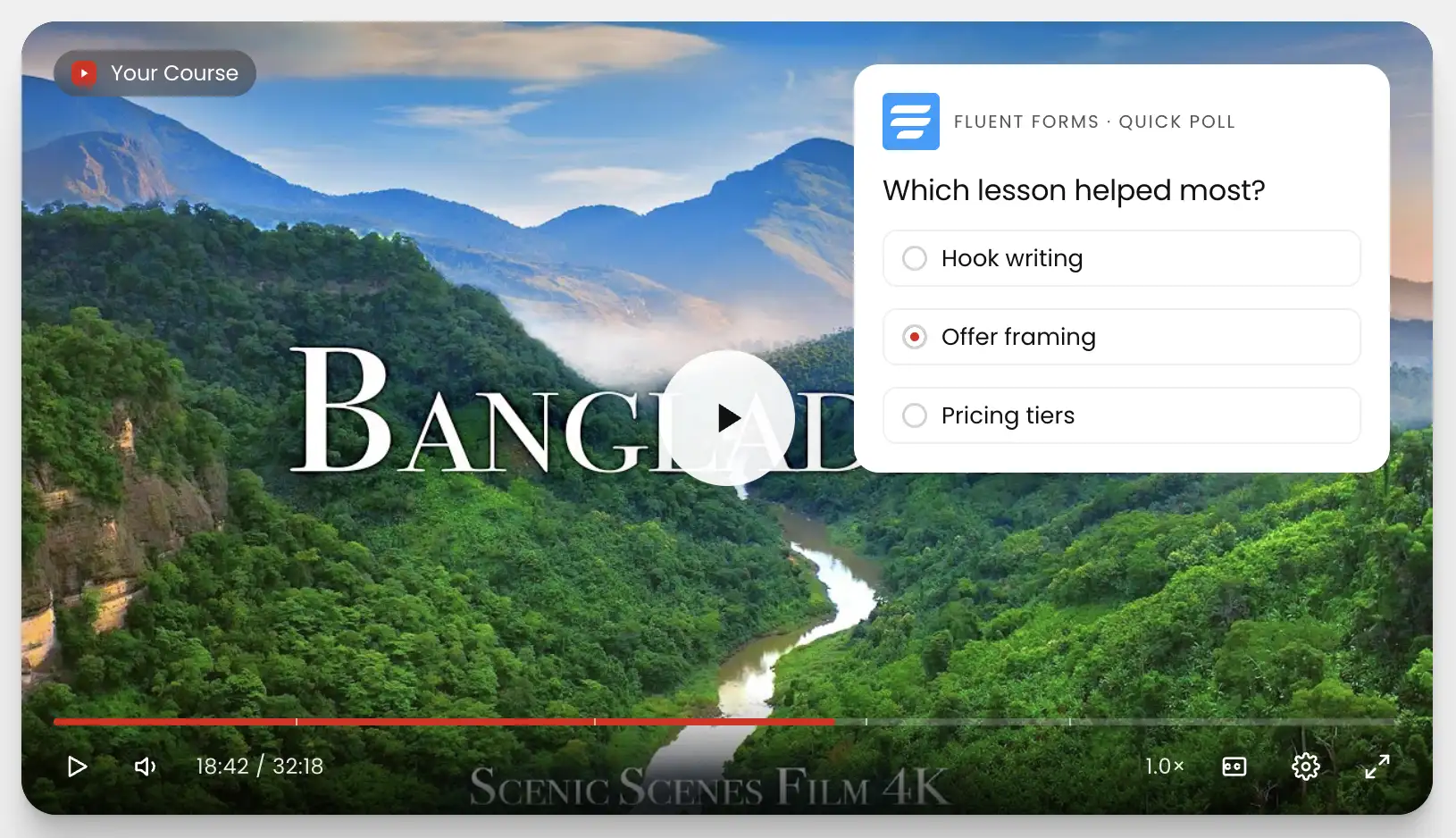
Ad Units – Timed ad placements inside the video, independent of the video host’s ad system.
Text and Button Overlays – Lighter-weight than CTA banners. A single line of supporting text, a download button, a chapter label. No link target required. Useful for contextual prompts that appear during specific sections of longer videos.
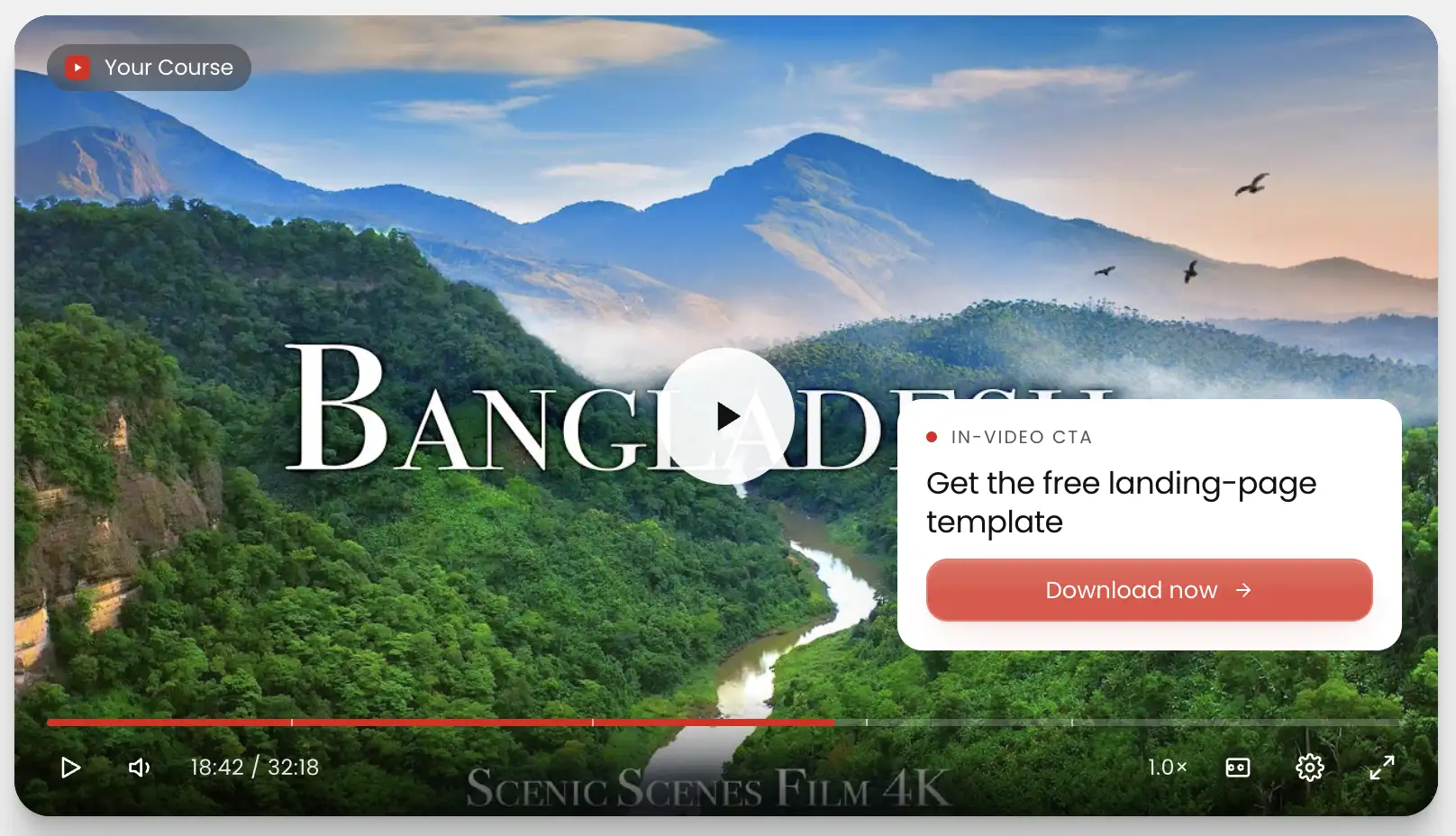
Shortcode Output – Any WordPress shortcode can render as a timed layer. A booking widget, a countdown timer, a custom form- if it outputs via shortcode, it can be placed inside the video at the timestamp you define.
The result is that the video becomes a direct engagement surface. What the viewer sees, when they see it, and what happens when they act on it is entirely within your control, inside your WordPress install, without redirecting them off the page.
Timed Content and AJAX Compatibility
Timed Content shows specific portions of a video at the times you define. It’s strictly about what appears in the video at what point based on CRM tags selected by you.
AJAX Compatibility means FluentPlayer blocks initialize correctly in dynamic page contexts where content loads without a full page reload. Most WordPress video plugins initialize on page load and break when content is injected dynamically. FluentPlayer handles this, which matters for sites using theme builders, tabbed layouts, popup-based video delivery, or any JavaScript-driven content loading.
Video Analytics Inside WordPress
FluentPlayer’s analytics run inside your WordPress install. No external service, no separate login, no per-seat pricing to access your own data.
Metrics tracked per video: total views, unique viewers, average watch time, completion rate, top-performing videos by engagement, watch time trend over time, new vs. returning viewer split, audience location breakdown, device distribution, and performance over time.
The most actionable metric is audience retention. The per-video retention graph shows exactly which timestamps viewers are dropping off at. If viewers are leaving at the 3-minute mark of a product demo, that tells you something specific about the content or the layer you placed at minute 4. You can cross-reference the drop-off timestamp against your interactive layer placement and adjust accordingly. This is the kind of feedback loop that is completely absent from any standard embed.
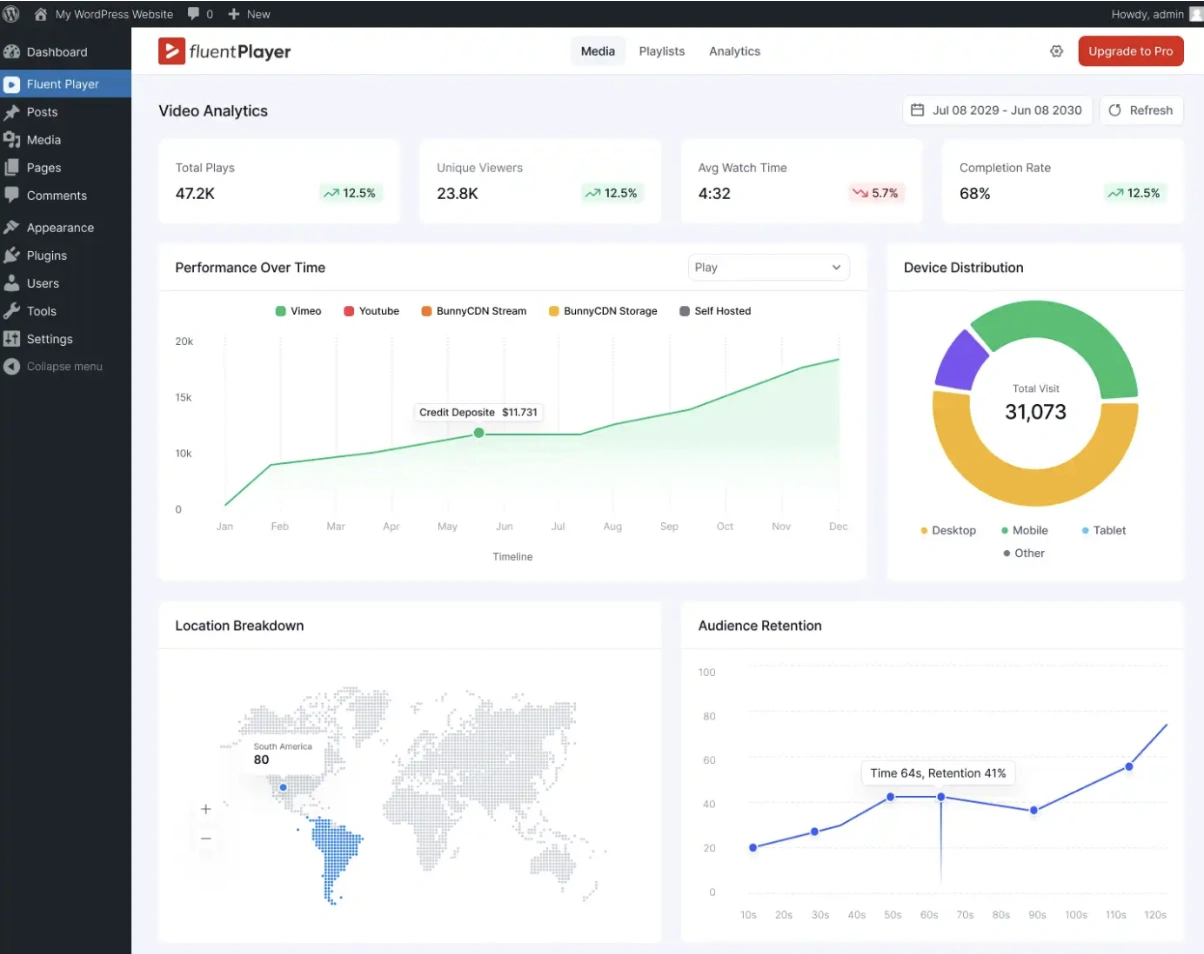
For teams that want this alongside broader site data, FluentPlayer forwards playback events to Google Analytics. The full dataset is available inside WordPress regardless of whether GA is connected.
FluentCRM, Fluent Forms, and FluentCommunity Integrations
The integrations with the Fluent product stack are first-party, not webhook workarounds. They are built into the plugin and available directly from the player settings.
FluentCRM – Emails captured via in-video forms are added to FluentCRM contacts with tags applied at capture. The tag is defined in the layer settings. FluentCRM automation sequences trigger from that point exactly as they would from any other entry point.
Fluent Forms – Any Fluent Forms form can be placed as a timed layer. Payment forms, lead capture with conditional logic, surveys, quizzes. Form submissions are entered into Fluent Forms’ entry system and trigger any notifications and automations already configured.
FluentCommunity – FluentPlayer playlists and individual videos embed directly inside FluentCommunity course content. Per-member watch data is tracked inside FluentCommunity so you can see exactly how individual members engage with course videos, not just aggregate view counts.
With these integrations, video engagement data becomes part of the same picture as your CRM contacts, form entries, bookings, and course progress.
Migrate your existing content from Presto Player
If you are on Presto Player, you do not need to rebuild your video library. FluentPlayer has a built-in migration tool under Settings > Migration that pulls your presets, media, global settings, and analytics directly from Presto Player. Both plugins run on the same site simultaneously, so you can test before committing.
You choose exactly what transfers. Global settings and presets are selected by default. Media and analytics are opt-in. Both support item-level selection, so you can bring over specific videos or specific presets rather than importing everything at once. Analytics requires media to be selected first since Presto Player ties visit data to individual media items.
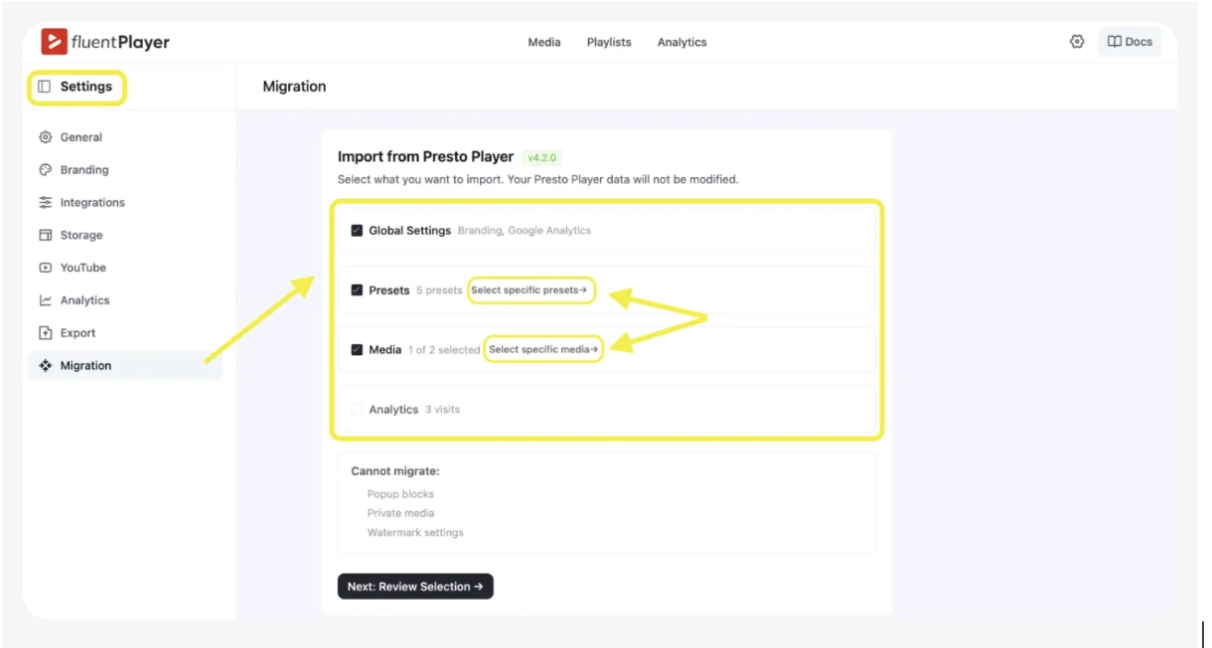
Three things cannot migrate: pop-up blocks, private media, and watermark settings. Pop-up blocks need to be recreated as interactive layers inside FluentPlayer. Private media has no migration path and must be re-uploaded manually. Watermark settings need to be reconfigured under Settings > Branding after the import.
If you run the migration a second time, the overwrite checkbox on the review screen is checked by default. Uncheck it if you want to add new items without replacing what was already imported. Here is a full walkthrough of the Presto Player migration to FluentPlayer.
Custom Branding and Media Tagging
Custom branding is applied at the preset level. Your logo and brand colors are set once in the preset and inherited by every player using that preset. This applies to YouTube and Vimeo-hosted content, too, so the viewer sees your brand on the player regardless of where the video is hosted.
Media Tagging lets you tag videos in your FluentPlayer library to filter, sort, and build playlists from tagged sets. Without tags, a library of 50 or more videos becomes a flat list you scroll through every time you need something. Tags give the library a structure that holds up as the content volume grows.
What FluentPlayer Is Not
FluentPlayer does not host video files, transcode footage, or provide a CDN. You bring your own video source. BunnyCDN, Mux, YouTube, Vimeo, or self-hosted files on your server. FluentPlayer provides the player, the engagement layer, and the analytics on top of whatever source you are already using.
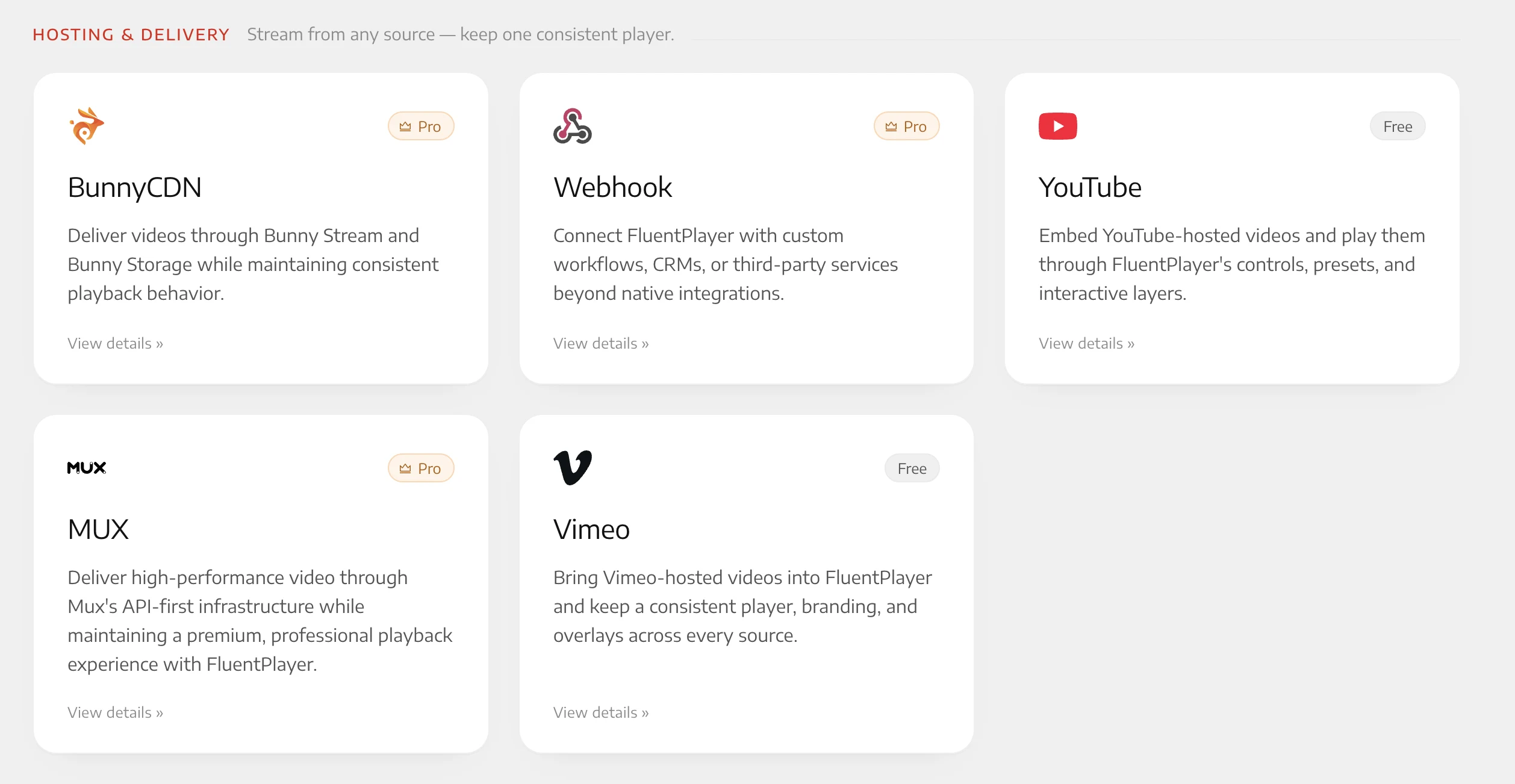
This means no migration. Course content already on BunnyCDN, marketing videos on YouTube, and podcast audio on a self-hosted server all work from the same plugin without re-uploading or re-encoding anything. The video delivery cost stays with the host you have already chosen. FluentPlayer is the layer above it.
Who FluentPlayer Is Actually Built For
The clearest signal that FluentPlayer is the right tool for your setup is whether your current video embed is creating friction in one of these specific places: viewers not finishing content they started, leads slipping away after watching a demo, no data on which videos are actually performing, inconsistent player behavior across your site, or no way to gate or sequence content access without a complex workaround.
Course creators who need chapters, playlists, per-member progress tracking, and gated sections: FluentPlayer addresses all of that in a single plugin rather than across three or four separate tools.
Membership sites where video is part of the premium content layer need timed access control and per-user watch data, not just a player that plays.
Marketing teams running video-driven lead funnels need in-video email capture and CRM integration, not a form below the video that most viewers never scroll to.
Businesses using video for sales and demos need to know exactly where in the video viewers are dropping off- not just how many views it got.
Conclusion
Video on WordPress has always been the part where you hand control to someone else and accept whatever they give you back. FluentPlayer changes that boundary. The viewer experience, the data, the engagement layer, the integrations- all of it stays inside your WordPress install, on your terms.
FluentPlayer is available now in its free version on the WordPress library. The free tier covers the core player functionality across all supported video sources. The Pro plan, which includes more advanced interactive layers, video analytics, and timed content, is currently live. If you’re running any part of the Fluent stack already, the integrations are available immediately on install. If you’re not, FluentPlayer works as a standalone player as well, with the full feature set across all supported video sources.
Drop the layer in and watch what your video can actually do for your sales funnel.

Ninja Tables– Easiest Table Plugin in WordPress



Add your first comment to this post