Ninja Tables 5.2.6: More Control, Better Printing & Stronger Security

We’re excited to roll out Ninja Tables 5.2.6, packed with powerful table management tools, smoother interactions, important print fixes, and a key security improvement. It’s the first release of 2026 and sets the foundation for what’s coming next on the product roadmap.
The last update was all about FluentCart integration and strengthening WooCommerce functions. But this update shifts focus to making table handling faster, cleaner, and more reliable for site admins and end users alike.
What’s New in Ninja Tables 5.2.6
This release adds several usability-focused features designed to simplify table management and improve everyday workflows.
Whether you manage dozens of tables, work with large datasets, or frequently share table data, these additions are designed to save time and reduce errors. Ninja Tables 5.2.6 effectively reduces friction in common table-management tasks.
Added features
The features introduced in Ninja Tables 5.2.6 are focused on control, safety, and everyday usability. Instead of adding complexity, this release improves how users manage tables at scale, interact with individual data points, and recover from common mistakes.
1. Bulk delete for tables
Managing a growing number of tables is now easier than ever. You can select multiple tables and delete them in one action, saving time and reducing repetitive manual work. Clean up faster by deleting multiple tables at once. No more repetitive clicks.
This feature is especially helpful for agencies, content-heavy sites, and developers who frequently create test or temporary tables during development.
2. Trash & restore tables
Accidentally deleted a table? No worries. Deleted tables are no longer removed permanently right away. They are moved to “Trash,” allowing you to restore them if needed. It adds an extra layer of safety when managing important data. Tables move to trash first, giving you the option to restore them anytime.
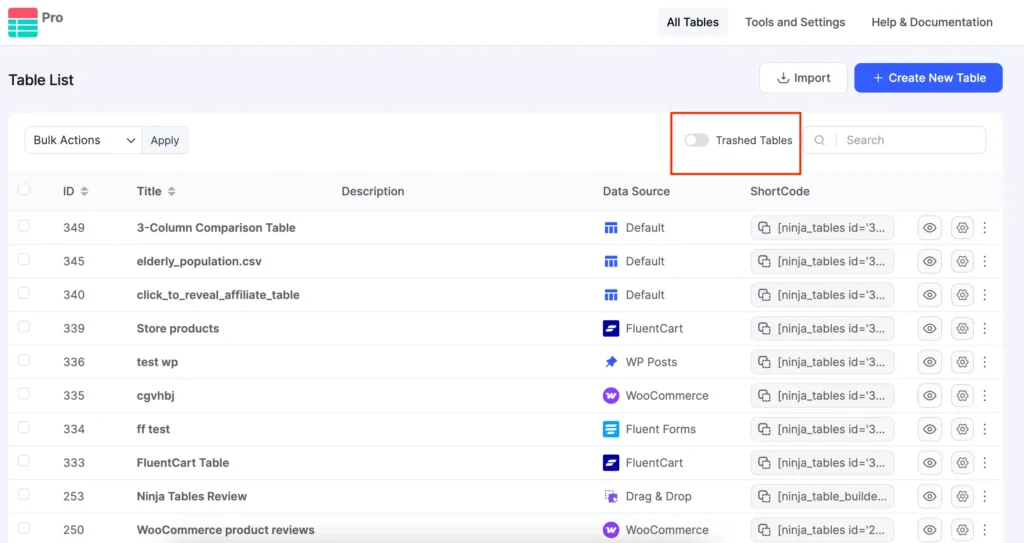
Just toggle the “Trashed Tables” option on and you’ll see the tables you deleted (accidentally or intentionally!). Restore the tables from here.
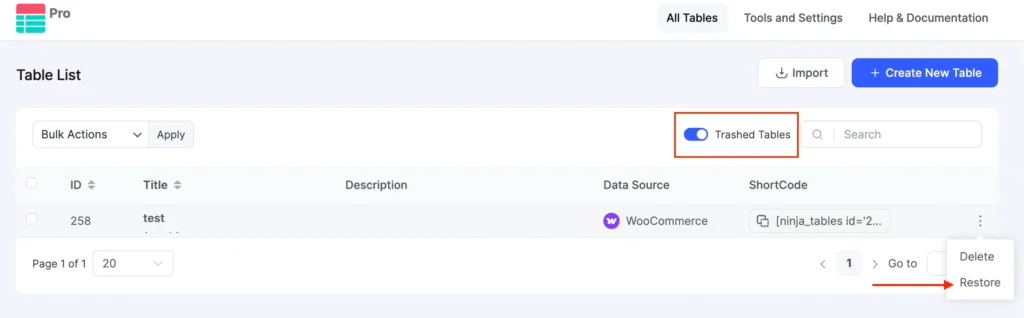
This change adds a safety net for users who manage critical data, collaborate with teams, or make frequent content updates, reducing the chance of accidental data loss.
3. Single-row modal view
For better readability on large or responsive tables, you can now open individual rows in a dedicated modal view. This makes it easier to focus on row-level data without scrolling or layout breaks. View individual rows in a focused modal layout — perfect for large or responsive tables.
This option is under “Features” list in Table Design tab. Enable it and hit save.
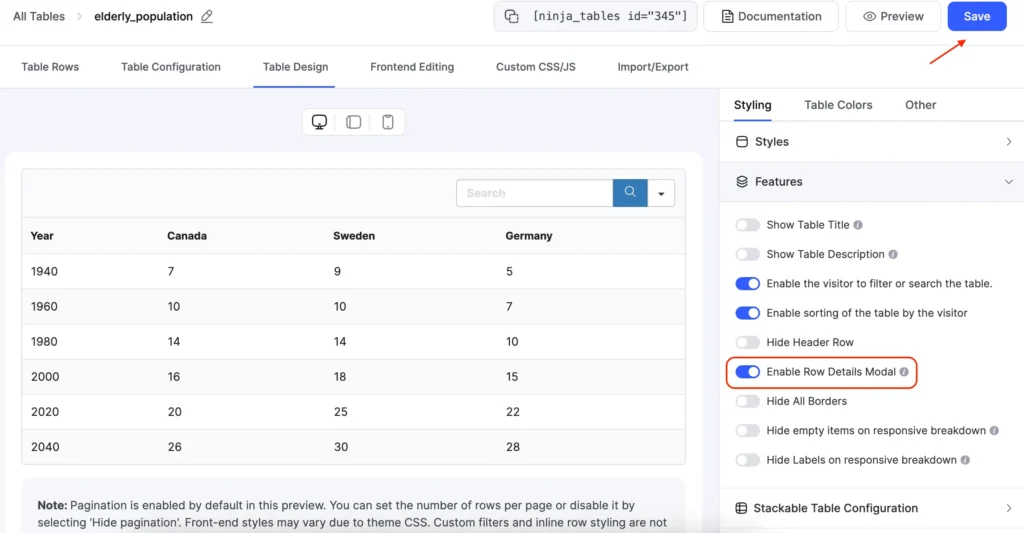
When you see this table in the frontend and click on a row, you’ll see a modal view.
Like this,
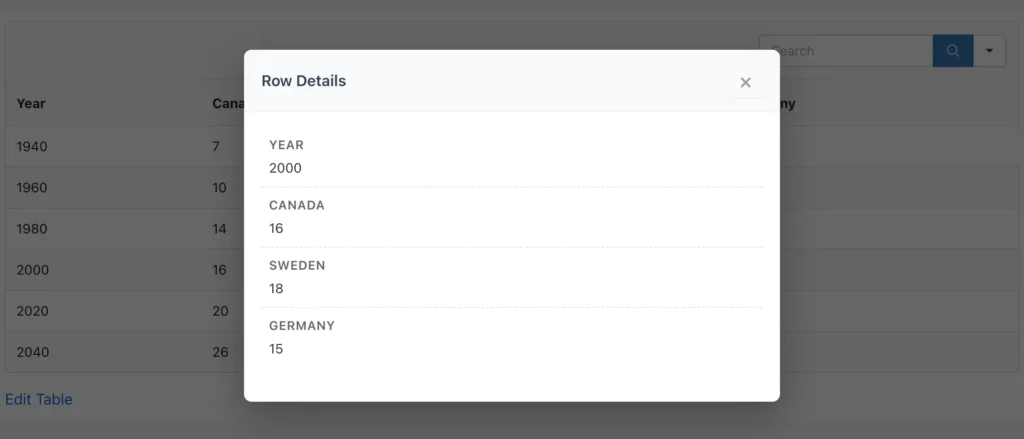
This improves readability and accessibility by helping users concentrate on row-level data without being distracted by surrounding columns or layout constraints.
Note: This feature is also available in Ninja Tables block.
4. Click to Copy Cell Content
Need to quickly reuse table data? You can now copy any cell’s content in the frontend with a single click, making data sharing and editing faster and more convenient.
Enable this feature from “Advanced Settings” for specific column/s.
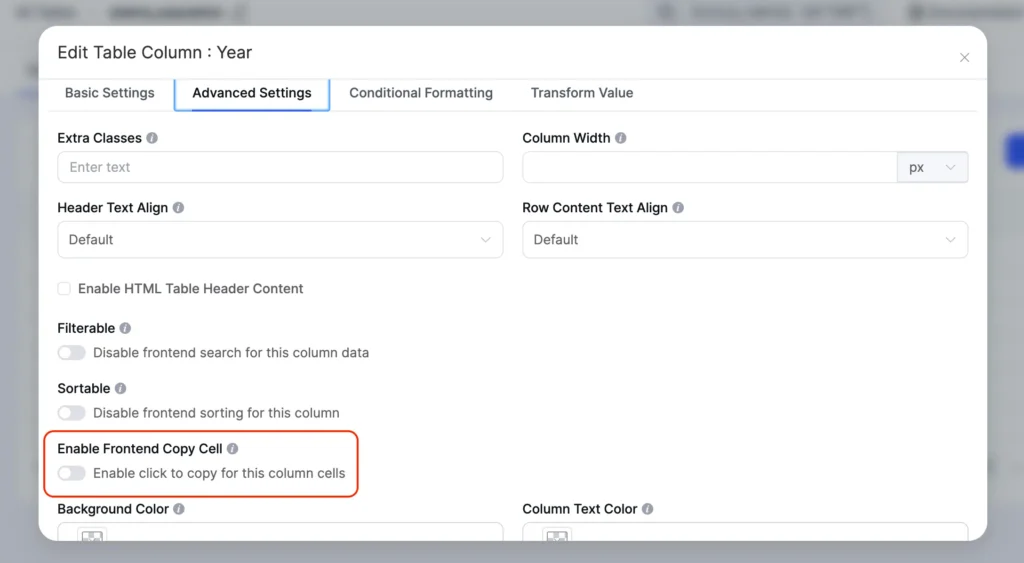
This small interaction improvement removes unnecessary steps and makes working with table data feel faster and more intuitive.
Each addition is designed to reduce friction in real-world workflows—whether you’re cleaning up multiple tables, reviewing row-level data on smaller screens, or quickly reusing table content elsewhere.
Fixes & improvements
In addition to new features, this update resolves several issues that affected printing, integrations, and interface behavior. These fixes aim to make Ninja Tables more reliable in real-world use cases.
- Fixed printing issues where conditional formatting was not displayed correctly
- Fixed responsive breakpoint conflicts affecting table layouts during printing
- Resolved Fluent Forms payment form warnings for smoother form integration
- Fixed FluentCart permalink issues affecting product and checkout links
- Resolved a drag & drop color picker issue for more consistent UI behavior
Security update
Security remains a priority in Ninja Tables 5.2.6. Access to ninja_table_info and ninja_table_cell has been restricted to public posts only, preventing unnecessary exposure of table data.
This update ensures better control over how and where table information can be accessed, helping site owners maintain safer data practices.
Why This Update Matters
Ninja Tables 5.2.6 focuses on improving how users manage, review, and safeguard tables in real-world scenarios. Features like bulk delete and trash and restore make it easier to maintain a growing number of tables without the risk of accidental data loss, especially for sites that frequently create, update, or remove tables.
The single-row modal view and click to copy cell content enhancements directly improve how users interact with table data. They make large or responsive tables easier to read and allow data to be reused quickly without extra steps—small improvements that add up in daily workflows.
Combined with important printing fixes, smoother Fluent Forms integrations, and a targeted security update, this release strengthens the core Ninja Tables experience. If you manage complex tables, rely on printed outputs, or work with table data regularly, version 5.2.6 delivers practical improvements that make those tasks simpler and more reliable.
Let us know if you’re having trouble with anything.
Get in touch with Ninja Tables
How to Update
That’s the easy part! You can update to version 5.2.6 through your WP Plugins dashboard or download the latest version from the plugin repository.
- Go to your WordPress dashboard
- Navigate to Plugins > Installed Plugins
- Find Ninja Tables and click “Update”
- Or, download the latest version from wordpress.org
Update and Get Started
Ninja Tables 5.2.6 is a refinement-driven release that strengthens the core experience of working with tables. By improving table management, enhancing printing reliability, and tightening data access, this update makes Ninja Tables more dependable for both growing sites and established workflows.
As the first release of 2026, it sets the tone for upcoming improvements on the product roadmap while delivering immediate value to everyday users. We recommend updating to 5.2.6 to take advantage of these enhancements and keep your tables running smoothly.
Happy table-making!

Ninja Tables– Easiest Table Plugin in WordPress




Add your first comment to this post