
Enterprise WordPress Development: What It Actually Takes to Build At Scale

WordPress runs 43% of the web. What that number actually points to is more interesting than market share: a platform that started as blogging software in 2003 now runs the publishing infrastructure for the White House, NASA, News Corp, and The New York Times. These are organizations with no tolerance for downtime, compliance requirements that vary by region and industry, and data operations that would bring most standard configurations to their knees before lunch.
These organizations chose WordPress deliberately, and what they built looks nothing like what most people do with WordPress. Behind every enterprise deployment sits a stack of decisions the interface never makes visible and data infrastructure built to process hundreds of thousands of records in real time.
Enterprise WordPress development is the discipline that makes all of that work. This article covers the architecture, the content operations, the governance, the security layer, and the part that almost everyone leaves out entirely, which is the data layer, and what happens when it breaks.
TL;DR
- Enterprise WordPress development treats WordPress as digital infrastructure, not just a website builder
- The visible site is roughly 10% of what enterprise WordPress development actually involves
- Architecture choices around caching, CDN delivery, and rendering determine whether the platform can absorb scale
- Content operations at enterprise scale require structured content models, multisite governance, and editorial workflow systems
- Scalability at the enterprise level requires decisions about caching architecture, CDN configuration, headless rendering, and server-side data processing
- Governance is what separates enterprise WordPress from a large WordPress site: defined deployment pipelines, role controls, multisite governance, and editorial workflow systems
- Security and compliance needs vary by industry and go far beyond any out-of-the-box WordPress setup
- Data management is the underappreciated layer: standard table plugins break at volume; server-side processing or AJAX pagination is not optional
- Ninja Tables’ DataTables rendering engine addresses the data layer gap with server-side AJAX pagination, chunk based import for hundreds of thousands of rows inside WordPress
What Is Enterprise WordPress Development?
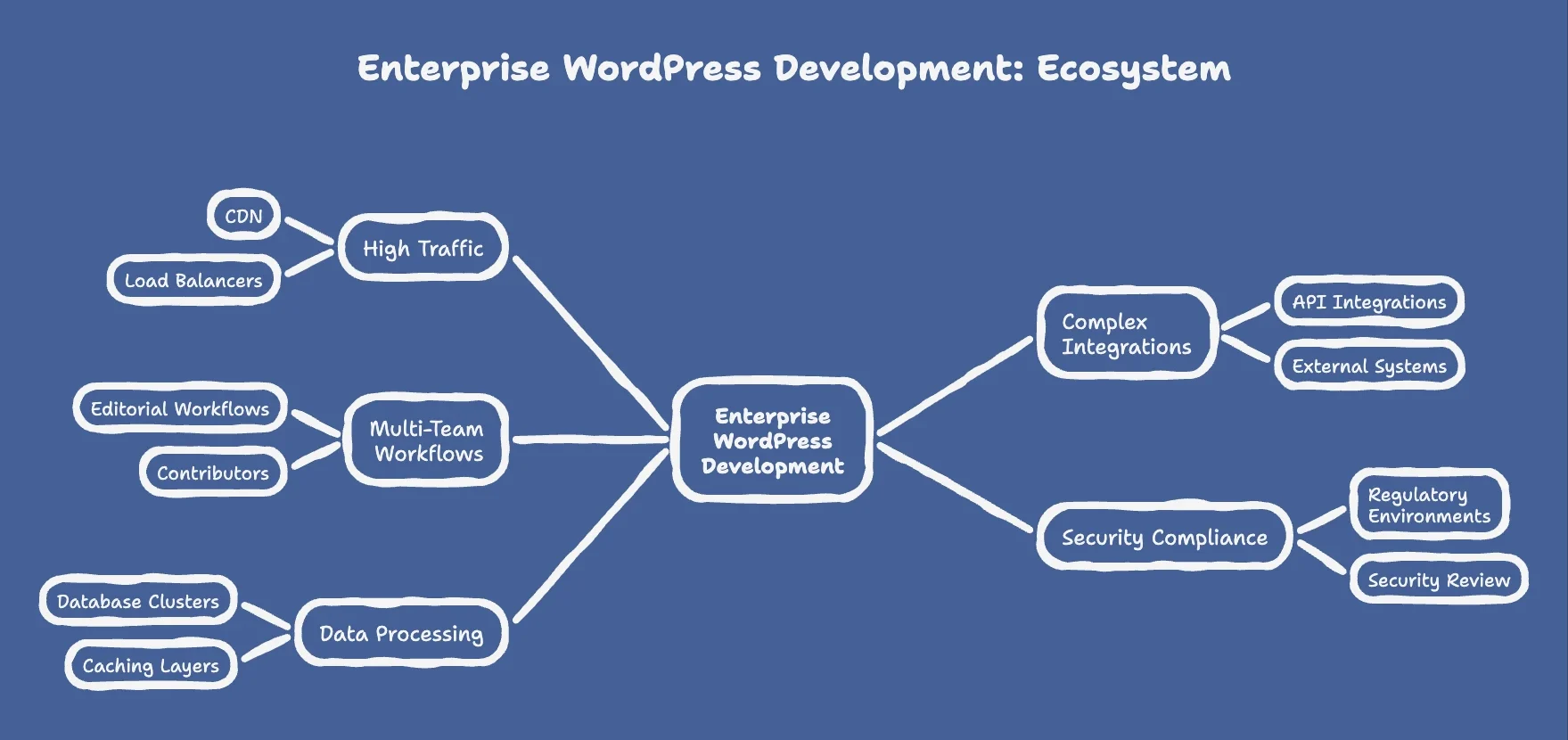
Enterprise WordPress development is the process of designing, engineering, and maintaining WordPress as a high-performance digital platform built for organizational scale: high traffic, complex integrations, multi-team publishing workflows, secured against industry-specific compliance requirements, and integrated with external business systems, and built to process data at volumes that standard configurations cannot handle.
The word “enterprise” is applied loosely in most contexts. It is not a product or a tier. In WordPress specifically, it describes a threshold where the platform is no longer being used as a content publishing tool but as core digital infrastructure. Decisions made in enterprise WordPress development affect user experience for millions of people, editorial workflows for hundreds of contributors, security posture across multiple regulatory environments, and the organization’s ability to move fast without breaking things.
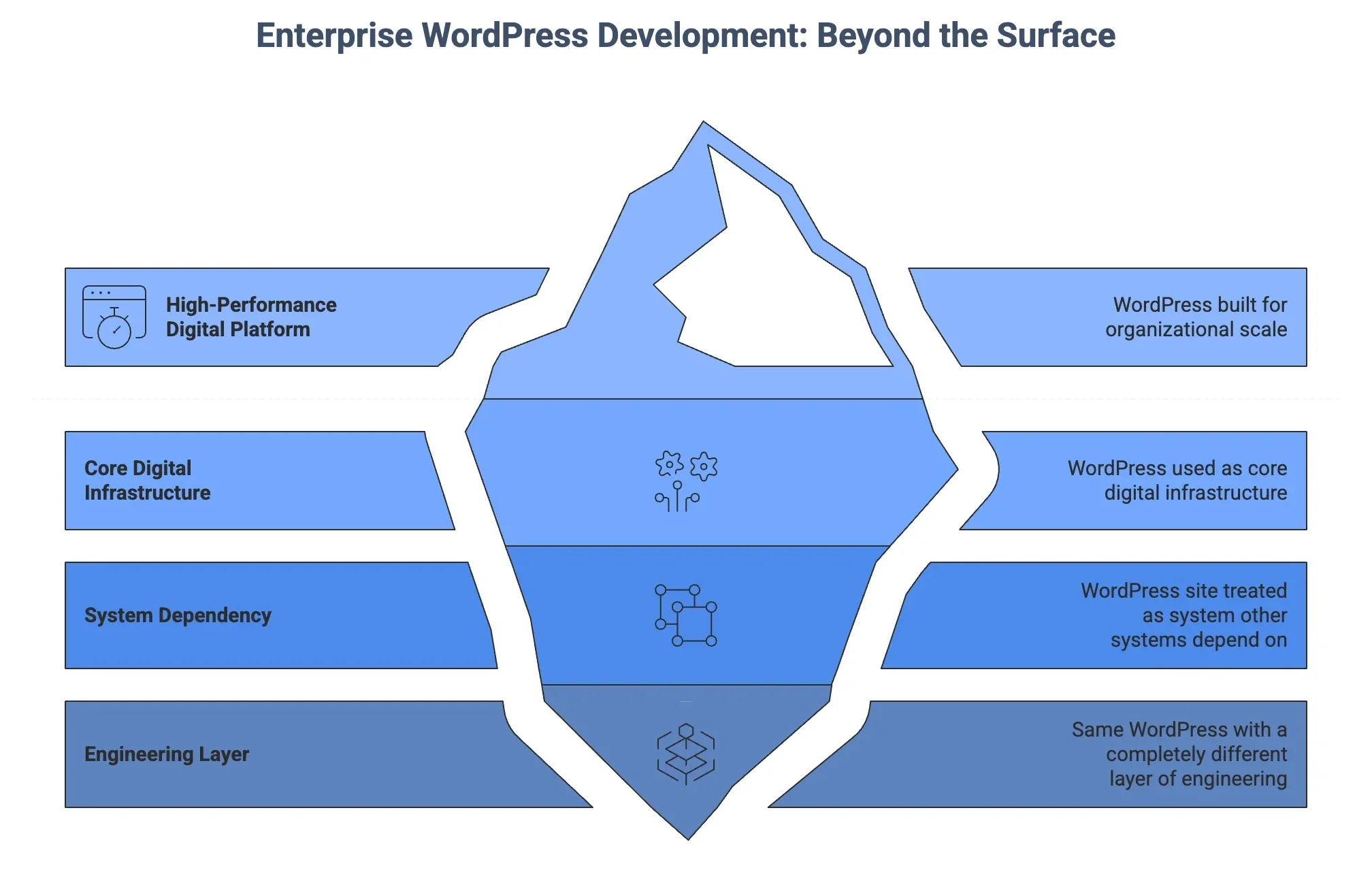
WordPress.org defines the enterprise tier as sites requiring custom development, managed hosting, dedicated security review, and formal support contracts. In practice, enterprise WordPress development begins the moment a WordPress site is treated as a system that other systems depend on, rather than a standalone website.
The organizations that run WordPress at this level, including major media publishers, Fortune 500 companies, and government institutions, are not using a different CMS. They are using the same one with a completely different layer of engineering beneath it.
Why Organizations Choose WordPress for Enterprise Development
The question still gets asked, usually by architects evaluating Sitecore, Adobe Experience Manager, or Contentful: Is WordPress actually enterprise-ready?
The answer is visible in the deployment data. According to the HTTP Archive 2025 Web Almanac, WordPress accounts for roughly 58% of CMS usage among the top 10,000 websites by traffic. That concentration at the top of the web is not market share drift from small businesses. What makes the choice rational at scale is a combination of factors that proprietary enterprise CMS platforms consistently underestimate.
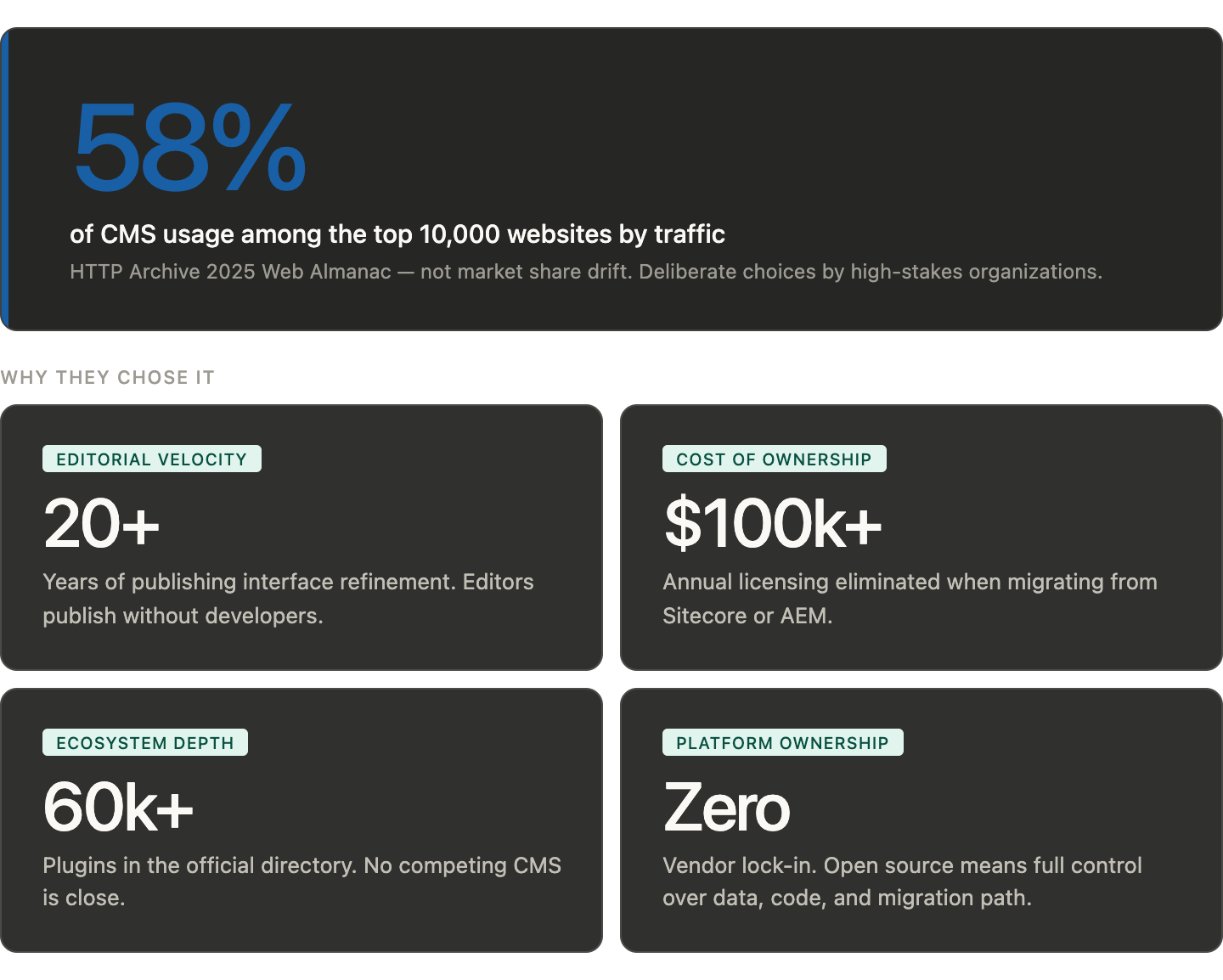
Four factors drive that choice consistently.
Editorial velocity. WordPress’s publishing interface has been refined for over two decades. Non-technical contributors can publish, update, and manage content at scale without developer involvement. At organizations with hundreds of editors across multiple regions, that editorial autonomy is not a convenience feature. It is the difference between a site that stays current and one that creates a bottleneck at every content update.
Total cost of ownership. Organizations migrating from Sitecore or Adobe Experience Manager to WordPress typically eliminate six figures in annual licensing costs. That budget redirects toward custom development, infrastructure, and the engineering work that actually differentiates the platform from competitors, rather than toward platform licenses that do not.
Ecosystem depth. The WordPress developer and plugin ecosystem has no equivalent among CMS alternatives. For any integration requirement, performance optimization, or content structure an enterprise needs, a reliable starting point already exists. The work is configuration and extension, not greenfield engineering from scratch.
Platform ownership. Enterprise organizations on proprietary or SaaS CMS platforms do not control their data, their codebase, or their migration path. WordPress is open source. The organization owns all of it. As vendor lock-in becomes a recognized risk in enterprise digital strategy, ownership matters more each year.
What actually makes WordPress perform at scale
Standard WordPress installed on shared hosting will not support enterprise traffic. The platform itself is capable of handling it. The default configuration is not. Enterprise WordPress development begins with infrastructure decisions that most WordPress users never encounter.
The architecture behind enterprise-level WordPress explains the ecosystem itself.
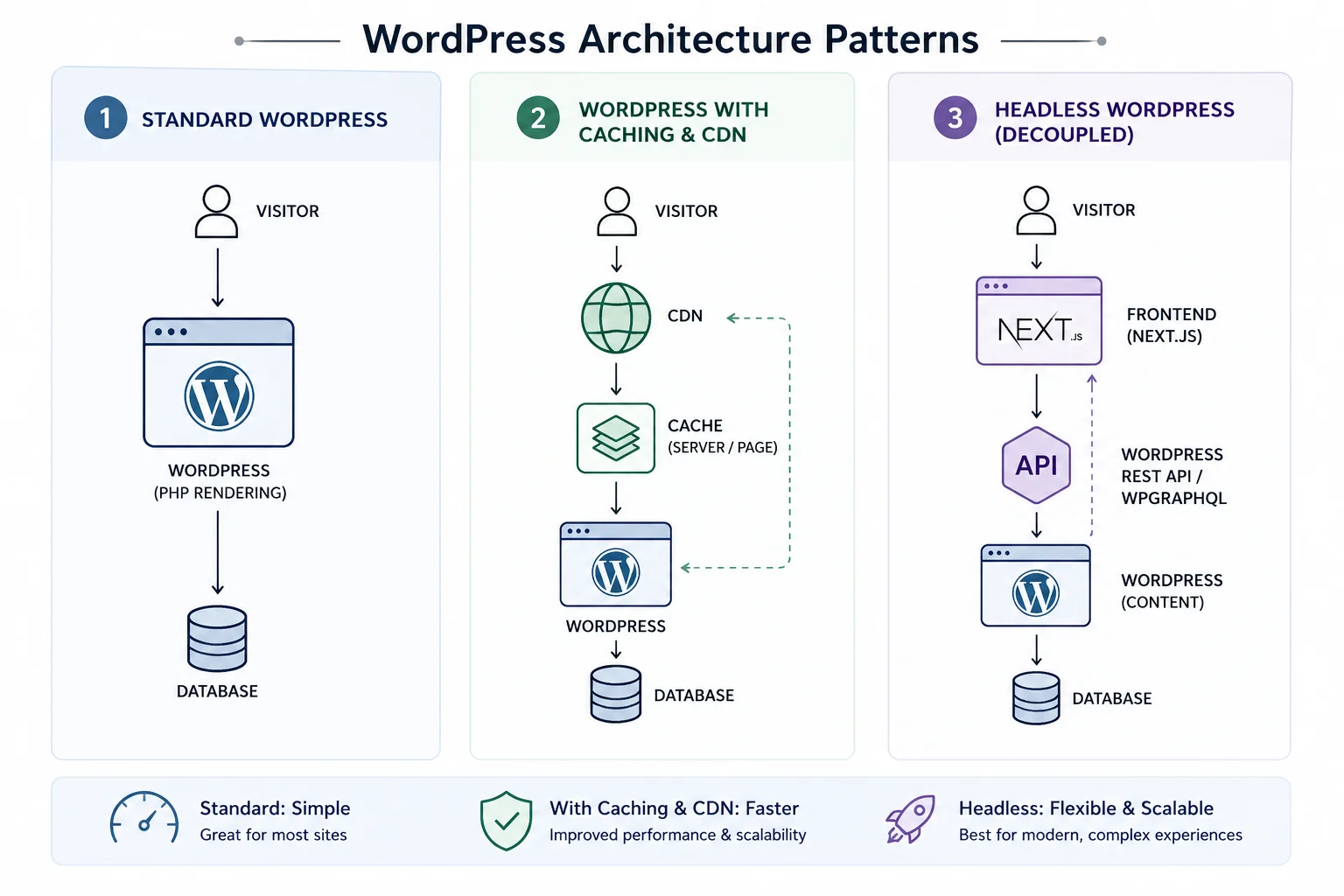
Caching strategy
WordPress generates pages dynamically by default, querying the database for every request. With hundreds of thousands of monthly visitors, that query load becomes a performance bottleneck. Enterprise WordPress implementations use page-level caching, object caching (typically Redis or Memcached), and database query caching in combination to reduce database load to a fraction of what uncached WordPress produces.
The layers are not interchangeable. Page caching serves pre-built HTML to anonymous visitors without touching the database. Object caching stores the results of expensive database queries so they do not run repeatedly. Database query caching sits at the MySQL or MariaDB level. A properly configured caching stack allows enterprise WordPress sites to serve millions of monthly visitors from infrastructure that would be overwhelmed by the same traffic without it.
CDN and global delivery
Enterprise WordPress sites with international audiences use a Content Delivery Network to serve assets from edge nodes geographically close to each visitor. This reduces latency for static assets, moves image and script delivery off the origin server, and provides a layer of DDoS protection as a secondary benefit.
For organizations with truly global audiences, the CDN configuration extends to edge-cached HTML delivery, where full page responses are cached at the CDN layer and served without the WordPress origin server being involved at all. This is architecturally close to static site delivery while maintaining WordPress’s dynamic publishing capabilities for authenticated editors.
Headless and decoupled architecture
Some enterprise WordPress implementations separate content management from presentation entirely. WordPress handles content creation, storage, and editorial workflows. A separate frontend, typically built in Next.js or Nuxt, queries WordPress via the REST API or WPGraphQL and handles rendering independently.
This gives development teams freedom to optimize frontend performance outside of WordPress’s PHP rendering layer. It introduces real architectural complexity and operational overhead. Headless WordPress is not the default choice for enterprise implementations. It is a deliberate decision made when the standard rendering path cannot meet specific performance requirements.
The Integration Layer: WordPress as a Connected Enterprise System
Enterprise WordPress development almost never means WordPress in isolation. It means WordPress as the content and publishing hub of a connected system that includes CRM platforms, marketing automation tools, data warehouses, analytics systems, e-commerce backends, and custom internal applications.
The integrations that appear most often are Salesforce for CRM data synchronization, HubSpot for marketing automation, ERP systems for product and inventory data, customer data platforms for personalization, and custom APIs connecting proprietary internal systems.
What distinguishes enterprise-level integration from standard plugin connectivity is engineering discipline. Consumer-grade integrations use pre-built plugins designed for a standard use case. Enterprise integrations are custom-built to handle edge cases, failure states, retry logic, data transformation, and rate limit management. They are tested, version-controlled, and deployed through the same pipeline as the rest of the codebase.
The REST API and GraphQL layer in WordPress has matured to the point where WordPress can function as a headless backend for applications that have nothing to do with content publishing. An enterprise organization might use WordPress as the data and authentication layer for a customer portal or internal tool while the WordPress admin interface is never exposed to end users at all.
Governance: What Separates Enterprise WordPress
A large WordPress site with many editors and many pages is not the same as an enterprise WordPress implementation. The distinction is governance.
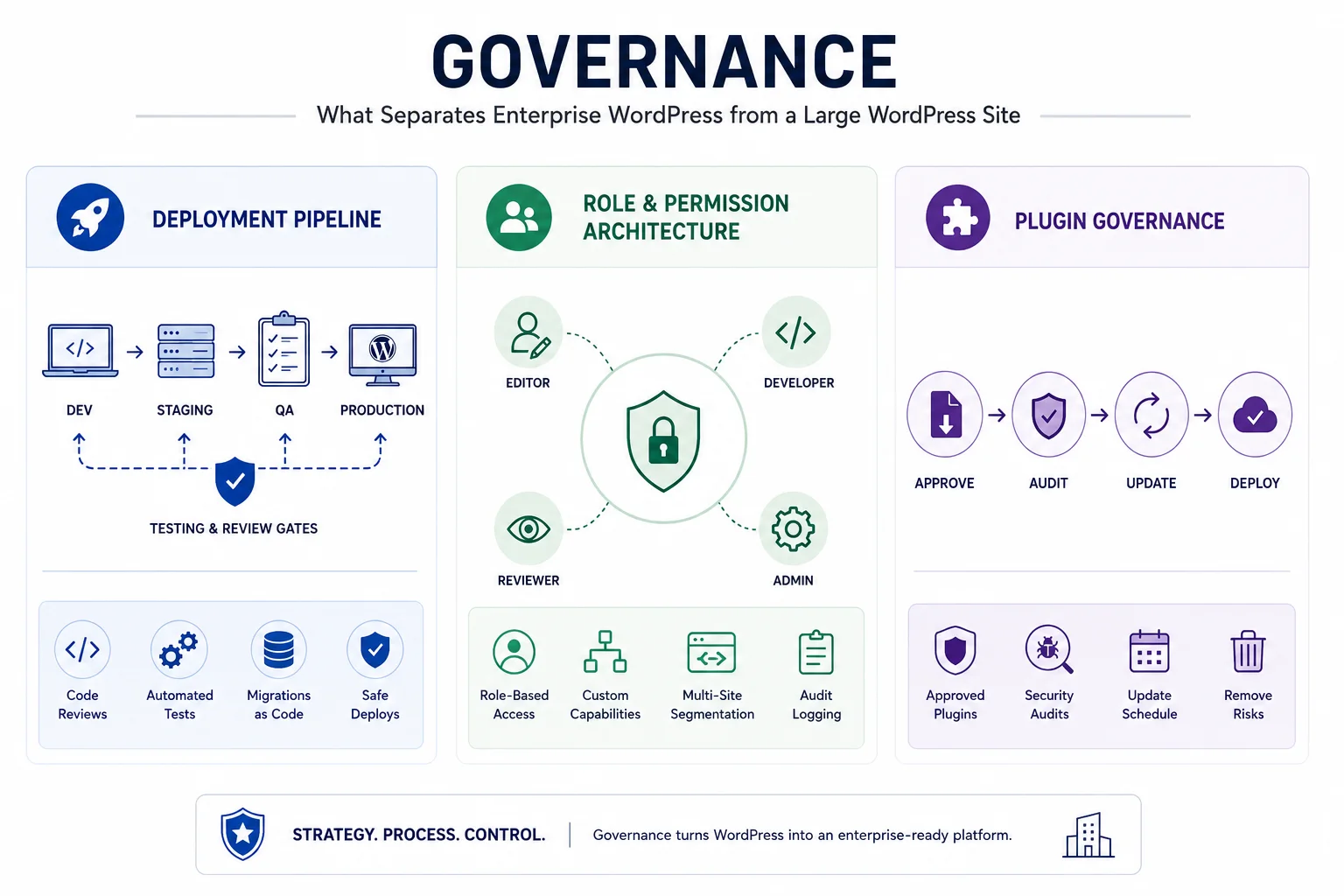
Governance in enterprise WordPress development covers three areas: deployment pipeline discipline, role and permission architecture, and update management.
Deployment pipeline
Enterprise WordPress does not deploy code changes directly to production. Changes move through a defined set of environments: typically local development, staging, and production, sometimes with additional QA and pre-production environments in between. Each environment transition is gated by automated tests, manual QA review, or both.
CI/CD tools like GitHub Actions, CircleCI, and Bitbucket Pipelines manage this pipeline. Code reviews are required. Database migrations are handled through version-controlled scripts. Plugin updates are tested in staging before promotion to production. The result is a deployment process that is slower than clicking “Update” in the WordPress admin and far less likely to take a production site down on a Tuesday afternoon.
Role and permission architecture
Enterprise WordPress implementations use role-based access control to match editorial permissions to editorial responsibilities. A regional content editor can publish in their assigned section but cannot modify site-wide settings. A developer has access to the codebase but not to production database credentials. A stakeholder has read access to draft content but cannot publish.
WordPress’s built-in role system is a starting point. Enterprise implementations extend it significantly, often with custom capabilities attached to specific content types, with multi-site configurations that segment permissions across different site properties, and with audit logging that records who changed what and when.
Plugin governance
Plugins are the most common source of enterprise WordPress risk, and not because plugins are inherently dangerous. The risk is in unmanaged plugin portfolios where updates happen opportunistically, where the dependency chain between plugins is not tracked, and where deprecated or abandoned plugins accumulate without review.
Enterprise WordPress governance includes a defined plugin approval process, regular security audits of installed plugins, and an update schedule that applies patches through the staging environment before production. Organizations that treat plugins as software dependencies with the same rigor applied to application libraries dramatically reduce plugin-related risk.
Security and compliance in enterprise WordPress development
Enterprise WordPress security is not the same conversation as “is WordPress secure.” The platform’s security track record is solid. The attack surface at enterprise scale is different from a standard installation’s attack surface, and the compliance requirements vary significantly by industry.
Healthcare organizations deploying WordPress face HIPAA requirements around data handling. Financial institutions deal with PCI-DSS compliance for any part of the stack that touches payment data. Government websites operate under accessibility standards (Section 508 in the US, EN 301 549 in Europe) and sometimes under data sovereignty requirements that restrict where user data can be processed.
Enterprise WordPress security implementations typically include Web Application Firewall configuration at the server or CDN level, Two-Factor Authentication enforced for all editor accounts, brute force protection and login rate limiting, regular penetration testing by external security firms, secret scanning in the deployment pipeline, and database encryption for sensitive data fields.
The hosting environment matters significantly. WordPress VIP, WP Engine’s enterprise tier, Pantheon, and managed cloud environments on AWS, GCP, or Azure provide security infrastructure that would be expensive to replicate independently. Enterprise organizations evaluate hosting vendors on uptime SLAs, backup frequency, failover capability, and security certification status.
The Data Layer
Architecture, integrations, and governance get most of the attention in enterprise WordPress discussions. The data layer is discussed less and matters more than most practitioners acknowledge.
Enterprise organizations using WordPress are not just publishing content. They are managing, displaying, and distributing institutional data at a scale that standard WordPress tooling was not designed for. Product catalogs with hundreds of thousands of SKUs. Financial reporting tables with millions of transaction rows. Member directories spanning tens of thousands of records. Research datasets that update daily and need to be queryable by site visitors in real time.
The gap between what standard WordPress table plugins can handle and what enterprise data volumes actually require is significant. Most WordPress table plugins use client-side rendering: every row loads into the browser on page load, and JavaScript handles sorting, filtering, and pagination from there. This architecture works at a few hundred rows. At ten thousand rows it slows noticeably. Above that, it fails.
How Ninja Tables Supports the Enterprise WordPress Development
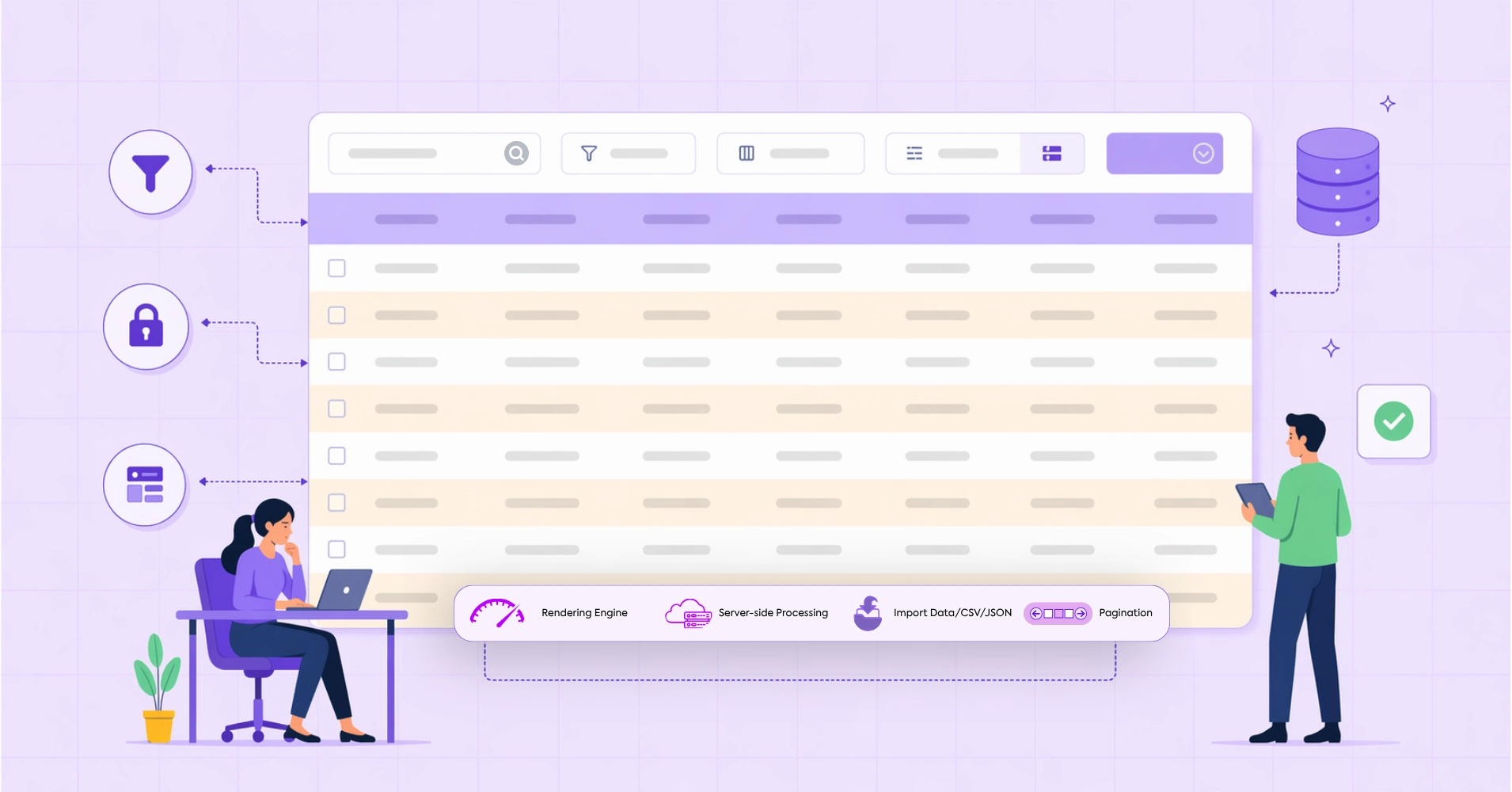
Enterprise data requirements need server-side processing: the database handles all queries, and the browser receives only the rows needed for the current view. Each sort, filter, or page turn triggers an AJAX request to the server, which returns only the matching data. The browser’s load does not increase as the dataset grows.
This is the gap that Ninja Tables’ DataTables rendering engine addresses. Released in version 5.2.8, the DataTables engine integrates one of the most proven data grid libraries in enterprise software directly into Ninja Tables, with native server-side AJAX processing built in. The database does the work. The browser displays one page of results at a time. Load time stays consistent whether the table holds 5,000 rows or 500,000.
The release also includes a chunk-based CSV import system that processes large files in batches rather than loading the entire file into PHP memory. This makes importing large institutional datasets reliable on standard hosting environments without hitting PHP memory limits or max execution time restrictions mid-import. For enterprise WordPress implementations managing data at real volume, this changes what is possible inside the platform without custom development. The Ninja Tables 5.2.8 release notes cover the configuration and supported use cases in detail.
Wrapping Up
Enterprise WordPress development is a discipline built on decisions that most WordPress users never have to make. How code gets deployed. How access gets controlled. How data gets processed at volume. How the platform integrates with the rest of the organization’s technology stack.
WordPress is capable of handling all of it. That capability is not in the default installation. It is in the engineering decisions built around it. The organizations running WordPress at the scale of major media publishers, government institutions, and global enterprises are not using a different platform. They are using the same one with a completely different level of rigor applied beneath the surface.
If your WordPress site has reached the point where standard approaches are creating ceilings rather than floors, the next step is not switching platforms. It is building properly.

Ninja Tables– Easiest Table Plugin in WordPress





Add your first comment to this post