When Your WordPress Table Plugin Is Wrong for Your Data

When Your WordPress Table Plugin Is Not Enough

You installed a table plugin, built the table, and something still does not work. Users are confused, the page crawls, or the data sits there doing nothing useful. The instinct is to swap the plugin, but that is often the wrong diagnosis.

WordPress table plugin limitations tend to fall into three distinct categories. The data structure is wrong for a table format. The table type is mismatched to the task. Or the plugin’s rendering architecture genuinely cannot handle the data volume. Each one looks similar on the surface and has a completely different fix, which is why swapping plugins without diagnosing the actual problem almost always wastes time.

In this blog, we will go through how to identify which limitation you are actually dealing with, when a WordPress table is the wrong tool entirely, and what the right solution looks like for large datasets specifically.

TL;DR

  • WordPress table plugin limitations fall into three categories: wrong data structure, wrong table type, and wrong rendering architecture
  • Five specific data patterns that consistently fail in standard WordPress table formats, regardless of which plugin you use
  • The difference between a display table and a data table, and why confusing the two creates problems no settings panel can fix
  • Where client-side rendering breaks and what server-side processing actually means for large datasets in WordPress
  • Why most plugins claiming “large dataset support” and genuine big data support are not the same thing
  • How Ninja Tables’ DataTables rendering engine addresses the gap that has limited other WordPress table plugins for years

What a table effectively does well

Before diagnosing what is wrong, it helps to be clear about what tables genuinely do well.

A table is the right structure when users need to compare multiple attributes across multiple items simultaneously: product specs across three models, pricing tiers across five plans, player statistics across a full squad, team standings across a season. The defining feature of all these cases is that the columns mean the same thing for every row, and users need to read across rows and down columns to make sense of the data.

Tables also work well when users need to find a specific record in a larger set, which is why sorting, searching, and filtering matter so much for larger datasets. A user who knows they need the row for “Invoice #4821” or “Product SKU: WM-0094” is using the table as a lookup tool. That is a valid and common use case.

Where tables work, they work better than almost any other format. Dense, comparable, structured data presented in a well-built table is faster to read than paragraphs, more scannable than cards, and more useful than a chart when the user needs the actual values rather than a visual trend.

The problem is that most people reach for a table plugin by default, regardless of whether the data fits that structure.

Five data patterns that fail in a standard WordPress table

Each of these shows up constantly across WordPress sites, and in most cases, the table plugin gets blamed for a problem that started one layer above it.

1. Data with no meaningful comparison across rows

A table implies that every row is the same type of thing. If the rows are genuinely different in kind, not just in value, a table creates false equivalence.

A WordPress site listing “team members” with a name, role, bio, and photo does not belong in a table. Users do not need to compare Ana’s bio against Marcus’s bio. They are looking at individuals, not comparing attributes. A card layout or a custom post type with archive pages serves this far better.

The same applies to blog post listings, recipe archives, event schedules with varying structures, and testimonial collections. Each of these contains items that are meant to be read individually, not scanned comparatively. A table forces a comparative structure onto data that does not benefit from it.

2. Hierarchical or relational data

Tables are a flat structure. Each row holds one level of data, and when the data has parent-child relationships, or when records belong to categories that themselves carry properties, a flat table hides the structure rather than communicating it.

A product catalog where each product has multiple variants, each variant has its own price and stock status, and each category has display rules is relational data. Flattening it into a table either loses the relationships entirely or creates hundreds of near-duplicate rows that confuse users and slow the page.

WordPress handles relational data better through custom post types with taxonomies, or through purpose-built WooCommerce product structures. A table can be part of the display layer for these, but it should not be the structural layer.

3. Data that changes meaning without context

Some data requires explanation to be useful. A table cell that reads “47%” means nothing without knowing what it measures, over what period, against what baseline. If every cell in a column requires a tooltip, a footnote, or a hover state to be meaningful, the table is carrying data that belongs in a different format.

Research data, survey results with nuanced categories, financial metrics with complex definitions, and scientific measurements with units that vary by row all tend to fall into this pattern. Users slow down not because they cannot find the data, but because they cannot interpret it without leaving the table to look something up.

Reports, annotated data visualizations, or structured text with embedded tables for specific comparisons work better here. The table is a supporting element, not the primary container.

4. Primarily visual data

If the primary attribute users need is an image, a video, or a color, a table is usually the wrong structure.

A property listing where the first thing a user evaluates is a photo, a design portfolio where the work itself is the content, a product gallery where visual impact drives the purchase decision: none of these belong in a table. The format prioritizes text and values. Images placed inside table cells are constrained to small, fixed-dimension spaces where they compete with surrounding text rather than inviting the kind of open visual browsing that image-first content requires.

Grid layouts, gallery plugins, and card-based archives handle visual-first content correctly. A table can work as a secondary view, an option for users who want to compare specs after they have already browsed visually, but putting it as the entry point for visually driven content produces a worse experience than a simpler format would.

5. Data with too few rows to need a table

A table with three rows is almost always worse than a simple list or a short paragraph.

Three pricing options, four team members, two shipping methods: none of these need search, sorting, or pagination. The overhead of a table plugin and the rigid visual structure of a grid add complexity without adding anything useful to the reader’s experience. A simply styled list or a short descriptive paragraph serves this data better and loads faster with no plugin required.

When the table type is wrong

Assuming the data does belong in a table, the next most common mismatch is using the wrong kind of table for the task.

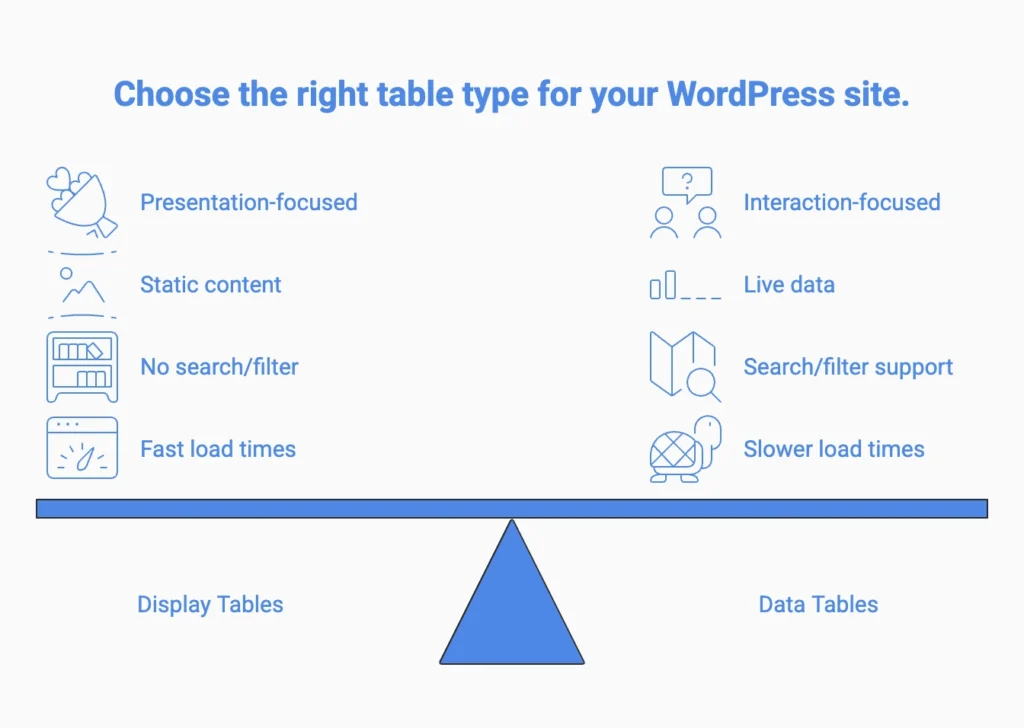
WordPress table plugins broadly fall into two categories, display tables and data tables, and most site owners treat them as equivalent when they serve fundamentally different purposes.

A display table is built for presentation: static content entered manually, formatted for a reader who will scan it once. Pricing tables, feature comparison tables, and simple informational grids all fit here. They do not need search or live data connections, just clean formatting and fast load times.

Demo Image
Demo Image
Demo Image
A smartwatch with a polished silver case paired with a classic brown leather strap.
An elegant rose-gold smartwatch with a soft blush strap and delicate dial details.
A fresh and modern smartwatch with a cool silver case and soft sky-blue dial.
Classic brown
Blush pink
Sky blue
$199
$179
$219
Details
Display
Always-On square display
Slim square display
Wide square display
Classic analog dial
Elegant minimal dial
Modern numeric dial
Case & Size
42mm case size
40mm case size
44mm case size
Stainless steel case
Rose gold aluminum case
Polished silver aluminum case
Reinforced glass display
Scratch resistant glass
Edge-to-edge glass display
Strap
Premium leather strap
Soft leather strap
Silicone sport band
Breathable stitched design
Lightweight and flexible
Soft-touch sport fit

A data table is built for interaction. It connects to a live data source, supports search and filtering, handles pagination, and updates when the underlying data changes. Product catalogs, inventory tables, financial records, and membership directories are data table use cases, where functionality determines whether the table is useful and visual styling is a secondary concern.

TitleStatus
Liza04-May-26When Your WordPress Table Plugin Is Wrong for Your DatapublishTips
Md Shahjahan16-Apr-26Ninja Tables 5.2.8: Now with DataTables Rendering and More!publishNinja Tables
Liza15-Apr-26Big Data Table Design: A UX Guide That Actually WorkspublishTips
Liza08-Apr-26Big Data Tables in WordPress: What Works and What BreakspublishTips
Liza08-Apr-26How to Merge Cells in a WordPress Table Without Losing DatapublishWordPress Plugins
Liza30-Mar-26How to Upsell and Cross-Sell Products in Your Online StorepublishTips
Nusrat Fariha13-Mar-26Personalized Shopping Experience Increases AOVpublishTips
Nusrat Fariha10-Mar-26Average Order Value (AOV): Definition, Formula, and StrategiespublishTips, WooCommerce
Nusrat Fariha08-Mar-26The Moment a Visitor Decides to Buy (It's Earlier Than You Think)publishTips
Liza03-Mar-26Feature-Based Pricing vs Usage-Based Pricing (With Real Tables)publishTips
Nusrat Fariha27-Feb-26FluentPlayer First Look: More Than a Video Player PluginpublishWordPress Plugins
Editorial Panel06-Mar-26Overlooked WooCommerce Business Setup Details That Impact GrowthpublishWooCommerce
Nusrat Fariha25-Feb-26What Makes a Comparison Page Feel Trustworthy?publishComparison, Tips
Liza26-Feb-26Enterprise Scale Tables in WordPress: How Ninja Tables Handles EverythingpublishWordPress Plugins
Liza18-Feb-26Mobile-First Table Design Principles for 2026publishTips
Nusrat Fariha17-Feb-26Why Most Product Comparison Pages Don't ConvertpublishTips
Md Shahjahan06-Mar-26Ninja Charts 3.4.0: Gutenberg Block Support Is Here!publishCharts and Graphs
Nusrat Fariha10-Feb-26Product Tables for WordPress Stores: Turn Browsers Into BuyerspublishWordPress Plugins
Md Shahjahan28-Jan-26Ninja Tables 5.2.6: More Control, Better Printing & Stronger SecuritypublishNinja Tables
Nusrat Fariha30-Jan-2615+ Use Cases of WordPress Directory Plugins for Growing WebsitespublishWordPress Plugins
Nusrat Fariha26-Jan-26AuthLab Connect 2025: Where We Connect, Celebrate, and Look AheadpublishWordPress Plugins
Liza04-Feb-26Enhancing UX with Searchable & Sortable TablespublishTips
Liza21-Jan-26Why Most Pricing Tables Confuse Visitors (And how to fix it)publishTips
Md Shahjahan25-Dec-25Ninja Tables 2025 Year In ReviewpublishNinja Tables
Nusrat Fariha15-Dec-25Personalized Marketing in Modern TimespublishWordPress Plugins
Liza05-Dec-25Sticky Headers vs Fixed Columns in Product Table: What's Better on Mobile?publishTips
Nusrat Fariha17-Nov-25Ninja Tables Fluent Integrations: What Your Site NeedspublishNinja Tables, WordPress Plugins
Nusrat Fariha13-Nov-25How to Integrate FluentCart with Ninja TablespublishNinja Tables, WordPress Plugins
Liza13-Nov-2515+ High Converting Pricing Table Design Examples for Any WebsitepublishTips
Nusrat Fariha05-Nov-25Sales Data Visualization with Tables and ChartspublishWordPress Plugins
Liza31-Oct-25Showcasing Profile: Creating a Professional Portfolio Table in WordPresspublishWordPress Plugins
Liza23-Oct-25Automate Patient Data: Fluent Forms to Ninja TablespublishNinja Tables
Nusrat Fariha14-Oct-25Meet FluentCart: Modern Solution for Modern eCommercepublishReview
Nusrat Fariha09-Oct-25Get Ready for Halloween Sales with Ninja Tables!publishNinja Tables, WooCommerce
Editorial Panel15-Oct-257 Tips to Reduce Cart Abandonment in eCommerce RetailpublishTips
Nusrat Fariha03-Oct-25Ratings and Review Tables in WordPress for SEO, UX, and TrustpublishNinja Tables
Liza07-Oct-25Ninja Tables Smart Features Save You More Time Than You ThinkpublishNinja Tables
Nusrat Fariha29-Sep-25eCommerce Customer Journey: A Complete GuidepublishTips
Liza28-Sep-25Data Tables, Display Tables, and Decision Tables: Know the DifferencepublishTips
Nusrat Fariha21-Sep-25Add a Dynamic Discount Table to Your StorepublishNinja Tables
Liza18-Sep-25Why Comparison Tables Boost Conversions During Holiday SeasonpublishTips
Md Shahjahan11-Nov-25Ninja Tables 5.2.4: FluentCart Integration & More!publishNinja Tables
Nusrat Fariha10-Sep-25Prepare for the Upcoming Holiday Sales Season (Halloween, BFCM, Christmas)publishTips
Liza08-Sep-25Infinite Scroll vs Pagination: How to Balance UX and SEOpublishTips
Editorial Panel15-Sep-25How to Build Real-Time Calculator in Elementor FormpublishTips
Liza27-Aug-25Use a Real Estate Listing Table to Get Better CommissionpublishTips
Editorial Panel22-Aug-25Visuals, Charts, and Tables for Your SEO ReportpublishNinja Tables
Nusrat Fariha26-Aug-25Quickly Create Tables in WordPress (No Coding!)publishNinja Tables
Nusrat Fariha14-Aug-25Master WooCommerce UX for Better Sales and RevenuepublishWooCommerce
Liza12-Aug-25How to Use AI in WordPress: A Complete GuidepublishTips
Nusrat Fariha07-Aug-25Ninja Charts 3.3.2: Fixes and ImprovementspublishCharts and Graphs
Liza24-Jul-25Freelance Project Management Tools: Can Tables Do It All?publishTips
Nusrat Fariha16-Jul-25Tables for Affiliate Marketing: Earn More as an AffiliatepublishNinja Tables
Md Shahjahan01-Aug-25Ninja Tables 5.2.3: Exciting New Features and ImprovementspublishNinja Tables
Liza11-Jul-25Actionable Data Table Design Tips for Better ConversionspublishTips
Liza06-Jul-25Design the Best Insurance Comparison TablepublishTips
Nusrat Fariha08-Jul-25Overcome WooCommerce Product Table Challenges Once and for All!publishWooCommerce
Editorial Panel01-Jul-25How to Customize WooCommerce Checkout Page: Step-by-Step GuidepublishWooCommerce
Nusrat Fariha24-Jun-25WP Posts Table Use Cases: Organize and Display WordPress ContentpublishNinja Tables, WordPress Plugins
Liza25-Jun-25Year-Round Seasonal Marketing CampaignspublishTips
Md Shahjahan18-Jun-25Ninja Tables 5.1.1: Data Table Updates and Drag & Drop ImprovementspublishNinja Tables
Nusrat Fariha16-Jun-25Sneak Peek into FluentCart: Your eCommerce, Your TermspublishReview, WordPress Plugins
Liza16-Jun-25How to Present Marketing Report Data Using TablespublishTips
Md Shahjahan02-Jun-25Ninja Tables 5.1.0 : Fresh New Plugin UIpublishNinja Tables
Nusrat Fariha28-May-25Your Favourite Table Plugin is Getting Revamped!publishNinja Tables
Liza29-May-25Data Management Challenges and SolutionspublishTips
Liza12-Jun-25How to Track Student Progress​ in WordPresspublishNinja Tables
Nusrat Fariha07-Jun-25Create WordPress Tables in 2 Minutes: Quick Guide for BeginnerspublishNinja Tables
Nusrat Fariha23-May-25Bundle Marketing: Product Bundling Ideas for BusinessespublishTips
Liza26-May-25Creating Healthcare Data Table in WordPresspublishWordPress Plugins
Nusrat Fariha01-Jun-25Schedule Table in WordPress: Manage Events and Appointments EasilypublishWordPress Plugins
Nusrat Fariha26-May-25B2B eCommerce Sales: Proven Tips for Your BusinesspublishTips
Liza21-May-25Beginners Guide to WordPress Employee Directory TablepublishWordPress Plugins
Nusrat Fariha19-May-25FluentAffiliate Teaser: Because Your Affiliate Marketing Deserves Better!publishWordPress Plugins
Nusrat Fariha15-May-25Why Ninja Tables is the Best Table Plugin in WordPresspublishNinja Tables
Nusrat Fariha03-Sep-25Meet FluentAffiliate: Best WordPress Affiliate Management SolutionpublishReview
Liza13-May-25Google Sheets Integration in WordPress- Real Examples & Use CasespublishTips
Nusrat Fariha08-May-25Upgrade Your Sports Website: Add Live Score & Points TablepublishNinja Tables, Tips
Liza06-May-25Best WordPress Table Plugins for 2026publishWordPress Plugins
Nusrat Fariha28-Apr-25Grow Your Business with WordPress Tables (2026)publishNinja Tables
Liza21-Apr-25Data Visualization Use Cases and ExamplespublishNinja Tables
Liza06-Apr-25Marketing Strategy 2025: Shaped by Consumer TrendspublishWordPress Plugins
Nusrat Fariha21-Mar-25Dynamic Data Visualization Ins and OutspublishNinja Tables, WordPress Plugins
Editorial Panel12-Mar-25The Secret to eCommerce Success: Using WordPress Tables to Drive ConversionspublishWordPress Plugins
Editorial Panel24-Feb-25Location-Based Recommendations: Guiding Customers to ProductspublishTips
Liza10-Mar-25Consumer Trends 2025: What Marketers Must Know to Stay AheadpublishTips
Liza10-Feb-25Valentine’s Day Marketing Ideas with Smart Product TablespublishTips
Liza23-Jan-25Ratings and Reviews in Data TablespublishWordPress Plugins
Liza14-Jan-25Underrated Features of Ninja Tables You Should UsepublishNinja Tables
Md Shahjahan24-Dec-24A Year in Review: Ninja Tables Biggest Milestones in 2024publishNinja Tables
Mohiuddin Omran10-Dec-24What is the Digital Marketing Strategy that Tracks Users Across the Web?publishTips
Nusrat Fariha04-Dec-2411 Types of Product Tables Your Website NeedspublishWordPress Plugins
Liza03-Dec-24How to Create Product Specification Table in WordPresspublishTips
Liza25-Nov-24Interactive Data Visualization in WordPress: Tables and ChartspublishCharts and Graphs
Mohiuddin Omran11-Nov-24WordPress Community Plugin: Build Engaging Online Spaces EffortlesslypublishWordPress Plugins
Liza12-Nov-24Black Friday Stats, Trends and Strategies for Small BusinessespublishTips
Nusrat Fariha18-Nov-24Meet FluentCommunity: WordPress Community Plugin at Its BestpublishReview
Liza25-Oct-248 WooCommerce Store Design ExamplespublishWooCommerce
Liza24-Sep-24Top Fall Marketing Ideas to Drive SalespublishTips
Liza12-Sep-24Design The Perfect Feature Comparison Table in WordPresspublishTips
Nusrat Fariha22-Sep-24How Ninja Tables Helps Your Halloween SalespublishNinja Tables
Liza22-Aug-24Integrate WooCommerce, Google Sheets, & More with Ninja TablespublishNinja Tables
Mohiuddin Omran13-Aug-24The All-Time Olympic Medal Table with Free TemplatespublishWordPress Plugins
Liza02-Aug-24Simplify Your Decisions with Pros and Cons TablespublishTips
Mohiuddin Omran18-Jul-24What Makes a Good Website: Power List of Top WordPress PluginspublishWordPress Plugins
Nusrat Fariha01-Aug-24Upload a Table Background Image to Your WordPress TablepublishNinja Tables
Mohiuddin Omran09-Jul-24FluentBoards Review: Features, Pros, Cons, and More!publishReview
Liza08-Jul-24Creating Tables in WordPress: Everything You Should KnowpublishTips
Liza05-Jun-24Recovering Lost Sales: 10 Shopping Cart Abandonment SolutionspublishTips
Nusrat Fariha09-Jun-24Announcing Free WordPress Table Templates Page!publishWordPress Plugins
Nusrat Fariha10-May-24How to Create a Product Review Table?publishWordPress Plugins
Liza30-Apr-247+ Woocommerce Statistics and Trends Shaping Revenue in 2025publishTips, WooCommerce
Nusrat Fariha25-Apr-24Transform Value: Turn Text into HyperlinkpublishNinja Tables
Mohiuddin Omran17-Apr-24Misleading Statistics: Learn, Spot, Avoid, and Get Rid of them publishTips
Liza03-Apr-24A Guide to Comparison Tables for Products, Services, and FeaturespublishTips
Nusrat Fariha19-Mar-24Ninja Tables Features That Simplify Your LifepublishNinja Tables
Liza06-Mar-247 Techniques to Speed up WooCommerce CheckoutpublishTips, WooCommerce
Editorial Panel01-Mar-246 Best WordPress Pricing Table Plugins in 2026publishWordPress Plugins
Liza27-Feb-24Ninja Tables Turns 6!publishNinja Tables, Review
Liza28-Feb-24Color Palettes for Data VisualizationpublishTips
Nusrat Fariha09-Feb-24Best Chart Plugins in WordPress: Improve UX with Interactive ChartspublishCharts and Graphs, WordPress Plugins
Mohiuddin Omran26-Jan-24How to Make a Graph in Google SheetspublishTips
Liza15-Jan-24Export-Import Tables in WordPresspublishNinja Tables, Tips
Mohiuddin Omran10-Jan-24Best jQuery Table Plugins in 2025publishTips, WordPress Plugins
Liza28-Dec-23Mapping Tomorrow: Emerging Data Trends for 2026publishTips
Mohiuddin Omran22-Dec-23FluentSnippets Review: Facts, Features, and AlternativespublishReview, WordPress Plugins
Nusrat Fariha09-Jan-24Links in Data Tables: Dynamic Data VisualizationpublishNinja Tables
Mohiuddin Omran04-Dec-23Amazon Affiliate Program: A to Z for Amazon AssociatespublishTips
Nusrat Fariha20-Dec-23Ninja Tables in 2023: Year In ReviewpublishNinja Tables, Review
Liza23-Nov-23Conditional Formatting in WordPress TablespublishTips, WordPress Plugins
Liza07-Nov-23Guiding Data Table Examples for Great Website VisualizationpublishTips
Tanzil Ebad Chowdhury27-Oct-239 WordPress Data Visualization Plugins You Can't Overlook!publishWordPress Plugins
Liza20-Oct-23Introducing FluentBooking: WordPress Scheduling PluginpublishReview, WordPress Plugins
Liza18-Oct-23Get in The Spirit of Holiday Sales with 13 Halloween Marketing IdeaspublishTips
Mohiuddin Omran12-Oct-23Mastering the Bootstrap Table: Creating Clean, Responsive, and User-Friendly LayoutspublishTips, WordPress Plugins
Mohiuddin Omran27-Sep-23A Comprehensive Guide on How to Center a Table with CSSpublishTips
Liza07-Sep-23How to Generate Leads, Increase User Engagement, and Drive TrafficpublishTips
Nusrat Fariha24-Aug-23FOMO Marketing Ideas: Create Urgency and Drive ConversionspublishTips
Tanzil Ebad Chowdhury23-Aug-237+ Dynamic Data Types: Toolkit for Configuring Table ColumnspublishTips, WordPress Plugins
Liza21-Aug-23How to Create Stackable Tables with Ninja TablespublishNinja Tables, WordPress Plugins
Liza31-Jul-23How to Add Media to a Data TablepublishNinja Tables, WordPress Plugins
Tanzil Ebad Chowdhury27-Jul-232 Easy Ways to Merge Cells in WordPress Tables (+Pro Tips)publishNinja Tables, Tips
Nusrat Fariha20-Jul-23Simplifying Data Presentations & Common MistakespublishNinja Tables, Tips
Mohiuddin Omran18-Jul-23How to Make a Table in Google Sheets: In-depth TutorialpublishTips
Tanzil Ebad Chowdhury12-Jul-237 Types of Comparison Charts for Effective Data VisualizationpublishTips
Liza14-Jul-23Closer Look at Charts vs Tables: The Right Data VisualizationpublishComparison, Ninja Tables
Mohiuddin Omran03-Jul-23Writing Google Reviews and Displaying Reviews in WordPress TablespublishReview, Tips
Nusrat Fariha22-Jun-2311 Effective Summer Marketing Tips to Boost Your SalespublishTips
Liza19-Jun-23How To Design a Table the Right Way: Mastering Data Table DesignpublishNinja Tables, Tips
Tanzil Ebad Chowdhury15-Jun-23Responsive Table Modes in Ninja Tables | No CodingpublishNinja Tables
Md Shahjahan08-Jun-23Introducing Ninja Tables 5.0.0: Smoother, Lighter, and More PowerfulpublishNinja Tables
Nusrat Fariha02-Jun-23How To Customize Default WooCommerce ButtonpublishNinja Tables, WooCommerce
Liza07-Jun-23Limitations of WooCommerce and Best SolutionspublishNinja Tables, WooCommerce
Tanzil Ebad Chowdhury25-May-23TablePress vs Ninja Tables: Which Is Better?publishComparison
Liza22-May-23What Makes a Good Website: Checklist for Business OwnerspublishTips
Mohiuddin Omran11-May-23TablePress Review: Is It Worth Upgrading to Pro Or Not?publishComparison, WordPress Plugins
Tanzil Ebad Chowdhury08-May-23Good Data Visualization: Master the Art of Visual StorytellingpublishTips
Nusrat Fariha29-Apr-23Color Customizing WordPress TablespublishNinja Tables, WordPress Plugins
Mohiuddin Omran17-Apr-23WooCommerce Inventory Management: Why, How, WhatpublishTips, WooCommerce
Nusrat Fariha10-Apr-23Table Data Visualization: Efficiency and GuidelinespublishWordPress Plugins
Mohiuddin Omran30-Mar-23WordPress WooCommerce Tutorial: Step-by-Step GuidepublishWooCommerce
Mohiuddin Omran30-Mar-23History, Pros, Cons, and Brief Overview of WooCommercepublishWooCommerce
Nusrat Fariha23-Mar-23Optimize WooCommerce for Higher Conversion RatespublishWooCommerce
Mohiuddin Omran08-Mar-23Data Visualization Basics, Skills & TechniquespublishTips
Nusrat Fariha07-Mar-23Reviews of Ninja Tables Google Sheets IntegrationpublishWordPress Plugins
Mohiuddin Omran23-Feb-23Making a Product Comparison Table in WordPresspublishNinja Tables, WordPress Plugins
Mohiuddin Omran17-Feb-23Ninja Tables Is Turning 5!publishNinja Tables, Review
Nusrat Fariha10-Feb-23Easily Add Restaurant Reservation System to WordPresspublishTips, WordPress Plugins
Mohiuddin Omran07-Feb-23Valentine’s Day Marketing Ideas, Strategies & ExamplespublishNinja Tables, Tips
Nusrat Fariha06-Feb-23Create Charts in WordPress With a Free Charts PluginpublishNinja Tables
Nusrat Fariha02-Feb-23How To Create WP Posts TablepublishNinja Tables
Mohiuddin Omran27-Jan-23Valentine’s Ideas for Your Business to Celebrate LovepublishTips
Nusrat Fariha24-Jan-23Ninja Tables Free vs PropublishNinja Tables, WordPress Plugins
Mohiuddin Omran10-Jan-23Ways to Create a Responsive Table in WordPresspublishNinja Tables
Nusrat Fariha11-Jan-23Best WooCommerce Product Table PluginspublishWooCommerce, WordPress Plugins
Nusrat Fariha03-Jan-23How To Integrate WooCommerce With Ninja TablespublishNinja Tables, WooCommerce
Mohiuddin Omran14-Dec-22Ninja Tables 2022 Year in Review: What's New, What's next?publishNinja Tables, Review
Nusrat Fariha09-Dec-22Designing Data Tables for ChristmaspublishTips, WooCommerce
Mohiuddin Omran07-Dec-22Bad Data Visualization Examples: Fix It or Risk ItpublishTips
Mohiuddin Omran04-Jan-23Easiest Way to Make Beautiful Restaurant Menu for WebsitepublishNinja Tables, Tips
Mohiuddin Omran10-Nov-22Use SEO-Optimized Tables to Get Rich Snippets in SERPpublishTips
Nusrat Fariha09-Nov-22Ninja Tables Advanced Features ExplainedpublishNinja Tables
Mohiuddin Omran03-Nov-22wpDataTables Review: Pros, Cons, Pricing, and SubstitutepublishReview, WordPress Plugins
Mohiuddin Omran31-Oct-22Create a High-Converting Pricing Table That Engages CustomerspublishNinja Tables, Tips
Nusrat Fariha27-Oct-22Marketing Tips to Increase Sales for WordPress UserspublishTips
Mohiuddin Omran24-Oct-22How to Easily Create a League Points Table in WordPresspublishNinja Tables, Tips
Nusrat Fariha19-Oct-22Online Pricing Tables Without CodingpublishNinja Tables
Md Shahjahan13-Oct-22Ninja Tables 4.3.1: Bug Fixes And A Lot of ImprovementspublishNinja Tables
Nusrat Fariha06-Oct-22WooCommerce Halloween Sales 2026publishNinja Tables, WooCommerce
Mohiuddin Omran04-Oct-22Comparison Table Best Practices to Boost Customer ExperiencepublishNinja Tables, Tips
Mohiuddin Omran27-Sep-22Pricing Table Best Practices, Strategies, and ExamplespublishTips
Mohiuddin Omran15-Sep-22Paymattic: The Ultimate Payment and Fundraising PluginpublishReview, WordPress Plugins
Mohiuddin Omran09-Sep-22Best WooCommerce Product Table AlternativespublishComparison, WooCommerce
Mohiuddin Omran02-Sep-22wpDataTables Alternatives: Best Way to Visualize Table DatapublishComparison
Mohiuddin Omran29-Aug-22How To Create WooCommerce Product Table EffortlesslypublishNinja Tables, WooCommerce
Nusrat Fariha26-Aug-22Barn2 Plugins Vs Ninja Tables | Posts Table & WooCommerce Product TablespublishComparison, WooCommerce
Nusrat Fariha23-Aug-22Barn2 Plugins Bundle Offer or Standalone Ninja Tables?publishComparison, WooCommerce
Nusrat Fariha19-Aug-22Ninja Tables vs wpDataTables | Best Table Plugin in WordPresspublishWordPress Plugins
Mohiuddin Omran18-Aug-22Diving Into the Best Table Plugins With Google Sheets IntegrationpublishWordPress Plugins
Nusrat Fariha15-Aug-22A Beginner’s Guide to Ninja Tables Drag and Drop BuilderpublishNinja Tables
Mohiuddin Omran12-Aug-22Best TablePress Alternatives to Make Data Tables More EfficientpublishComparison
Mohiuddin Omran10-Aug-22Image Gallery Plugin for WordPress: Create Awesome GalleriespublishNinja Tables, Tips
Mohiuddin Omran06-Aug-22How to Create an Image Gallery in WordPresspublishNinja Tables, Tips
Nusrat Fariha23-Sep-22The Right Tools To Boost WooCommerce SalespublishWooCommerce, WordPress Plugins
Mohiuddin Omran29-Jul-22How to Create Responsive Tables Without Compromising UXpublishNinja Tables
Nusrat Fariha02-Aug-22Fluent Forms Data in Ninja TablespublishNinja Tables
Mohiuddin Omran27-Jul-22Product Comparison Table: Create Tables for AmazonpublishWordPress Plugins
Mohiuddin Omran22-Jul-226 Strategies to Optimize WooCommerce Product PagepublishTips, WooCommerce
Mohiuddin Omran18-Jul-22Create Online Tables Easily with Drag and Drop Table BuilderpublishNinja Tables, Tips
Nusrat Fariha25-Jul-22Best Form Plugins for WordPresspublishWordPress Plugins
Nusrat Fariha05-Jul-22Ninja Tables and WP Table Builder ComparedpublishComparison, Ninja Tables
Nusrat Fariha04-Jul-22Why Use Table Plugins | Benefits & ImportancepublishNinja Tables
Nusrat Fariha23-Jun-22Best Drag and Drop Table Plugin In WordPresspublishNinja Tables
Nusrat Fariha23-Jun-22Best Uses of Ninja Tables For WooCommercepublishNinja Tables, WooCommerce
Nusrat Fariha23-Jun-22Best Uses Of WooCommerce Table PluginspublishNinja Tables, WooCommerce
Nusrat Fariha22-Jun-22Google Sheets In WordPress TablepublishNinja Tables
Nusrat Fariha22-Jun-22Best Ways To Create WordPress TablespublishNinja Tables

Building a data use case on a display table plugin means users cannot search, cannot filter, and have to scroll through everything manually. Building a display use case on a data table plugin adds configuration overhead and slower load for capabilities the table will never use.

The decision tables, data tables, and display tables breakdown covers this distinction in more depth. It is worth reading before choosing a plugin type, not after.
data table vs display table

When the table plugin is the bottleneck

Most of the time, the problem is not the plugin. But when it is, it almost always comes down to volume, integration, or rendering architecture, and these three things are not equally common.

Sometimes the data is right for a table, the table type is correct, and the plugin is still the problem, though this tends to happen in more specific situations than most people expect.

Volume is the most common one. Standard WordPress table plugins process data on the client side, meaning every row gets sent to the browser, JavaScript handles sorting, filtering, and searching from there. This works cleanly up to a few hundred rows, starts to slow noticeably in the low thousands, and above ten thousand rows tends to fail in ways users experience as a broken page rather than a slow one.

If your table is slow and the data is structured correctly and the table type fits the task, the plugin’s processing architecture is the issue rather than the configuration. The fix is a plugin built for server-side processing, where the database handles queries and only the requested slice of data goes to the browser.

Integration is the second situation. A table that needs to stay in sync with a Google Sheet, pull from WooCommerce product data, or reflect live form submissions needs a plugin built for live data connections. A static table plugin with a CSV import will not maintain those relationships. Data goes stale the moment it is imported, and there is no mechanism to keep it current.

The third is rendering, and this is where most WordPress table plugins stop being honest with you.

When “large dataset support” is not the same as big data support

Most plugins that claim large dataset support mean they can handle a few thousand rows without crashing. That is a reasonable baseline, but it is not what organizations dealing with genuine data volume actually need.

A research institution exporting 80,000 patient records. A manufacturer pulling 200,000 component entries from an ERP system. A SaaS business displaying a client’s full transaction history spanning two years and 500,000 rows. For these use cases, client-side rendering is not slow. It is architecturally incapable.

What these cases require is a rendering engine that never holds the full dataset in the browser at all. Every user interaction, whether it is a page turn, a column sort, or a filter applied, sends a request to the server. The server queries the database, returns only the relevant page of results, and the browser renders that slice. The browser stays light regardless of whether the underlying table has 5,000 rows or 5 million.

This is server-side processing in the strict sense, and most WordPress table plugins do not have it. They have client-side rendering with pagination layered on top, which still requires the full dataset to load before the browser can split it into pages. The distinction matters enormously at scale.

What to look for when your data is genuinely large

When a table’s row count is heading into the tens of thousands or beyond, the questions change. It is no longer about which plugin has the best styling options or the cleanest UI. The questions become: does this plugin use true server-side processing or AJAX pagination where the database does the filtering, or is it JavaScript filtering a local dataset? Does it support chunk-based import for large files? Does the rendering engine perform identically at 500 rows and 500,000?

Until recently, the honest answer for WordPress was that no plugin fully met those criteria. The options were purpose-built enterprise data grid tools outside WordPress, or accepting the performance ceiling that client-side rendering imposes.

Ninja Tables 5.2.8 changed that. The release ships DataTables as a fully integrated alternative rendering engine inside the plugin, with complete server-side AJAX pagination built in. Each page, sort, or filter operation sends a request to the server, the database returns only the relevant rows, and the browser renders that response. The full dataset never touches the browser. Alongside that, the release includes a chunk-based CSV import system that handles large files on shared hosting without hitting PHP memory limits, so the import side and the render side are matched in architecture.

The full breakdown of what shipped, including how to configure server-side pagination, set up column-level filtering, and import large CSV files in chunks, is in the Ninja Tables 5.2.8 release notes.

A quick audit for your current table

If something is wrong with a table on your site, run through these four questions before reaching for a new plugin.

Does the data have a natural comparison across rows? If users have no reason to read across a row and compare one item to another, the table structure is probably wrong.

Do users need to interact with the data or just read it? If they only need to read it, a display table or a simpler format is sufficient. If they need to search, filter, sort, or paginate, you need a data table with the right backend.

How many rows will this table realistically reach at its maximum? If the answer is under 500, any decent plugin handles it. Between 500 and 5,000, plugin choice starts to matter. Above 5,000, the processing architecture determines whether the table works at all.

Where does the data come from, and how often does it change? Static data entered manually belongs in a display table. Dynamic data from an external source or one that updates regularly needs a live connection and a plugin built for it.

If the answers point to the table structure being wrong, no plugin fixes that. If they point to the plugin being wrong, changing plugins while keeping the data structure is the right move.

Where Ninja Tables fit well

Ninja Tables is a data table plugin built for interactive, filterable, searchable tables connected to real data sources. It handles WooCommerce product tables, Google Sheets integration, form-connected tables, and manual data entry with full interactivity.

A three-row pricing comparison that never changes, a portfolio grid where images drive the experience, or a purely presentational layout with no user interaction are all better served by simpler tools. Ninja Tables adds the most value when the data is live, the volume is meaningful, and users need to do something with the table rather than just read it.

For high-volume use cases specifically, the DataTables rendering engine introduced in version 5.2.8 handles the scale that standard WordPress table plugins cannot. If your dataset is heading into the tens of thousands of rows, that is where Ninja Tables now operates differently from the alternatives. For the use cases, it fits at standard data scale, the types of product tables your business needs, and the examples of data table design on websites show what well-matched implementations look like in practice.

Wrapping up

The table plugin you choose matters less than whether a table is the right structure for your data in the first place. A well-chosen plugin on a structurally wrong table still produces a table that frustrates users. A capable plugin mismatched to the wrong table type creates configuration problems that no setting resolves.

When those foundational questions are answered correctly, the plugin decision becomes much more straightforward.

Data that belongs in a table is structured, comparable across rows, high enough in volume to justify the format, and meant to be interacted with rather than passively read. When the data does not fit those conditions, starting with a different format saves time that would otherwise be spent troubleshooting a tool that was never suited to the job.

FAQs

Can I use a table to display WordPress posts or custom post types?

Yes, with the right plugin. The Posts Table pulls directly from your WordPress database and displays posts as rows, complete with filtering by category, tag, date, or custom field. Ninja Tables supports this through its WP Posts integration. The key question is whether users actually need to compare posts across attributes, or whether they just need a list. If it is the latter, a standard archive template may serve better.

What is the difference between a data table and a display table in WordPress?

A display table holds static content entered manually, formatted for readers who scan it once. A data table connects to a live data source and supports user interaction: search, filter, sort, and pagination. Most WordPress table plugins lean toward one or the other. Using the wrong type for your use case creates problems that plugin settings cannot fix.

My table loads slowly. Is it always a plugin problem?

Not always. If the table has fewer than 500 rows and still loads slowly, the issue is likely the plugin’s rendering or a page-level performance problem. If it has several thousand rows, the issue is almost certainly client-side processing. The plugin is loading all rows into the browser at once, and the browser cannot handle it. The fix is a plugin that uses server-side processing, not a faster version of the same architecture.

When should I use a chart instead of a table?

Use a chart when the pattern or trend in the data is more important than the individual values. Use a table when users need the actual numbers to make a decision or comparison. A chart showing revenue growth over 12 months is more readable than a table. A table showing each month’s exact revenue by product line is more useful than a chart when a user needs to check a specific figure.

How do I know if my data is too complex for a standard table?

Two signals. First: if every cell requires a tooltip or footnote to be understood, the data has too much context for a flat table format. Second: if rows represent genuinely different types of things rather than the same type of thing with different values, the table structure is forcing a comparison that does not exist in the data. Both cases call for a different format, or at least a restructured table that separates the data into more coherent groups.

NinjaTables Main Logo

Ninja Tables– Easiest Table Plugin in WordPress

Get in touch with Ninja Tables

Similar Posts

Add your first comment to this post