
Ninja Tables 5.2.8: Now with DataTables Rendering and More!

Your favorite plugin just crossed a threshold that most WordPress table plugins haven’t fully approached. Ninja Tables today introduces DataTables as a fully integrated alternative rendering engine, complete server-side AJAX pagination, deep column-level filtering, mobile-first responsive layouts, and a chunk-based large CSV import system. If you’ve been searching for a real big data table plugin for WordPress- not just a table that handles a few hundred rows, this is THE release that changes what’s possible.
WordPress table plugins have always had a ceiling. Load a few hundred rows, fine. Push past a few thousand? Client-side rendering starts collapsing under its own weight: bloated DOM, sluggish sort operations, JavaScript sorting through memory it shouldn’t be holding.
We’ve been aware of this gap for a while, and Ninja Tables 5.2.8 is our direct answer to it.
A Quick Look Back: What We Shipped Last
Before getting into what’s new, a quick recap of where we left off. Ninja Tables 5.2.6 and 5.2.7 focused on table management and security:
- Bulk delete for tables: select and remove multiple tables in one action
- Trash & restore: deleted tables go to trash first, recoverable anytime
- Single-row modal view: open individual rows in a focused modal layout
- Click to copy cell content: copy any cell value from the frontend in one click
- Stronger security: restricted access to ninja_table_info and ninja_table_cell to public posts only, along with fixes to printing, FluentCart permalinks, and Drag & Drop color picker
That update was about control and safety. This one is about scale.
Big News: Introducing the DataTables Rendering Engine
Before we get into the feature list, it’s worth explaining what the DataTables engine actually is and why it changes things.
DataTables is a widely adopted jQuery plugin with a well-established server-side processing protocol. When server-side mode is active, every table interaction, page navigation, column sort, global search, and filter input triggers an AJAX request to the server. The server handles the query, returns only the current page of results, and DataTables renders that response. The browser never holds the full dataset.
With its server-side processing, your database does the heavy lifting. Sorting becomes an ORDER BY clause. Filtering becomes a WHERE clause. Pagination becomes LIMIT and OFFSET. The result is a table that performs identically whether it’s displaying 500 rows or 500,000. The browser stays light. The table stays fast.
The core of this release is architectural. That’s why Ninja Tables 5.2.8 now supports natively through the DataTables rendering engine. You don’t initialize DataTables manually. You select it as the rendering engine in your table settings, configure your columns and filters through the Ninja Tables interface you already know, and the server-side infrastructure is handled internally.
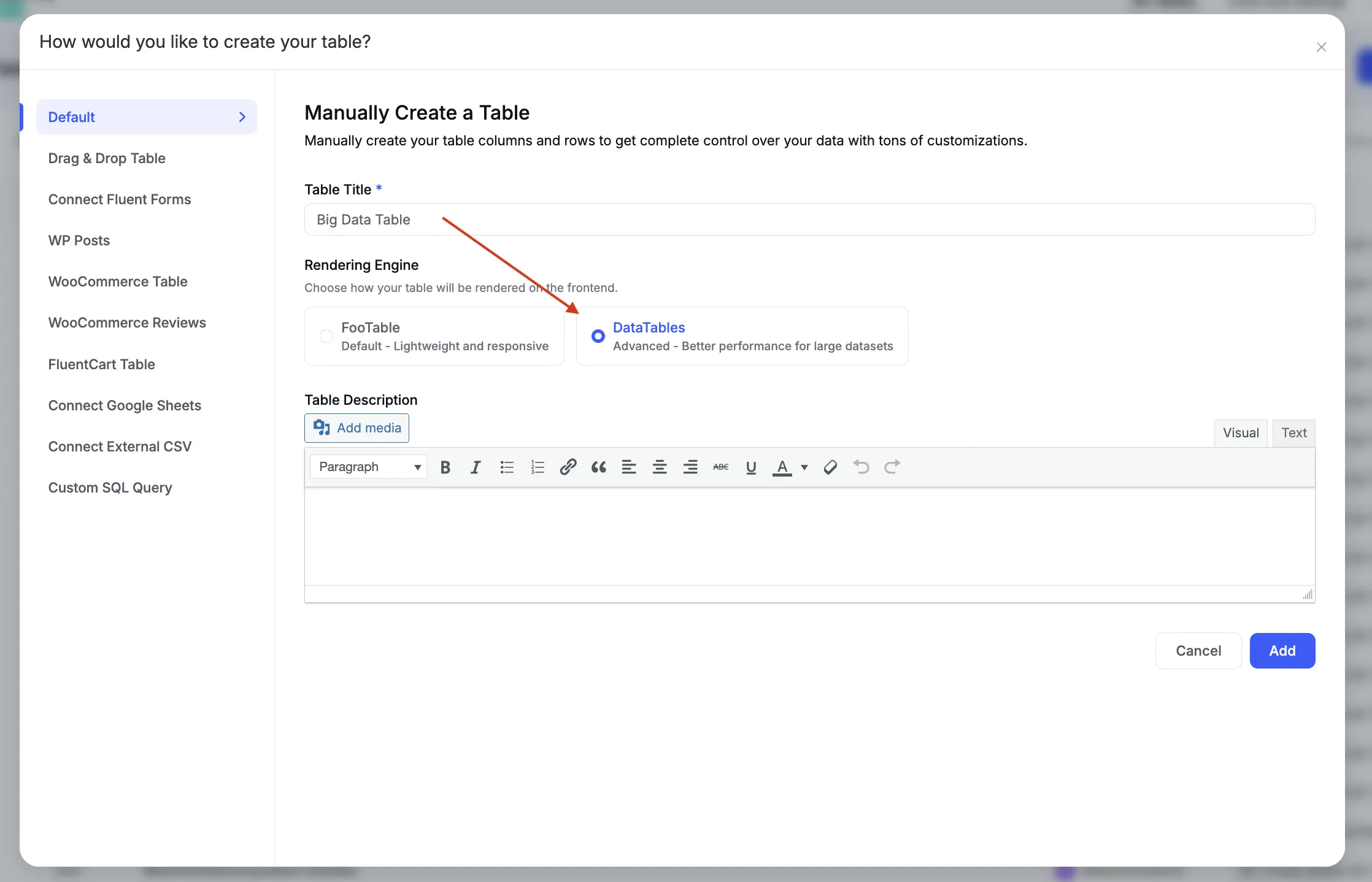
The DataTables engine is opt-in per table. Existing tables using the default engine are unaffected.
Now, what if you already have the data?
If you don’t want to manually input rows, there’s a much faster path introduced in this version. Say you have a CSV with 100,000+ rows — multiple columns, big dataset, ready to go. Head to Import, choose DataTables instead of FooTable, and hit Import. Your data lands in table format in seconds.
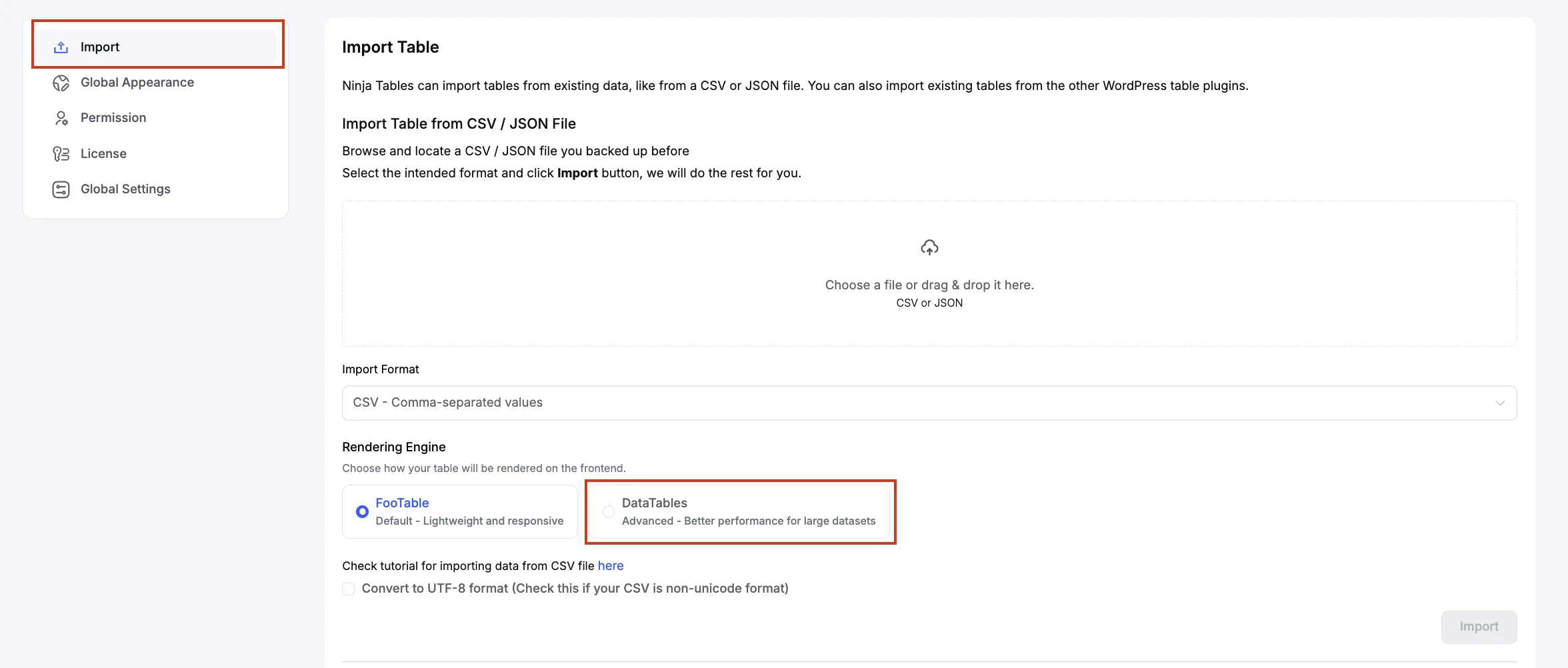
No need to touch the rendering settings afterward, either. If the file is within the range Ninja Tables’ default Legacy rendering can handle — and yes, Legacy handles massive files seamlessly, we’re not shy about it — you’re done right there.
And for a big data set?
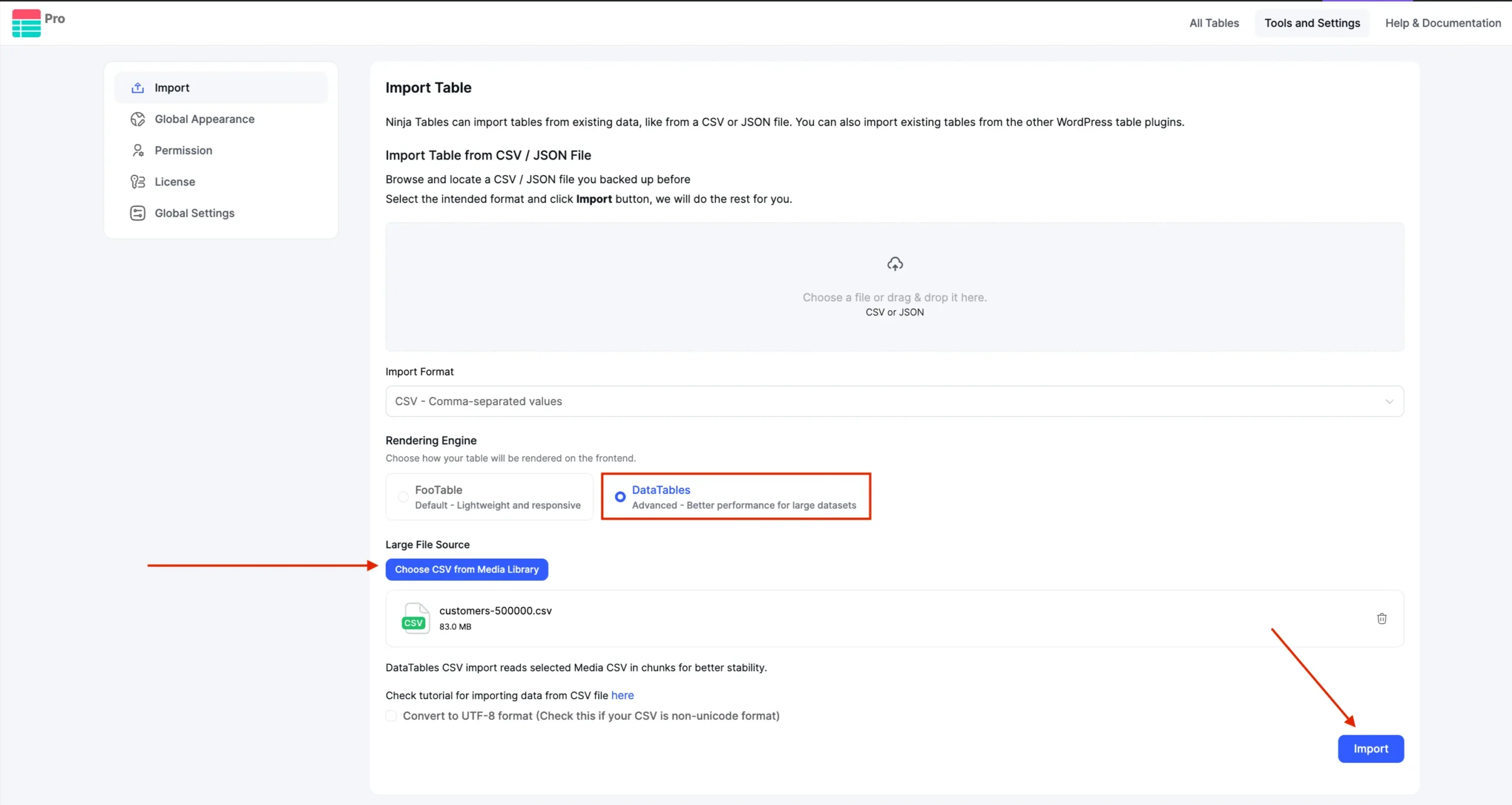
But if you’re dealing with a very large dataset, there’s a dedicated path for that too. Upload the CSV or dataset file to your WordPress Media Gallery first. When you select DataTables as the rendering engine on import, a Large File Source option appears — point it to the file in your media library, click Import, and the table is ready before your coffee gets cold.
Why this update matters: The problem with client-side rendering at scale
Most WordPress table plugins render everything client-side. They load the full dataset into a JavaScript array on page load, then use JavaScript to paginate, search, and sort. For small tables under a few hundred rows, this is perfectly fine. The moment data volume grows into the thousands or tens of thousands, things break down fast.
A page carrying 50,000 rows of data in a client-rendered table can take several seconds to load. Sorting triggers a full DOM re-render. Searching parses every row in memory. On mobile devices or slower connections, this can make the table functionally unusable.
Ninja Tables now integrates this engine directly into the plugin’s table configuration layer.
What this integration provides, specifically:
- No custom AJAX handler required. The server-side endpoint, request parsing, and response formatting are handled internally by Ninja Tables.
- No DataTables initialization script required. Configuration happens in the table settings UI; DataTables is initialized with the correct options automatically.
- Full compatibility with the Ninja Tables column model. Column types, renderers, styling, and filter configurations defined in the Ninja Tables UI map directly to DataTables column definitions.
- Gutenberg block support included. DataTables rendering works in the block editor, not only via shortcode.
For developers managing large datasets like product catalogs, member directories, research data, financial records, and inventory exports, this is the correct architecture. Client-side rendering was never the right tool for that scale.
What’s More in Ninja Tables 5.2.8
Switching to the alternative rendering engine unlocks the full set of features documented in this release: server-side AJAX pagination, advanced column filtering, responsive detail rows, sticky headers and columns, and the large dataset import system. All of this renders through DataTables proven infrastructure, now fully integrated into the Ninja Tables interface you already know.
Server-side AJAX pagination
With the DataTables engine active, all pagination is server-side. Each page request sends start and length parameters to the server; the server queries the database for only those rows and returns them. The browser handles one page at a time.
Page size is configurable through a length menu with custom options — set whichever page sizes make sense for your use case (10, 25, 50, 100, or any combination). The length menu and pagination controls can each be positioned independently: top, bottom, or both.
For large datasets, this is the only architecture that keeps load times flat regardless of total row count.
Import large dataset: Chunk-based processing
Standard WordPress import processes load the entire source file into PHP memory before any database write occurs. For large files, this hits PHP memory limits or max_execution_time and fails before completion.
Ninja Tables 5.2.8 replaces that model with a chunk-based import pipeline:
- The source CSV or JSON file is read in chunks rather than fully loaded into memory
- Each chunk is batch-inserted to the database as a separate operation
- Import progress is tracked; the process resumes from the last successful chunk if interrupted
This keeps peak memory usage bounded regardless of total file size. A 50,000-row CSV doesn’t require 50,000 rows in PHP memory at once — just one chunk’s worth at a time. This makes large imports reliant on shared hosting, where memory and execution time limits are real constraints, not just edge cases.
Once imported, data is served through the DataTables server-side AJAX engine. Import scale and render scale are matched by design.
Column sorting by type
Column sort under the DataTables engine executes server-side and supports three distinct sort types:
- Text — lexicographic sort
- Number — numeric sort, so values like 9, 10, 11 sort correctly instead of 10, 11, 9
- Date — chronological sort, independent of how the date is formatted for display
Beyond sort type, you can set a default sort column and default sort direction at the table level. The table loads in that sort of state, no user interaction required. Useful for price-ordered product tables, date-ordered feeds, or any table where a specific initial sort is expected.
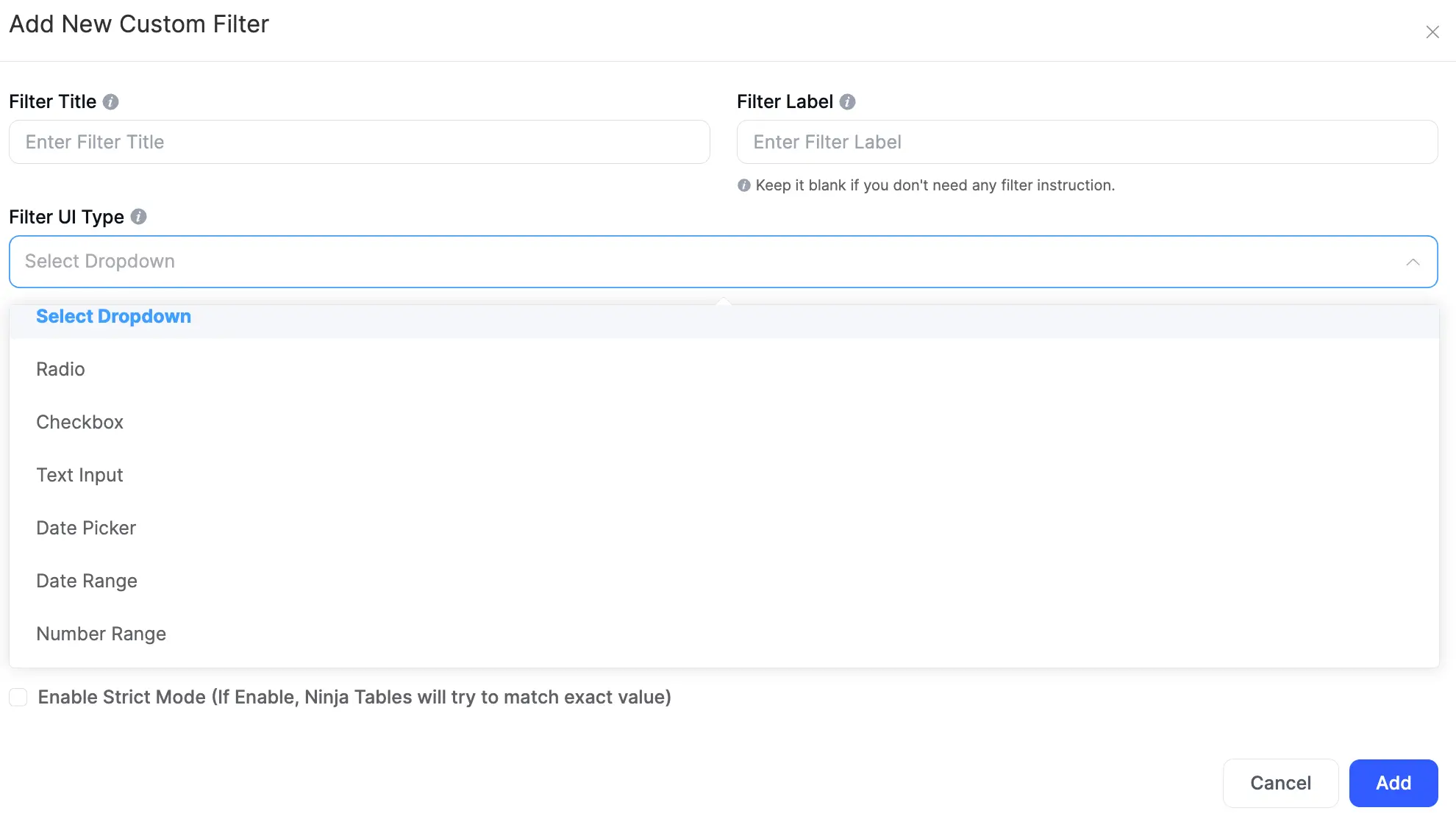
Per-column custom filters
Each column can carry its own independent filter control. Filter values are included in the AJAX request alongside pagination and global search parameters, all resolved server-side in a single combined query.
Filter Type | Input Behavior | Use Case |
Text input | Text match against that column | Name, description, ID fields |
Radio | Single-choice from defined options | Status, category with few values |
Checkbox | Multi-select from defined options | Tags, attributes |
Select (single) | Dropdown single selection | Category, type |
Select (multi) | Dropdown multi-selection | Attribute filter, region |
Number range | Min/max numeric inputs | Price range, quantity, score |
Date picker | Single date selection | Exact date match |
Date range | From/to date inputs | Date ranges, reporting windows |
Multiple column filters stack with each other and with global search — all conditions resolve in the same server query.
Global search
Global search passes input server-side as a parameter in the AJAX request, executed as a database query across indexed columns with placeholder text and position as configurable options.
Rows with expand modes and toggle position
When the viewport width drops below the configured breakpoint, columns that don’t fit are hidden from the row view and surfaced through an expandable detail row beneath the main row. Three expansion modes control the initial state:
- Default — detail rows closed; user expands individually
- Expand all — all detail rows open on table load
- Expand first — first row expanded on load; rest closed
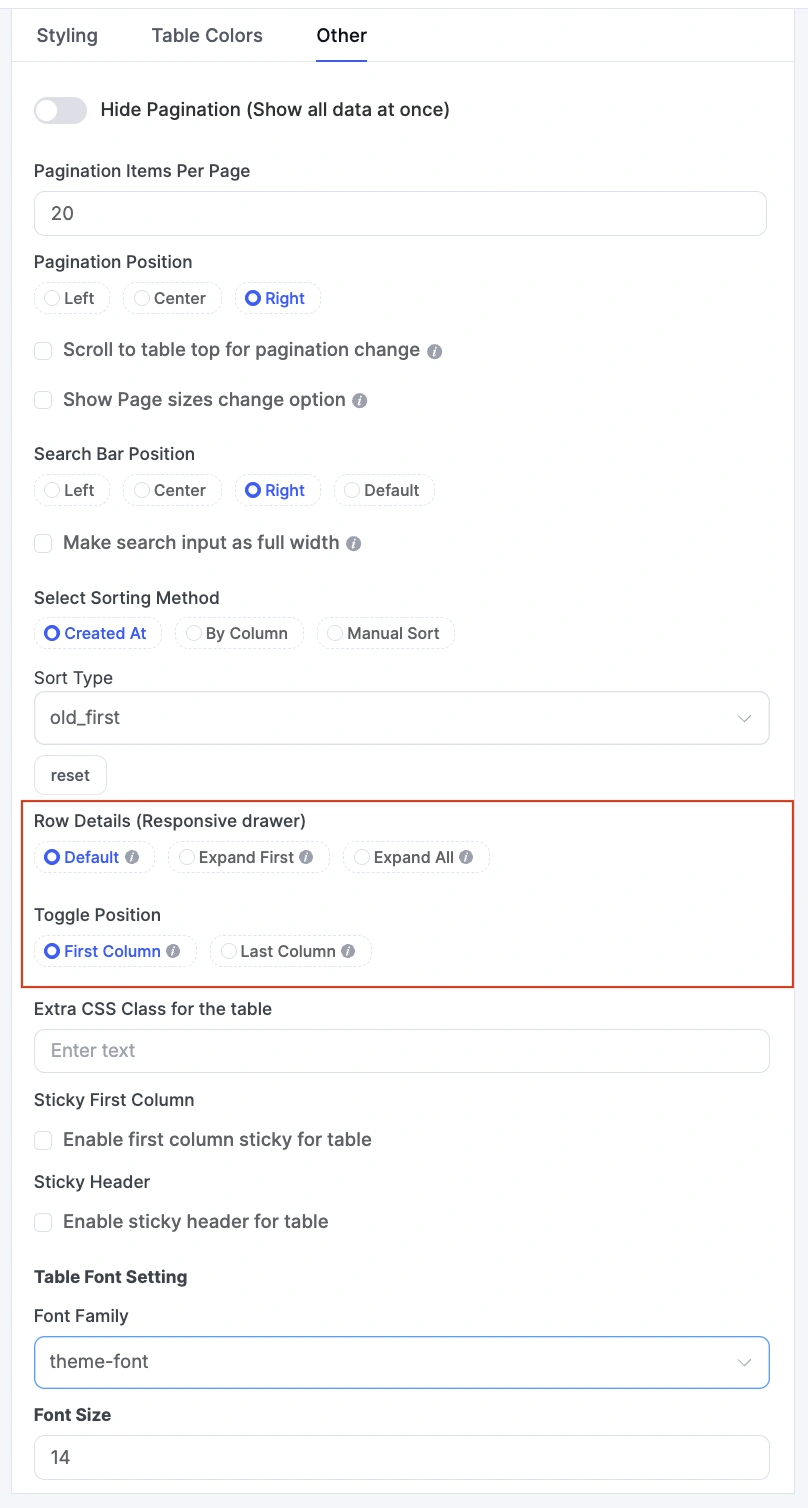
Toggle control position is configurable to the first or last column, depending on whether your primary column should sit unobstructed. Detail rows render from data already in the current AJAX response. No additional request fires on expand.
Stackable card layout for mobile with responsive breakpoints
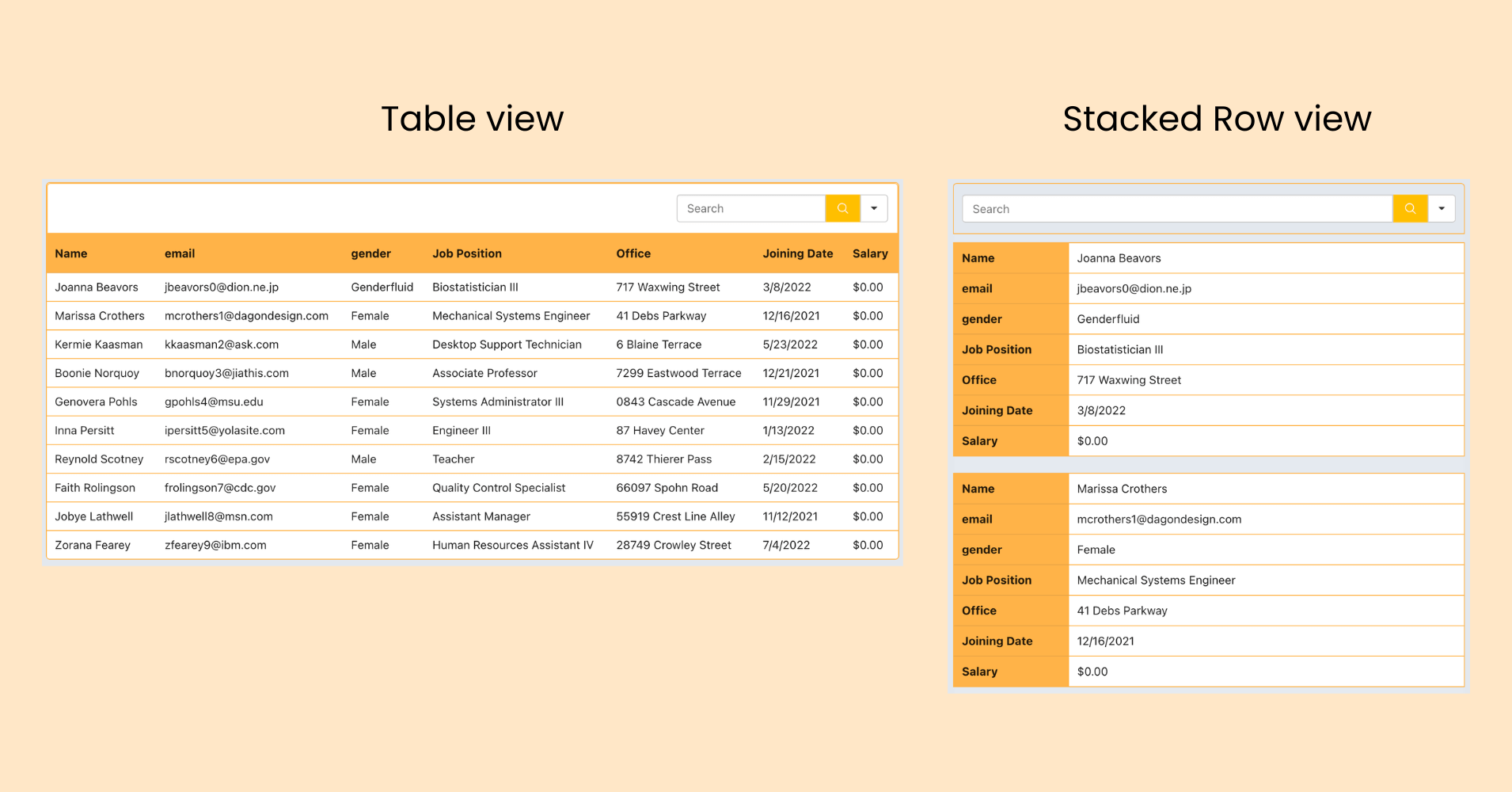
At mobile viewports, the stackable card layout converts each table row into a vertical card — each column becomes a label/value pair stacked top to bottom. This is a distinct mode from detail rows and applies when a row-based layout isn’t appropriate for smaller screens.
Breakpoint configuration follows standard device sizing: xs, sm, md, lg. You define at which breakpoint the card layout activates. Card layout and detail rows can be applied at different breakpoints for layered responsive behavior — table on desktop, detail rows on tablet, cards on mobile.
Color themes and full custom styling
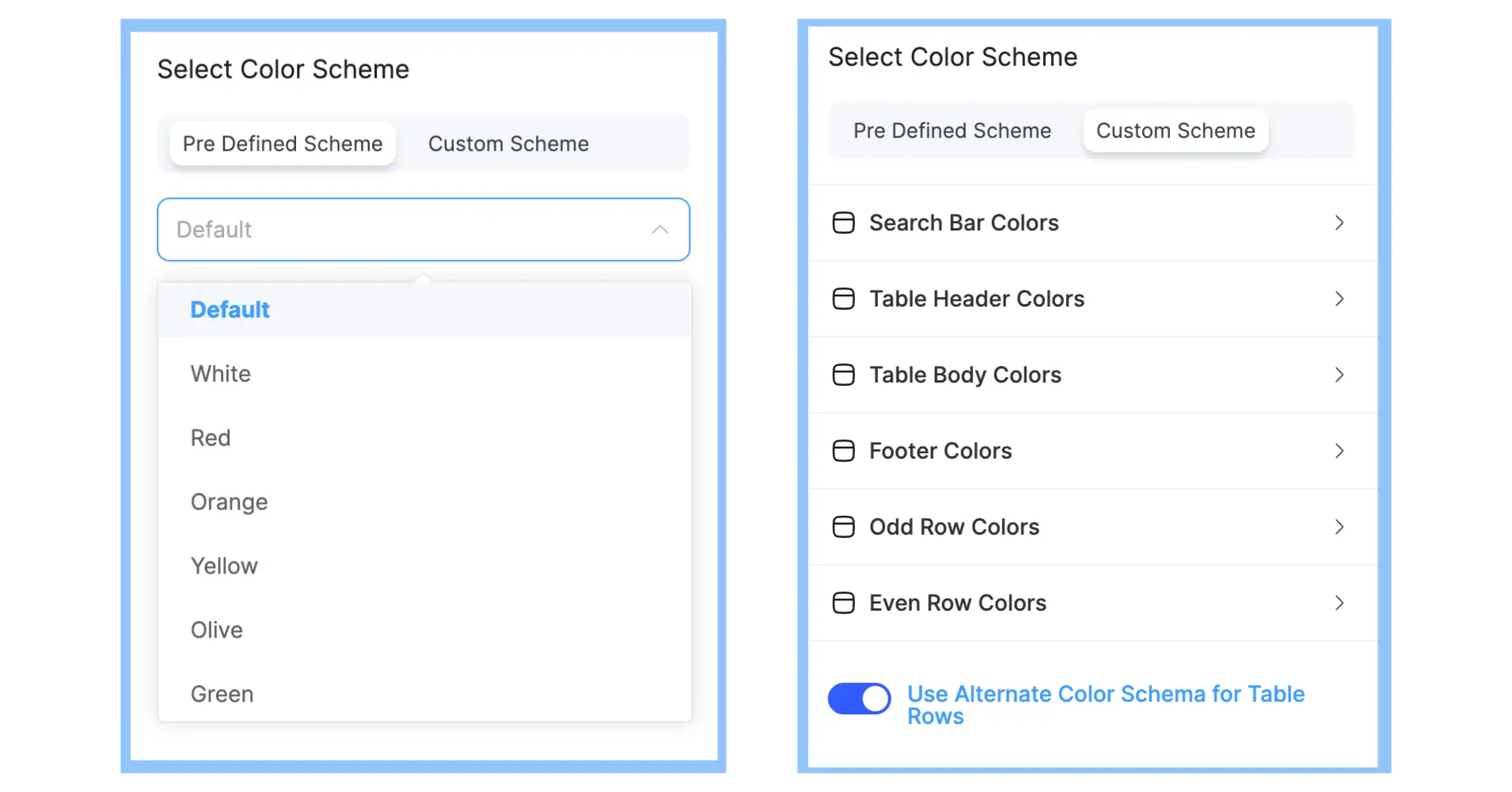
10+ predefined color themes are available for DataTables tables. Font family, font size, hide header row, and hide all borders are also configurable. Custom CSS class injection per table passes a class to the wrapper element for stylesheet-level targeting.
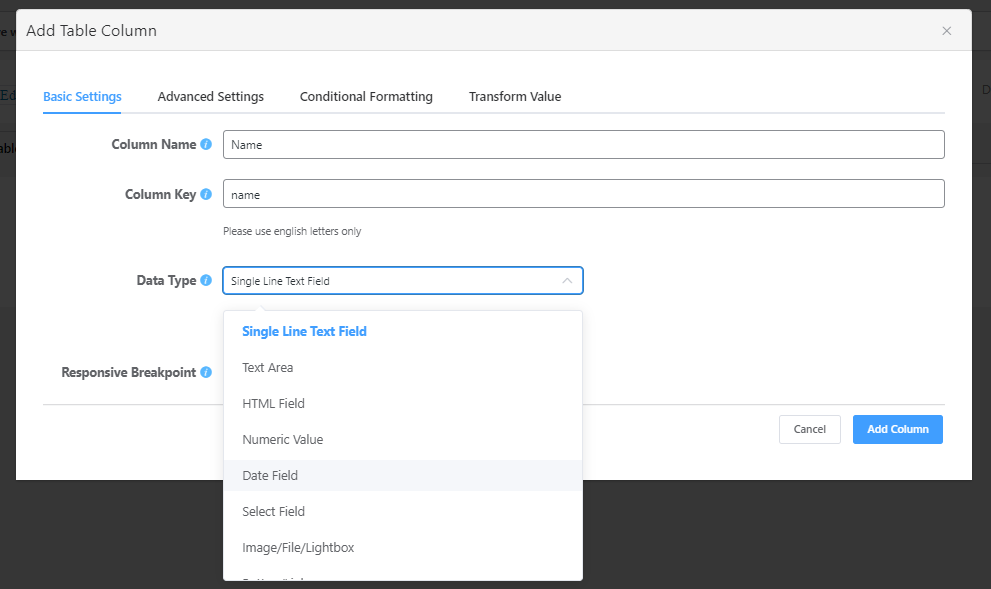
Renderers for all data types
Six renderers are available under the DataTables engine, each handling data display and behavior for its own data type in every column:
Column and per-cell conditional styling
Per-column styling applies independently per column: background color, text color, text alignment, content alignment, width, and visibility.
Per-cell conditional styling via row settings lets you define conditions against column values and apply specific colors to matching cells automatically — for example, a red background where a status column equals “Overdue”, or green text where a metric exceeds a threshold. Conditions evaluate against live row data on render.
Export, copy, sticky, and utility controls
- Copy-to-clipboard per column — enable copy on any column so users can copy cell values with a single click
- CSV export — exports the current filtered/sorted dataset; respects active filters
- Print export — sends the current table view to a print layout
- Row details modal on row click — opens a modal with all column values for the clicked row; useful for wide tables where not all columns are visible in the viewport
- Sticky header — header stays fixed on vertical scroll
- Sticky first column — first column stays fixed on horizontal scroll
- Show/hide table title and description — control whether header metadata renders on the frontend
DataTables in Gutenberg block
DataTables rendering was previously only available via shortcode. Ninja Tables 5.2.8 adds full DataTables engine support in the Gutenberg block. Tables using the DataTables provider can be inserted and configured through the block editor and render correctly on the frontend, no more back and forth carrying shortcodes.
Improvements & Bug Fixes
- Fixed: Shortcode rendering in HTML-type columns — shortcodes were being output as literal text instead of executing in certain configurations; now resolved across all rendering contexts
- Fixed: Responsive breakpoints — breakpoint evaluation was triggering layout changes at incorrect viewport widths; corrected so stackable card layout and detail rows activate at configured sizes
Who Benefits Most from This Update
This release targets a specific type of user who’s been underserved by standard WordPress table solutions: anyone working with genuinely large datasets.
If you’re managing a product catalog that’s grown beyond a few hundred or even thousands of items and your existing table solution has started lagging, the server-side AJAX pagination and large CSV import in Ninja Tables are built for your situation. If you’re displaying directory listings, financial data, inventory records, or research datasets that span thousands of rows, the DataTables engine gives you the rendering architecture to handle that load without degrading frontend performance.
The per-column filter types, especially number range and date range, make this practical for data-intensive applications where visitors need to slice and search large datasets in real time. Combined with conditional formatting and the cell renderer system, the result is a table that works as a genuine data interface, not just a static display.
For teams importing large external datasets, like CSV exports from CRMs, ERPs, Google Sheets, or analytics tools, the chunk-based import system makes the process reliable at scale without requiring server configuration changes.
For more on what you can build with Ninja Tables- including FluentCart product tables and Fluent Forms entry tables, the docs have you covered.
How to Update
Head to your WordPress dashboard → Plugins → Installed Plugins, find Ninja Tables, and click Update. Or download the latest version directly from the plugin repository.
After updating, the DataTables engine is available in any table’s configuration settings. Existing tables remain on the default engine until you switch. For large data use cases, choose DataTables rendering, configure your column filters and pagination settings, and enjoy the new chunk-based import to bring your dataset in.
Happy table building and share your thoughts with us!
Get in touch with Ninja Tables

Ninja Tables– Easiest Table Plugin in WordPress






Add your first comment to this post