
Ninja Tables 5.2.17: Google Sheets on DataTables & More!


Ninja Tables 5.2.17 is built around one request that outweighed the rest: bringing live Google Sheets and CSV sync to the DataTables engine. Until now, that sync option lived only on the Classic (FooTable) engine, which meant choosing between a live spreadsheet and server-side processing for large datasets.
This release closes that gap.
Alongside the sync work, the table editor becomes fully translatable, sticky columns get fixed on both engines, and there’s a round of fixes and security hardening across the board.
But most importantly, Google Sheets and CSV sync are now available on DataTables
What’s New in Ninja Tables 5.2.17?
This release is about live data. The DataTables engine learns to pull from a sheet or a CSV link and keep itself fresh, the admin speaks your language, and a handful of long-standing rough edges are smoothed out.
Google Sheets and CSV tables, now on DataTables
Until now, a Google Sheet or CSV link could only feed the Classic (FooTable) engine. With Ninja Tables Pro 5.2.17 (Pro), you can point a DataTables table at a published Google Sheet or any public CSV file, and it keeps itself in sync on a schedule you choose. Edit the sheet, and the table follows.
Setting it up takes three steps:
- In Google Sheets, go to File → Share → Publish to web and copy the CSV link (or grab any HTTPS link to a CSV file).
- In Ninja Tables, click Add Table, choose Google Sheets / CSV, and switch the rendering engine to DataTables.
- Paste the link, pick a sync interval, fetch the columns you want, and save. The first sync starts on its own.
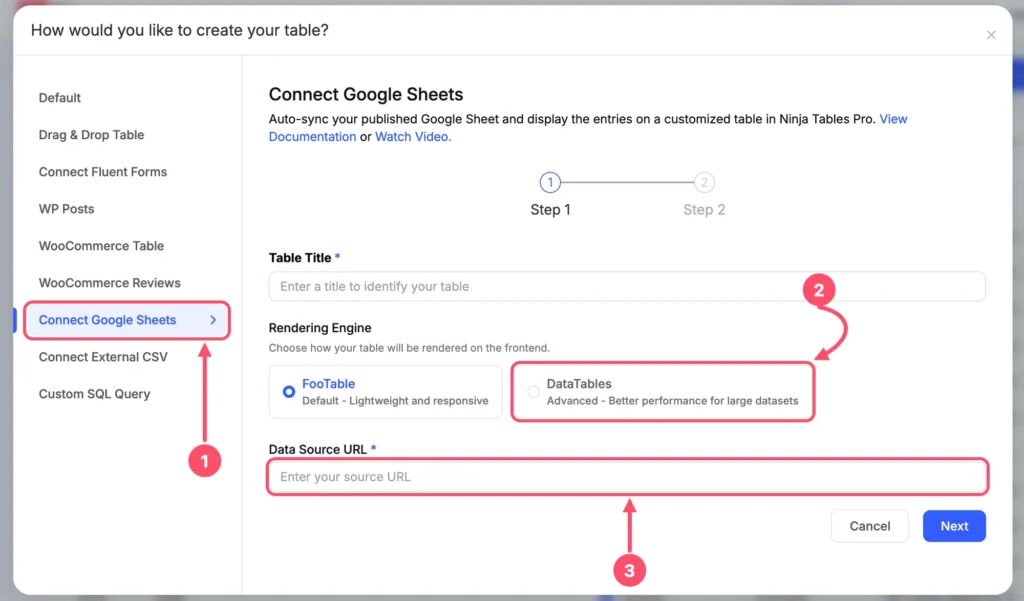
Sync intervals run from every 5 minutes to every 7 days, and you can change the interval any time from the table’s own settings panel.
Need the latest numbers right now? Hit Sync Now. Big sheets are imported in chunks with a progress bar, so a 50,000-row sheet won’t time out on you.
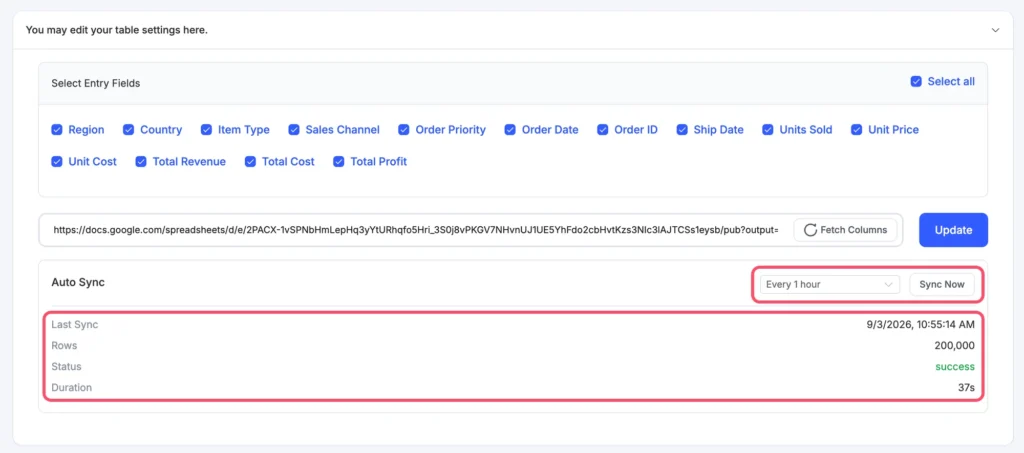
Changed the sheet’s structure? Open the table, click Fetch Columns, tick the ones you want, and update. Your existing classic engine Google Sheets tables are untouched; this is a new option, not a replacement.
FYI, the DataTables sync needs Ninja Tables Pro 5.2.17. On an older Pro, the DataTables option simply doesn’t appear for sheet and CSV sources, so nothing breaks while you update.
New features added
1. A table editor that speaks your language
The row editor, the actions column, row and cell color settings, and the column dialogs are now fully translatable, and the date picker follows your WordPress language instead of always showing English.
Spanish, French, Dutch, Swedish, Slovak, Basque, and Chinese ships with the plugin. On the front end, the search box, pagination, and “Row Details” labels are translatable too.
2. Sticky columns that actually stick
Sticky First Column (Pro) now pins your real first data column on both engines, even when the responsive toggle sits in front of it, and the pinned cells stay solid while the rest of the table scrolls underneath.
Sticky Header and Sticky First Column play nicely together; the corner cell stays on top, and turning Sticky Header off on a DataTables table now actually turns it off.
Fixes and improvements
1. DataTables fixes
- Custom filters work even when the visitor search box is turned off. Before, hiding the search box silently switched the filters off too.
- Print and CSV export (Pro) line up correctly on tables with responsive breakpoints. Values no longer shift one column to the right, and the last column is no longer dropped.
- The Design Studio loads clean, with no console errors from the settings switches, and older tables show the right on/off state for every toggle.
2. WooCommerce fixes
“Read more” means read more. In a WooCommerce table (Pro), a product that can’t be bought yet, such as one without a price, shows a real “Read more” link to its product page. Before, it looked like an add-to-cart button and pretended to add nothing to the cart.
3. Fluent Forms fixes
Ready for Fluent Forms 6.2. Fluent Forms tables now fetch submissions the modern way, so the deprecation notices that showed up with Fluent Forms 6.2 in debug logs are gone, and pagination totals are correct on every page.
4. Admin and front-end polish
- Classic-engine custom filters with checkboxes or radio buttons have proper spacing between the options again.
- Searchable dropdowns in the admin, like “Choose Form” for Fluent Forms, show their full border on all four sides.
- Button and link cells in the table editor grid render as readable link text instead of a colored button that could be invisible against the grid.
5. Security
Shortcodes only run where you wrote them. Cells filled from outside sources, such as Fluent Forms submissions, are now shown as plain text rather than executed as shortcodes, so a visitor can’t slip one in through a form.
Tables you author yourself keep running shortcodes exactly as before, and a cell that referenced itself can no longer take a page down. The cached table HTML is refreshed after the update so nothing old survives.
If you relied on shortcodes from another data source, a filter lets you opt that source back in. Thanks to WPScan for the responsible report.
Why This Update Matters
If your data lives in a spreadsheet, you no longer have to choose between the sheet and the modern table engine. Publish once, sync on a schedule, and give visitors a fast, searchable, responsive table that stays current. Add the translation work and the sticky-column fixes, and 5.2.17 makes big, living datasets a lot friendlier to build and to read.
How to Update
- Go to your WordPress dashboard.
- Open Plugins and find Ninja Tables (and Ninja Tables Pro).
- Click Update now. Update both plugins to get the Google Sheets sync.
New here? Grab the free version from WordPress.org.
Update Ninja Tables and Get Started!
Ninja Tables 5.2.17 is polished and ready. Update today, connect a sheet, and tell us what you’d like to see next in the comments. If anything feels off, our support team is one message away. The full list of changes is in the changelog.
Ninja Tables – Easiest Table Plugin in WordPress.

Ninja Tables– Easiest Table Plugin in WordPress



Add your first comment to this post