
Ninja Tables 5.2.18: Excel Import & Export, Smarter Design Preview & More!

Hello, welcome back to another Ninja Tables update!
This release takes care of something many of you have asked us for again and again. Your data lives in spreadsheets, and now it moves in and out of Ninja Tables without a CSV detour.
But most importantly: Excel import and export is here!
We’ve also given the Drag & Drop builder some new styling options, rebuilt the Table Design preview, made the Gutenberg block ready for the newest editor, and fixed a good number of bugs. Let’s dive in.
What’s New in Ninja Tables 5.2.18?
Import and export Excel files
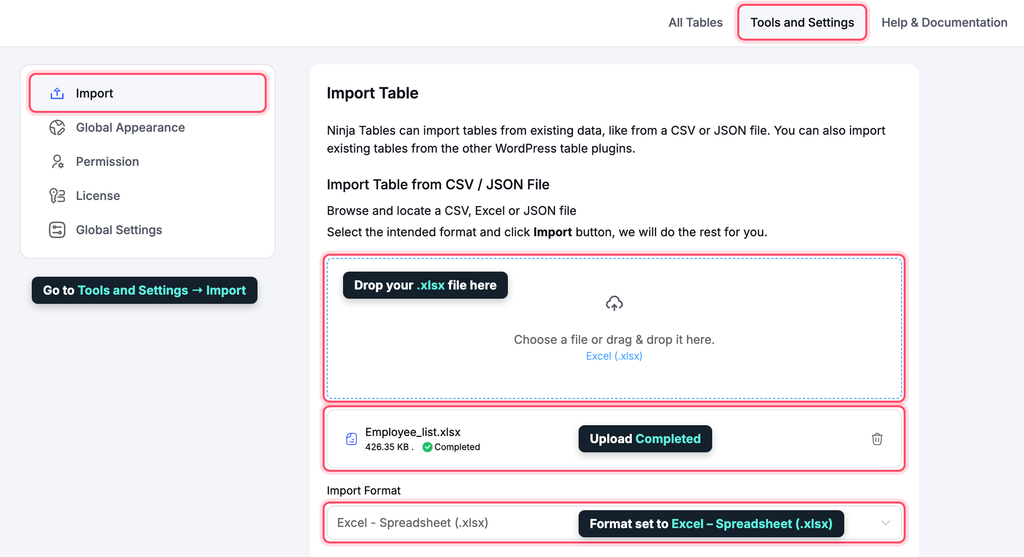
You can now bring an Excel (.xlsx) file straight into Ninja Tables. Go to Tools and Settings → Import, pick Excel – Spreadsheet (.xlsx), choose your file, and you’re done. No more “Save As CSV” first.
Big spreadsheets are fine too. Large files are imported in small batches in the background, so a sheet with thousands of rows won’t time out halfway. Ninja Tables reads the first worksheet of your file and uses its first non-empty row as the table header.
It works the other way too. Open any table, go to Tools → Export, and choose Excel (.xlsx). The file opens in Excel, Google Sheets and Numbers. It also keeps your data as it was:
- Numbers are exported as real numbers, so you can sum and sort them right away.
- Codes with leading zeros (like
00123) and long IDs stay as text, so Excel won’t change them. - The header row is bold and stays visible while you scroll.
- Values that look like formulas are saved as plain text. A cell like
=SUM(A1)is never run as a formula, so the exported file is safe to open.
Let your visitors download tables as Excel
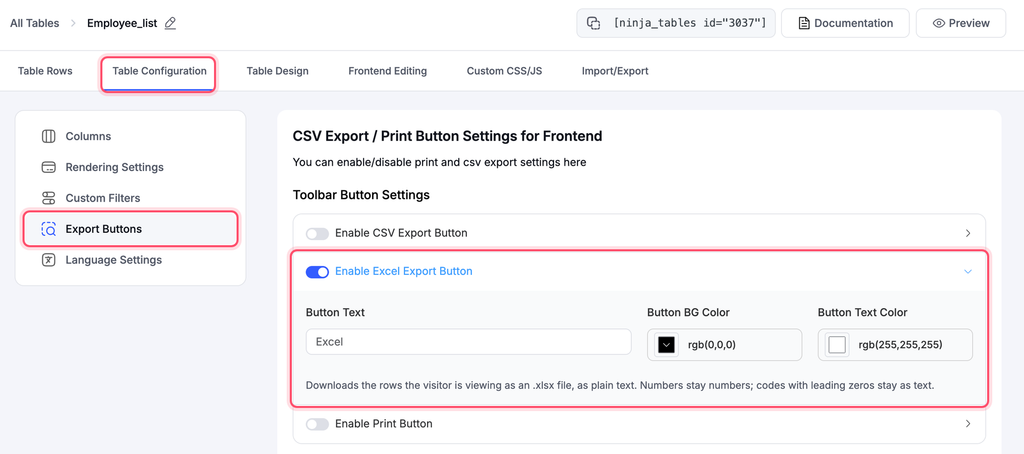
Your site visitors can now download tables as Excel files too (Pro). There is a new Excel button in the table toolbar, right next to the CSV and Print buttons. It works on both FooTable and DataTables tables.
Just like the CSV button, it downloads exactly what the visitor is looking at, after their search and filters. You can set the button’s label, background colour and text colour from Table Configuration → Buttons.
New features added
1. Strikethrough text in the Drag & Drop builder
Showing an old price next to a new one? Crossing out a feature a plan doesn’t include? Now you can. Strikethrough is a new font style in the Drag and Drop table builder. You’ll find it in the text, text-with-icon, list, stylish list, ribbon and button elements.
2. Opacity in the Drag and Drop builder’s colour pickers
The builder’s colour pickers now support opacity. Use soft, see-through backgrounds and highlights that fit nicely with your theme.
3. A Table Design preview you can trust
The Table Design preview now shows your table the way it really looks on the frontend. Change a setting and you’ll see the real result right away, before you save. What you see in the preview is what your visitors get.
4. Gutenberg block ready for the newest editor
Newer WordPress versions load the block editor inside an iframe. We’ve moved the Ninja Tables Gutenberg block to Block API v3, so your tables keep showing and working in the latest editor.
Fixes and improvements
DataTables
Duplicate tables keep their rows. Duplicating a DataTables table used to copy its settings but leave the rows behind. Now the copy comes with all its data. And if a duplicate ever fails halfway, the broken copy is removed, so you won’t find half-finished tables in your list.
Tables look right again. Some DataTables tables could show up without their styling. They now render with their proper design.
A cleaner, more accessible toolbar. The DataTables toolbar now lines up neatly, and we raised the colour contrast so text is easier to read for everyone.
Drag and Drop tables
Row colours and cell alignment stay put. Some themes’ table styles were overriding the row colours and cell alignment you set in the builder. Your design now wins.
Table styling
Turning off “Bordered table” removes the border colour. Before, the border colour could stick around after you switched borders off. Not anymore.
Hover highlights the whole row. On smaller screens, a row’s extra details open in a row below it. When you hover, both rows now highlight together, so it’s clear they belong to each other.
Security
Your tables are safer. We’ve tightened security and data handling across the plugin. Nothing changes for you; your tables just got sturdier. We recommend updating as soon as you can.
Why This Update Matters
Most table data starts in a spreadsheet. With Excel import and export, getting your data into Ninja Tables and back out takes a click, not a workaround. Add the new builder styles, a preview you can rely on, and a long list of fixes, and building tables gets quicker and more pleasant.
How to Update
- Go to your WordPress dashboard.
- Open Plugins and find Ninja Tables (and Ninja Tables Pro).
- Click Update now
New here? Grab the free version from WordPress.org.
Update Ninja Tables and Get Started!
Ninja Tables 5.2.18 is polished and ready. Update today, connect a sheet, and tell us what you’d like to see next in the comments. If anything feels off, our support team is one message away. The full list of changes is in the changelog.
Ninja Tables – Easiest Table Plugin in WordPress.

Ninja Tables– Easiest Table Plugin in WordPress



Add your first comment to this post