Mobile-First Table Design Principles for 2026

Mobile-First Table Design Principles for 2026

Over 70% of global web traffic now comes from mobile devices. That number keeps climbing. If your data tables are not built for small screens, you are already losing more than half your audience before they read a single row.

Mobile-first table design is not about making a desktop table “fit” on a phone. It means you design for the phone first, then scale up. This approach forces you to decide what data matters most. The result is a table that works everywhere, not just on a wide monitor.

This guide covers the core principles that make tables work on mobile in 2026, and shows exactly how Ninja Tables supports each one.

Why Mobile-First Design Matters in 2026

Mobile-first isn’t a trend anymore. It’s the baseline expectation.

Google’s mobile-first indexing means your mobile experience directly impacts search rankings. Users expect instant, readable content regardless of device.

A standard HTML table has no sense of screen size. On a desktop with a 1200px width, a ten-column table looks fine. On a phone with 390px, those same columns squeeze together, overflow the screen, or force the user to scroll sideways. Most WordPress table plugins ignore this reality. They either force horizontal scrolling (frustrating), shrink text to unreadable sizes (useless), or simply break the layout entirely (embarrassing). The fix is not to reduce your data. The fix is to change how the table presents that data, depending on the screen size it lands on.

We need to understand and implement core mobile-first design principles specifically engineered for data presentation.

Principle 1: Prioritize the most important columns first

Not all columns carry equal weight. On mobile, you cannot show ten columns and expect the layout to hold. You need to decide which two or three columns are non-negotiable for the user.

For example, a product table might show the product name and price on mobile, and hide weight, SKU, and dimensions unless the user expands the row. The user gets the key facts fast. They can dig deeper if they need to.

Ninja Tables handles this with responsive breakpoints. For each column, you set a breakpoint that tells the table when to hide that column. Set a column to hide on specific devices. The table stays clean. The primary data stays visible without any horizontal scrolling.
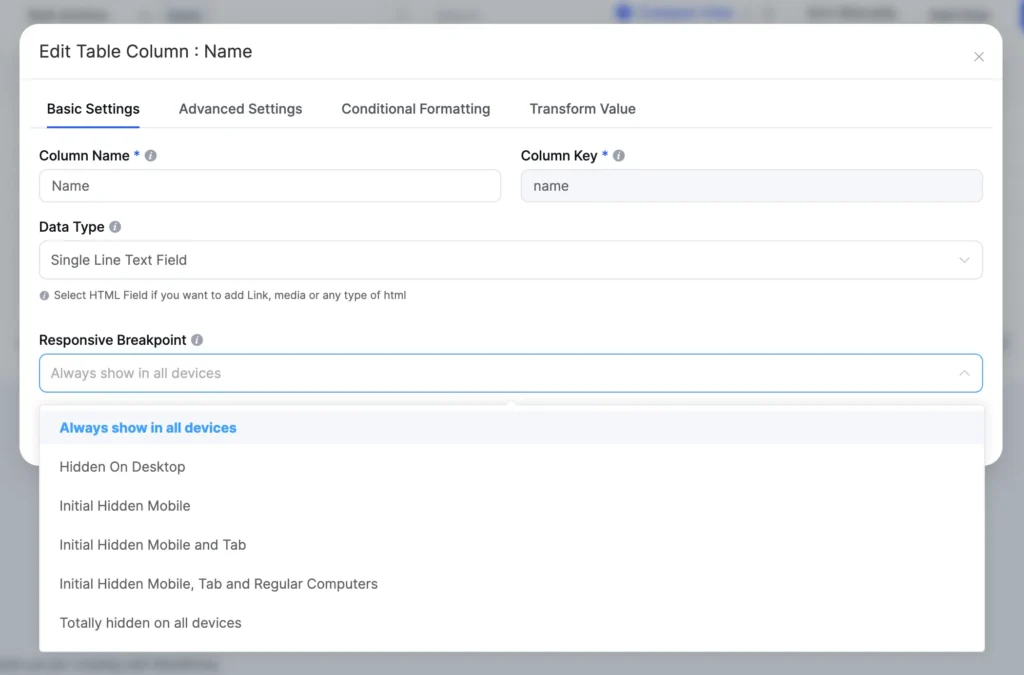
New Ui responsive breakpoints

You can combine multiple responsive breakpoints across different columns to create a layered view. The most critical columns always show. The secondary data hides until the screen is wide enough to display it properly.

NamePositionOfficeAgeStart dateSalary
Zorita SerranoSoftware EngineerSan Francisco562012/06/01$115,000
Zenaida FrankSoftware EngineerNew York632010/01/04$125,250
Yuri BerryChief Marketing Officer (CMO)New York402009/06/25$675,000
Vivian HarrellFinancial ControllerSan Francisco622009/02/14$452,500
Unity ButlerMarketing DesignerSan Francisco472009/12/09$85,675
Timothy MooneyOffice ManagerLondon372008/12/11$136,200
Tiger NixonSystem ArchitectEdinburgh612011/04/25$320,800
Thor WaltonDeveloperNew York612013/08/11$98,540
Tatyana FitzpatrickRegional DirectorLondon192010/03/17$385,750
Suki BurksDeveloperLondon532009/10/22$114,500
Sonya FrostSoftware EngineerEdinburgh232008/12/13$103,600
Shou ItouRegional MarketingTokyo202011/08/14$163,000
Shad DeckerRegional DirectorEdinburgh512008/11/13$183,000
Serge BaldwinData CoordinatorSingapore642012/04/09$138,575
Sakura YamamotoSupport EngineerTokyo372009/08/19$139,575
Rhona DavidsonIntegration SpecialistTokyo552010/10/14$327,900
Quinn FlynnSupport LeadEdinburgh222013/03/03$342,000
Prescott BartlettTechnical AuthorLondon272011/05/07$145,000
Paul ByrdChief Financial Officer (CFO)New York642010/06/09$725,000
Olivia LiangSupport EngineerSingapore642011/02/03$234,500
Michelle HouseIntegration SpecialistSidney372011/06/02$95,400
Michael SilvaMarketing DesignerLondon662012/11/27$198,500
Michael BruceJavascript DeveloperSingapore292011/06/27$183,000
Martena MccrayPost-Sales supportEdinburgh462011/03/09$324,050
Lael GreerSystems AdministratorLondon212009/02/27$103,500
Jonas AlexanderDeveloperSan Francisco302010/07/14$86,500
Jennifer ChangRegional DirectorSingapore282010/11/14$357,650
Jennifer AcostaJunior Javascript DeveloperEdinburgh432013/02/01$75,650
Jenette CaldwellDevelopment LeadNew York302011/09/03$345,000
Jena GainesOffice ManagerLondon302008/12/19$90,560

Principle 2: Collapsible rows or stack

When you cannot hide columns, you need a different strategy. Collapsed and stackable layouts solve this by reformatting the row itself.

A collapsed table keeps all the data but rolls each row into a card. The user sees the primary column by default. They tap to expand and see the rest of the row. This works well for tables with lots of columns and lots of rows, like a comparison table or a data-heavy product list.

Ninja Tables supports both collapsed and stackable layouts. The stackable layout goes a step further. It takes each row and turns it into its own mini-table. The columns become rows. Each piece of data gets its own labeled line. This is ideal when every column value is equally important and you cannot afford to hide any of them.

Plugin
Key Features
Rating
Active Installations
Pricing
Demo Image
  • Responsive
  • Google Sheets sync
  • Drag & Drop
  • Free templates
  • Import-export
  • Conditions
  • Search, sort, filter
  • Cost-efficient
  • All-in-one
80k+

BEST!

Freemium
Starts: $79/yr
Special Discount!
Demo Image
  • Import-export
  • Formulas
  • Responsive
  • Search/filter
  • Slightly expensive
7M
Freemium
Starts: $89/yr
Demo Image
  • Excel-Google Sheets
  • Import-export
  • Condition
  • Search/filter
70k+
Freemium
Starts: $59/yr

To turn on the stackable layout in Ninja Tables, go to Table Design and check the Stackable Table option. That’s it. The table restructures itself for small screens automatically.
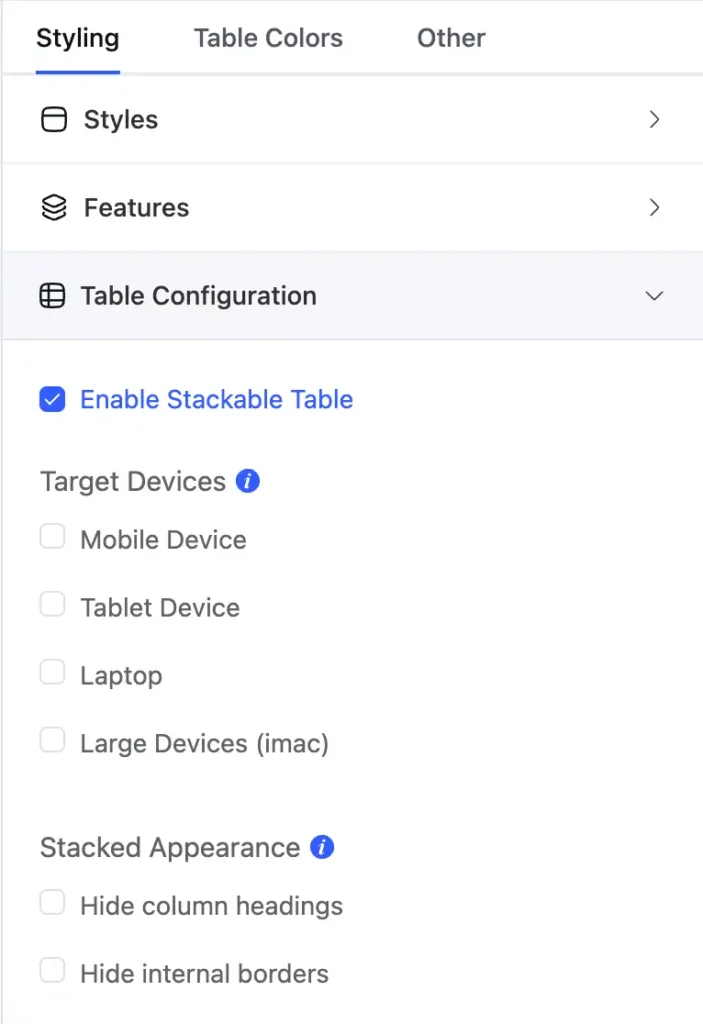
New table ui stackable table

One important note: you cannot use both Stackable Table and Responsive Breakpoints at the same time in Ninja Tables. You pick the method that fits your data. If some columns are less important, use breakpoints to hide them. If all columns matter equally, use stackable.

Click "+" to Expand and Compare

ModelImageCapacityCooking ModesDisplaySpecial FeaturesDimensionsWarrantyPriceDiscount
Compact Seriesmicrowave oven 1 comparison table20LBasic heating, defrostLED displayChild lock45cm x 35cm x 25cm1 year$12920%
Standard Seriesmicrowave oven 2 comparison table28LHeating, defrost, grillLED displayAuto cook menus52cm x 40cm x 30cm2 years$19930%
Premium Seriesmicrowave oven 3 comparison table32LHeating, defrost, grill, convection bakeTouch control with LCDSmart sensor cooking, voice assistant compatible55cm x 42cm x 32cm3 years$34940%

Principle 3: Support swipe navigation for wide tables

Some tables are genuinely wide. A financial table or a schedule grid might need eight to twelve columns, and hiding any of them would remove data the user needs. In these cases, you allow horizontal scrolling, but you make it deliberate and smooth.

This is the movable table approach. The table stays full-width. The user swipes left and right with a finger gesture to see the entire table. The header row stays fixed, so the user always knows which column they are reading.

Ninja Tables includes horizontal scrolling table support. When you set a table to this mode, the full horizontal layout becomes swipeable on touch devices. The user does not have to zoom or pinch. They just swipe, which is a natural gesture on any phone.

NoAppointmentPatient's NameGenderHistoryTreatment TypePhone NoE-mail AddressDate of birthAttendee
15/10/2025 10:0 AMRick NielsonMaleNew VisitRoutine Check+1 212 555 4567[email protected]3/16/1989No
25/11/2025 11:0 AMPamela TovFemaleRevisitCrowns+1 212 555 8756[email protected]7/22/1980Yes
35/17/2025 11:0 AMJim AndersonMaleNew VisitBone Grafting+1 212 666 2768[email protected]8/24/1996Yes
45/21/2025 2:0 PMStanley CooperMaleNew VisitScalling & Polishing+1 212 555 3111[email protected]12/2/2000No
55/14/2025 3:0 PMAllison SydneyFemaleNew VisitTMJ Treatment+1 212 777 3218[email protected]11/28/1997No
75/14/2025 12:0 AMHarvey SpencerMaleRevisitDental Emergencies+1 212 555 9034[email protected]2/17/2003Yes

This approach works best when the data has a natural left-to-right reading order. Think timelines, schedules, or side-by-side comparisons where each column represents a different time period or category.

Principle 4: Add search and filtering

A table with 50 rows on a desktop is manageable. On a phone screen, the user sees maybe four rows at a time. Scrolling through all 50 is slow and frustrating.

Search and filtering fix this. The user types a keyword or selects a filter, and the table shrinks to only the matching rows. They find what they need in three seconds instead of sixty.

Ninja Tables includes a built-in search bar and filter controls for all table types. You can make the table searchable with one checkbox in the settings. Users type directly into the search field and the table filters in real time. No page reload, no waiting.
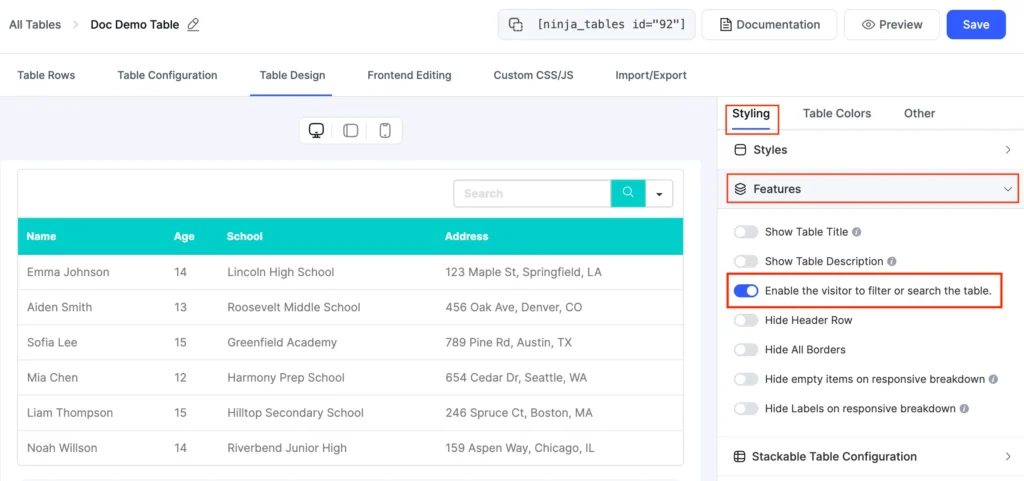
New Ui enable filter and search

For more structured filtering, you can add dropdown filters tied to specific columns. A user browsing a pricing table can filter by plan type, or a visitor reading a staff directory can filter by department. The table responds immediately.

TitleStatus
Jahan Liza18-Feb-26Mobile-First Table Design Principles for 2026publishTips
Nusrat Fariha17-Feb-26Why Most Product Comparison Pages Don't ConvertpublishTips
Nusrat Fariha10-Feb-26Product Tables for WordPress Stores: Turn Browsers Into BuyerspublishWordPress Plugins
Md Shahjahan28-Jan-26Ninja Tables 5.2.6: More Control, Better Printing & Stronger SecuritypublishNinja Tables
Nusrat Fariha30-Jan-2615+ Use Cases of WordPress Directory Plugins for Growing WebsitespublishWordPress Plugins
Nusrat Fariha26-Jan-26AuthLab Connect 2025: Where We Connect, Celebrate, and Look AheadpublishWordPress Plugins
Jahan Liza04-Feb-26Enhancing UX with Searchable & Sortable TablespublishTips
Jahan Liza21-Jan-26Why Most Pricing Tables Confuse Visitors (And how to fix it)publishTips
Md Shahjahan25-Dec-25Ninja Tables 2025 Year In ReviewpublishNinja Tables
Nusrat Fariha15-Dec-25Personalized Marketing in Modern TimespublishWordPress Plugins
Jahan Liza05-Dec-25Sticky Headers vs Fixed Columns in Product Table: What's Better on Mobile?publishTips
Nusrat Fariha17-Nov-25Ninja Tables Fluent Integrations: What Your Site NeedspublishNinja Tables, WordPress Plugins
Nusrat Fariha13-Nov-25How to Integrate FluentCart with Ninja TablespublishNinja Tables, WordPress Plugins
Jahan Liza13-Nov-2515+ High Converting Pricing Table Design Examples for Any WebsitepublishTips
Nusrat Fariha05-Nov-25Sales Data Visualization with Tables and ChartspublishWordPress Plugins
Jahan Liza31-Oct-25Showcasing Profile: Creating a Professional Portfolio Table in WordPresspublishWordPress Plugins
Jahan Liza23-Oct-25Automate Patient Data: Fluent Forms to Ninja TablespublishNinja Tables
Nusrat Fariha14-Oct-25Meet FluentCart: Modern Solution for Modern eCommercepublishReview
Nusrat Fariha09-Oct-25Get Ready for Halloween Sales with Ninja Tables!publishNinja Tables, WooCommerce
Editorial Panel15-Oct-257 Tips to Reduce Cart Abandonment in eCommerce RetailpublishTips
Nusrat Fariha03-Oct-25Ratings and Review Tables in WordPress for SEO, UX, and TrustpublishNinja Tables
Jahan Liza07-Oct-25Ninja Tables Smart Features Save You More Time Than You ThinkpublishNinja Tables
Nusrat Fariha29-Sep-25eCommerce Customer Journey: A Complete GuidepublishTips
Jahan Liza28-Sep-25Data Tables, Display Tables, and Decision Tables: Know the DifferencepublishTips
Nusrat Fariha21-Sep-25Add a Dynamic Discount Table to Your StorepublishNinja Tables
Jahan Liza18-Sep-25Why Comparison Tables Boost Conversions During Holiday SeasonpublishTips
Md Shahjahan11-Nov-25Ninja Tables 5.2.4: FluentCart Integration & More!publishNinja Tables
Nusrat Fariha10-Sep-25Prepare for the Upcoming Holiday Sales Season (Halloween, BFCM, Christmas)publishTips
Jahan Liza08-Sep-25Infinite Scroll vs Pagination: How to Balance UX and SEOpublishTips
Editorial Panel15-Sep-25How to Build Real-Time Calculator in Elementor FormpublishTips
Jahan Liza27-Aug-25Use a Real Estate Listing Table to Get Better CommissionpublishTips
Editorial Panel22-Aug-25Visuals, Charts, and Tables for Your SEO ReportpublishNinja Tables
Nusrat Fariha26-Aug-25Quickly Create Tables in WordPress (No Coding!)publishNinja Tables
Nusrat Fariha14-Aug-25Master WooCommerce UX for Better Sales and RevenuepublishWooCommerce
Jahan Liza12-Aug-25How to Use AI in WordPress: A Complete GuidepublishTips
Nusrat Fariha07-Aug-25Ninja Charts 3.3.2: Fixes and ImprovementspublishCharts and Graphs
Jahan Liza24-Jul-25Freelance Project Management Tools: Can Tables Do It All?publishTips
Nusrat Fariha16-Jul-25Tables for Affiliate Marketing: Earn More as an AffiliatepublishNinja Tables
Md Shahjahan01-Aug-25Ninja Tables 5.2.3: Exciting New Features and ImprovementspublishNinja Tables
Jahan Liza11-Jul-25Actionable Data Table Design Tips for Better ConversionspublishTips
Jahan Liza06-Jul-25Design the Best Insurance Comparison TablepublishTips
Nusrat Fariha08-Jul-25Overcome WooCommerce Product Table Challenges Once and for All!publishWooCommerce
Editorial Panel01-Jul-25How to Customize WooCommerce Checkout Page: Step-by-Step GuidepublishWooCommerce
Nusrat Fariha24-Jun-25WP Posts Table Use Cases: Organize and Display WordPress ContentpublishNinja Tables, WordPress Plugins
Jahan Liza25-Jun-25Year-Round Seasonal Marketing CampaignspublishTips
Md Shahjahan18-Jun-25Ninja Tables 5.1.1: Data Table Updates and Drag & Drop ImprovementspublishNinja Tables
Nusrat Fariha16-Jun-25Sneak Peek into FluentCart: Your eCommerce, Your TermspublishReview, WordPress Plugins
Jahan Liza16-Jun-25How to Present Marketing Report Data Using TablespublishTips
Md Shahjahan02-Jun-25Ninja Tables 5.1.0 : Fresh New Plugin UIpublishNinja Tables
Nusrat Fariha28-May-25Your Favourite Table Plugin is Getting Revamped!publishNinja Tables
Jahan Liza29-May-25Data Management Challenges and SolutionspublishTips
Jahan Liza12-Jun-25How to Track Student Progress​ in WordPresspublishNinja Tables
Nusrat Fariha07-Jun-25Create WordPress Tables in 2 Minutes: Quick Guide for Beginners (2026)publishNinja Tables
Nusrat Fariha23-May-25Bundle Marketing: Product Bundling Ideas for BusinessespublishTips
Jahan Liza26-May-25Creating Healthcare Data Table in WordPresspublishWordPress Plugins
Nusrat Fariha01-Jun-25Schedule Table in WordPress: Manage Events and Appointments EasilypublishWordPress Plugins
Nusrat Fariha26-May-25B2B eCommerce Sales: Proven Tips for 2025 and BeyondpublishTips
Jahan Liza21-May-25Beginners Guide to WordPress Employee Directory TablepublishWordPress Plugins
Nusrat Fariha19-May-25FluentAffiliate Teaser: Because Your Affiliate Marketing Deserves Better!publishWordPress Plugins
Nusrat Fariha15-May-25Why Ninja Tables is the Best Table Plugin in WordPresspublishNinja Tables
Nusrat Fariha03-Sep-25Meet FluentAffiliate: Best WordPress Affiliate Management SolutionpublishReview
Jahan Liza13-May-25Google Sheets Integration in WordPress- Real Examples & Use CasespublishTips
Nusrat Fariha08-May-25Upgrade Your Sports Website: Add Live Score & Points TablepublishNinja Tables, Tips
Jahan Liza06-May-25Best WordPress Table Plugins for 2026publishWordPress Plugins
Nusrat Fariha28-Apr-25Grow Your Business with WordPress Tables (2026)publishNinja Tables
Jahan Liza21-Apr-25Data Visualization Use Cases and ExamplespublishNinja Tables
Jahan Liza06-Apr-25Marketing Strategy 2025: Shaped by Consumer TrendspublishWordPress Plugins
Nusrat Fariha21-Mar-25Dynamic Data Visualization Ins and OutspublishNinja Tables, WordPress Plugins
Editorial Panel12-Mar-25The Secret to eCommerce Success: Using WordPress Tables to Drive ConversionspublishWordPress Plugins
Editorial Panel24-Feb-25Location-Based Recommendations: Guiding Customers to ProductspublishTips
Jahan Liza10-Mar-25Consumer Trends 2025: What Marketers Must Know to Stay AheadpublishTips
Jahan Liza10-Feb-25Valentine’s Day Marketing Ideas with Smart Product TablespublishTips
Jahan Liza23-Jan-25Ratings and Reviews in Data TablespublishWordPress Plugins
Jahan Liza14-Jan-25Underrated Features of Ninja Tables You Should UsepublishNinja Tables
Md Shahjahan24-Dec-24A Year in Review: Ninja Tables Biggest Milestones in 2024publishNinja Tables
Mohiuddin Omran10-Dec-24What is the Digital Marketing Strategy that Tracks Users Across the Web?publishTips
Nusrat Fariha04-Dec-2411 Types of Product Tables Your Website NeedspublishWordPress Plugins
Jahan Liza03-Dec-24How to Create Product Specification Table in WordPresspublishTips
Jahan Liza25-Nov-24Interactive Data Visualization in WordPress: Tables and ChartspublishTips
Mohiuddin Omran11-Nov-24WordPress Community Plugin: Build Engaging Online Spaces EffortlesslypublishWordPress Plugins
Jahan Liza12-Nov-24Black Friday Stats, Trends and Strategies for Small BusinessespublishTips
Nusrat Fariha18-Nov-24Meet FluentCommunity: WordPress Community Plugin at Its BestpublishReview
Jahan Liza25-Oct-248 WooCommerce Store Design ExamplespublishWooCommerce
Jahan Liza24-Sep-24Top Fall Marketing Ideas to Drive Sales in 2025publishTips
Jahan Liza12-Sep-24Design The Perfect Feature Comparison Table in WordPresspublishTips
Nusrat Fariha22-Sep-24How Ninja Tables Helps Your Halloween SalespublishNinja Tables
Jahan Liza22-Aug-24Integrate WooCommerce, Google Sheets, & More with Ninja TablespublishNinja Tables
Mohiuddin Omran13-Aug-24The All-Time Olympic Medal Table with Free TemplatespublishWordPress Plugins
Jahan Liza02-Aug-24Simplify Your Decisions with Pros and Cons TablespublishTips
Mohiuddin Omran18-Jul-24What Makes a Good Website: Power List of Top WordPress PluginspublishWordPress Plugins
Nusrat Fariha01-Aug-24Upload a Table Background Image to Your WordPress TablepublishNinja Tables
Mohiuddin Omran09-Jul-24FluentBoards Review: Features, Pros, Cons, and More!publishReview
Jahan Liza08-Jul-24Creating Tables in WordPress: Everything You Should KnowpublishTips
Jahan Liza05-Jun-24Recovering Lost Sales: 10 Shopping Cart Abandonment SolutionspublishTips
Nusrat Fariha09-Jun-24Announcing Free WordPress Table Templates Page!publishWordPress Plugins
Nusrat Fariha10-May-24How to Create a Product Review Table?publishWordPress Plugins
Jahan Liza30-Apr-247+ Woocommerce Statistics and Trends Shaping Revenue in 2025publishTips, WooCommerce
Nusrat Fariha25-Apr-24Transform Value: Turn Text into HyperlinkpublishNinja Tables
Mohiuddin Omran17-Apr-24Misleading Statistics: Learn, Spot, Avoid, and Get Rid of them publishTips
Jahan Liza03-Apr-24A Guide to Comparison Tables for Products, Services, and FeaturespublishTips
Nusrat Fariha19-Mar-24Ninja Tables Features That Simplify Your LifepublishNinja Tables
Jahan Liza06-Mar-247 Techniques to Speed up WooCommerce CheckoutpublishTips, WooCommerce
Editorial Panel01-Mar-246 Best WordPress Pricing Table Plugins in 2026publishWordPress Plugins
Jahan Liza27-Feb-24Ninja Tables Turns 6!publishNinja Tables, Review
Jahan Liza28-Feb-24Color Palettes for Data VisualizationpublishTips
Nusrat Fariha09-Feb-24Best Chart Plugins in WordPress: Improve UX with Interactive ChartspublishCharts and Graphs, WordPress Plugins
Mohiuddin Omran26-Jan-24How to Make a Graph in Google SheetspublishTips
Jahan Liza15-Jan-24Export-Import Tables in WordPresspublishNinja Tables, Tips
Mohiuddin Omran10-Jan-24Best jQuery Table Plugins in 2025publishTips, WordPress Plugins
Jahan Liza28-Dec-23Mapping Tomorrow: Emerging Data Trends for 2026publishTips
Mohiuddin Omran22-Dec-23FluentSnippets Review: Facts, Features, and AlternativespublishReview, WordPress Plugins
Nusrat Fariha09-Jan-24Links in Data Tables: Dynamic Data VisualizationpublishNinja Tables
Mohiuddin Omran04-Dec-23Amazon Affiliate Program: A to Z for Amazon AssociatespublishTips
Nusrat Fariha20-Dec-23Ninja Tables in 2023: Year In ReviewpublishNinja Tables, Review
Jahan Liza23-Nov-23Conditional Formatting in WordPress TablespublishTips, WordPress Plugins
Jahan Liza07-Nov-23Guiding Data Table Examples for Great Website VisualizationpublishTips
Tanzil Ebad Chowdhury27-Oct-239 WordPress Data Visualization Plugins You Can't Overlook!publishWordPress Plugins
Jahan Liza20-Oct-23Introducing FluentBooking: WordPress Scheduling PluginpublishReview, WordPress Plugins
Jahan Liza18-Oct-23Get in The Spirit of Holiday Sales with 13 Halloween Marketing IdeaspublishTips
Mohiuddin Omran12-Oct-23Mastering the Bootstrap Table: Creating Clean, Responsive, and User-Friendly LayoutspublishTips, WordPress Plugins
Mohiuddin Omran27-Sep-23A Comprehensive Guide on How to Center a Table with CSSpublishTips
Jahan Liza07-Sep-23How to Generate Leads, Increase User Engagement, and Drive TrafficpublishTips
Nusrat Fariha24-Aug-23FOMO Marketing Ideas: Create Urgency and Drive ConversionspublishTips
Tanzil Ebad Chowdhury23-Aug-237+ Dynamic Data Types: Toolkit for Configuring Table ColumnspublishTips, WordPress Plugins
Jahan Liza21-Aug-23How to Create Stackable Tables with Ninja TablespublishNinja Tables, WordPress Plugins
Jahan Liza31-Jul-23How to Add Media to a Data TablepublishNinja Tables, WordPress Plugins
Tanzil Ebad Chowdhury27-Jul-232 Easy Ways to Merge Cells in WordPress Tables (+Pro Tips)publishNinja Tables, Tips
Nusrat Fariha20-Jul-23Simplifying Data Presentations & Common MistakespublishNinja Tables, Tips
Mohiuddin Omran18-Jul-23How to Make a Table in Google Sheets: In-depth TutorialpublishTips
Tanzil Ebad Chowdhury12-Jul-237 Types of Comparison Charts for Effective Data VisualizationpublishTips
Jahan Liza14-Jul-23Closer Look at Charts vs Tables: The Right Data VisualizationpublishComparison, Ninja Tables
Mohiuddin Omran03-Jul-23Writing Google Reviews and Displaying Reviews in WordPress TablespublishReview, Tips
Nusrat Fariha22-Jun-2311 Effective Summer Marketing Tips to Boost Your SalespublishTips
Jahan Liza19-Jun-23How To Design a Table the Right Way: Mastering Data Table DesignpublishNinja Tables, Tips
Tanzil Ebad Chowdhury15-Jun-23Responsive Table Modes in Ninja Tables | No CodingpublishNinja Tables
Md Shahjahan08-Jun-23Introducing Ninja Tables 5.0.0: Smoother, Lighter, and More PowerfulpublishNinja Tables
Nusrat Fariha02-Jun-23How To Customize Default WooCommerce ButtonpublishNinja Tables, WooCommerce
Jahan Liza07-Jun-23Limitations of WooCommerce and Best SolutionspublishNinja Tables, WooCommerce
Tanzil Ebad Chowdhury25-May-23TablePress vs Ninja Tables: Which Is Better?publishComparison
Jahan Liza22-May-23What Makes a Good Website: Checklist for Business OwnerspublishTips
Mohiuddin Omran11-May-23TablePress Review: Is It Worth Upgrading to Pro Or Not?publishComparison, WordPress Plugins
Tanzil Ebad Chowdhury08-May-23Good Data Visualization: Master the Art of Visual StorytellingpublishTips
Nusrat Fariha29-Apr-23Color Customizing WordPress TablespublishNinja Tables, WordPress Plugins
Mohiuddin Omran17-Apr-23WooCommerce Inventory Management: Why, How, WhatpublishTips, WooCommerce
Nusrat Fariha10-Apr-23Table Data Visualization: Efficiency and GuidelinespublishWordPress Plugins
Mohiuddin Omran30-Mar-23WordPress WooCommerce Tutorial: Step-by-Step GuidepublishWooCommerce
Mohiuddin Omran30-Mar-23History, Pros, Cons, and Brief Overview of WooCommercepublishWooCommerce
Nusrat Fariha23-Mar-23Optimize WooCommerce for Higher Conversion RatespublishWooCommerce
Mohiuddin Omran08-Mar-23Data Visualization Basics, Skills & TechniquespublishTips
Nusrat Fariha07-Mar-23Reviews of Ninja Tables Google Sheets IntegrationpublishWordPress Plugins
Mohiuddin Omran23-Feb-23Making a Product Comparison Table in WordPresspublishNinja Tables, WordPress Plugins
Mohiuddin Omran17-Feb-23Ninja Tables Is Turning 5!publishNinja Tables, Review
Nusrat Fariha10-Feb-23Easily Add Restaurant Reservation System to WordPresspublishTips, WordPress Plugins
Mohiuddin Omran07-Feb-23Valentine’s Day Marketing Ideas, Strategies & ExamplespublishNinja Tables, Tips
Nusrat Fariha06-Feb-23Create Charts in WordPress With a Free Charts PluginpublishNinja Tables
Nusrat Fariha02-Feb-23How To Create WP Posts TablepublishNinja Tables
Mohiuddin Omran27-Jan-23Valentine’s Ideas for Your Business to Celebrate LovepublishTips
Nusrat Fariha24-Jan-23Ninja Tables Free vs PropublishNinja Tables, WordPress Plugins
Mohiuddin Omran10-Jan-23Ways to Create a Responsive Table in WordPresspublishNinja Tables
Nusrat Fariha11-Jan-23Best WooCommerce Product Table PluginspublishWooCommerce, WordPress Plugins
Nusrat Fariha03-Jan-23How To Integrate WooCommerce With Ninja TablespublishNinja Tables, WooCommerce
Mohiuddin Omran14-Dec-22Ninja Tables 2022 Year in Review: What's New, What's next?publishNinja Tables, Review
Nusrat Fariha09-Dec-22Designing Data Tables for ChristmaspublishTips, WooCommerce
Mohiuddin Omran07-Dec-22Bad Data Visualization Examples: Fix It or Risk ItpublishTips
Mohiuddin Omran04-Jan-23Easiest Way to Make Beautiful Restaurant Menu for WebsitepublishNinja Tables, Tips
Mohiuddin Omran10-Nov-22Use SEO-Optimized Tables to Get Rich Snippets in SERPpublishTips
Nusrat Fariha09-Nov-22Ninja Tables Advanced Features ExplainedpublishNinja Tables
Mohiuddin Omran03-Nov-22wpDataTables Review: Pros, Cons, Pricing, and SubstitutepublishReview, WordPress Plugins
Mohiuddin Omran31-Oct-22Create a High-Converting Pricing Table That Engages CustomerspublishNinja Tables, Tips
Nusrat Fariha27-Oct-22Marketing Tips to Increase Sales for WordPress UserspublishTips
Mohiuddin Omran24-Oct-22How to Easily Create a League Points Table in WordPresspublishNinja Tables, Tips
Nusrat Fariha19-Oct-22Online Pricing Tables Without CodingpublishNinja Tables
Md Shahjahan13-Oct-22Ninja Tables 4.3.1: Bug Fixes And A Lot of ImprovementspublishNinja Tables
Nusrat Fariha06-Oct-22WooCommerce Halloween Sales 2025publishNinja Tables, WooCommerce
Mohiuddin Omran04-Oct-22Comparison Table Best Practices to Boost Customer ExperiencepublishNinja Tables, Tips
Mohiuddin Omran27-Sep-22Pricing Table Best Practices, Strategies, and ExamplespublishTips
Mohiuddin Omran15-Sep-22Paymattic: The Ultimate Payment and Fundraising PluginpublishReview, WordPress Plugins
Mohiuddin Omran09-Sep-22Best WooCommerce Product Table AlternativespublishComparison, WooCommerce
Mohiuddin Omran02-Sep-22wpDataTables Alternatives: Best Way to Visualize Table DatapublishComparison
Mohiuddin Omran29-Aug-22How To Create WooCommerce Product Table EffortlesslypublishNinja Tables, WooCommerce
Nusrat Fariha26-Aug-22Barn2 Plugins Vs Ninja Tables | Posts Table & WooCommerce Product TablespublishComparison, WooCommerce
Nusrat Fariha23-Aug-22Barn2 Plugins Bundle Offer or Standalone Ninja Tables?publishComparison, WooCommerce
Nusrat Fariha19-Aug-22Ninja Tables vs wpDataTables | Best Table Plugin in WordPresspublishWordPress Plugins
Mohiuddin Omran18-Aug-22Diving Into the Best Table Plugins With Google Sheets IntegrationpublishWordPress Plugins
Nusrat Fariha15-Aug-22A Beginner’s Guide to Ninja Tables Drag and Drop BuilderpublishNinja Tables
Mohiuddin Omran12-Aug-22Best TablePress Alternatives to Make Data Tables More EfficientpublishComparison
Mohiuddin Omran10-Aug-22Image Gallery Plugin for WordPress: Create Awesome GalleriespublishNinja Tables, Tips
Mohiuddin Omran06-Aug-22How to Create an Image Gallery in WordPresspublishNinja Tables, Tips
Nusrat Fariha23-Sep-22The Right Tools To Boost WooCommerce SalespublishWooCommerce, WordPress Plugins
Mohiuddin Omran29-Jul-22How to Create Responsive Tables Without Compromising UXpublishNinja Tables
Nusrat Fariha02-Aug-22Fluent Forms Data in Ninja TablespublishNinja Tables
Mohiuddin Omran27-Jul-22Product Comparison Table: Create Tables for AmazonpublishWordPress Plugins
Mohiuddin Omran22-Jul-226 Strategies to Optimize WooCommerce Product PagepublishTips, WooCommerce
Mohiuddin Omran18-Jul-22Create Online Tables Easily with Drag and Drop Table BuilderpublishNinja Tables, Tips
Nusrat Fariha25-Jul-22Best Form Plugins for WordPresspublishWordPress Plugins
Nusrat Fariha05-Jul-22Ninja Tables and WP Table Builder ComparedpublishComparison, Ninja Tables
Nusrat Fariha04-Jul-22Why Use Table Plugins | Benefits & ImportancepublishNinja Tables
Nusrat Fariha23-Jun-22Best Drag and Drop Table Plugin In WordPresspublishNinja Tables
Nusrat Fariha23-Jun-22Best Uses of Ninja Tables For WooCommercepublishNinja Tables, WooCommerce
Nusrat Fariha23-Jun-22Best Uses Of WooCommerce Table PluginspublishNinja Tables, WooCommerce
Nusrat Fariha22-Jun-22Google Sheets Integration In WordPress TablepublishNinja Tables
Nusrat Fariha22-Jun-22Best Ways To Create WordPress TablespublishNinja Tables

Principle 5: Use pagination to keep load times fast

A table that loads 500 rows at once is slow on any device. On mobile, where many users are on cellular data, the load time is worse. A five-second wait is enough for most users to close the tab.

Pagination breaks the table into pages. Each page loads a defined number of rows, say 10 or 20. The user clicks next to load the following page. Load time drops because the browser is never handling the full dataset at once. But to utilize this feature at its highest efficiency, understand the use cases, where it is necessary or works effortlessly. Read this article on ‘Infinite Scroll vs Pagination: How to Balance UX and SEO’ to know its best strengths and weaknesses as when to add what.

Ninja Tables supports pagination out of the box. You set the number of rows per page in the table settings. The plugin generates the page controls automatically. You do not write any code to make it work.
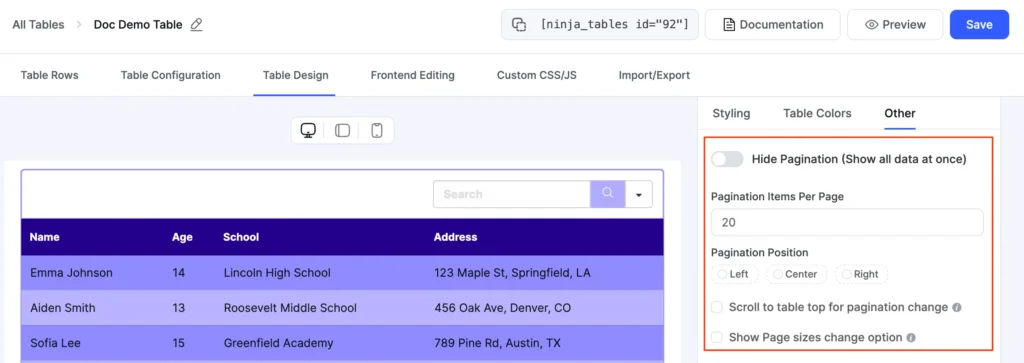
New Ui pagination

For users with fast connections who prefer scrolling, you can also set the rows-per-page number higher. The goal is to match the pagination depth to the size of your dataset and the likely connection speed of your audience.

Ninja Tables also supports AJAX pagination, where page changes load instantly without full page refreshes. This creates a smoother mobile experience, especially on slower connections.

ImageNameCategoryPriceChoose
Blue Hoodie (Zipper)Blue Hoodie (Zipper)Hoodies Original price was: $40.00.Current price is: $35.00.
HatHatHat Original price was: $20.00.Current price is: $15.00.
T ShirtT ShirtHalf sleeve$45.00
T-Shirt with LogoT-Shirt with LogoTshirts Original price was: $10.00.Current price is: $8.00.
Beanie with LogoBeanie with LogoAccessories Original price was: $20.00.Current price is: $18.00.
T-ShirtT-ShirtTshirts$18.00
Long Sleeve TeeLong Sleeve TeeTshirts$25.00
PoloPoloTshirts$20.00
Hoodie with LogoHoodie with LogoHoodies$45.00
Hoodie with PocketHoodie with PocketHoodies Original price was: $45.00.Current price is: $35.00.
Hoodie with ZipperHoodie with ZipperHoodies$45.00
BeanieBeanieAccessories Original price was: $20.00.Current price is: $18.00.
BeltBeltAccessories Original price was: $65.00.Current price is: $55.00.
CapCapAccessories Original price was: $18.00.Current price is: $16.00.
SunglassesSunglassesAccessories$90.00
Tank TopTank TopTanktop Original price was: $45.00.Current price is: $40.00.

Principle 6: Design for touch, not clicks

Desktop users navigate with a cursor that can target a 5px element precisely. Mobile users navigate with a thumb. A thumb needs more room.

Any interactive element in a table, whether it’s a sort button, a filter dropdown, or a link in a cell, needs to be large enough to tap without hitting the wrong target.

Ninja Tables outputs tables with touch-friendly controls by default. The sort headers, pagination buttons, and filter dropdowns all have enough padding for comfortable thumb interaction. You do not need to add custom CSS to meet this standard.

Beyond button size, touch-based interaction on tables also means designing the sort behavior carefully. On a phone, a user taps the column header to sort. The tap should register quickly and the table should reorder in under half a second. Slow sort responses make the table feel broken.

A good example of efficient sorting is shown below. Click the ‘On call’ column header to see it in action. With a single click, the Yes/No values group together automatically, and the matching cells are highlighted using Ninja Tables’ conditional formatting—no extra CSS, classes, or manual code needed.

NameRoleDepartmentOn-CallLeave Dates
Dr. Maya KhanGeneral PhysicianOutpatientYesN/A
Nurse Leo MartinNurseEmergencyNoJune 10–12, 2025
Dr. Priya SethiPediatricianPediatricsYesJune 20–22, 2025
Dr. Omar SalimSurgeonGeneral SurgeryNoN/A
Rina DasLab TechnicianDiagnostics LabYesJune 5–7, 2025
Jamal UddinReceptionistFront DeskNoJune 18, 2025
Dr. Eva MorenoDentistDentalNoJune 15–17, 2025
Anya ChowdhuryNursePediatricsYesJune 25–28, 2025
Dr. Karim FaizalCardiologistCardiologyNoN/A
Sanjana PaulPharmacy LeadPharmacyYesJune 13, 2025

Principle 7: Start with the right table type

Not every table serves the same purpose. A WooCommerce product table has different needs than a blog post list or a pricing comparison. Choosing the right table type from the start saves hours of rework.

Ninja Tables offers more than ten ways to create a table. You can build from scratch, import data from Google Sheets, connect a WooCommerce product feed, use a CSV file, or start from one of 50+ pre-made templates.

Get table templates for free
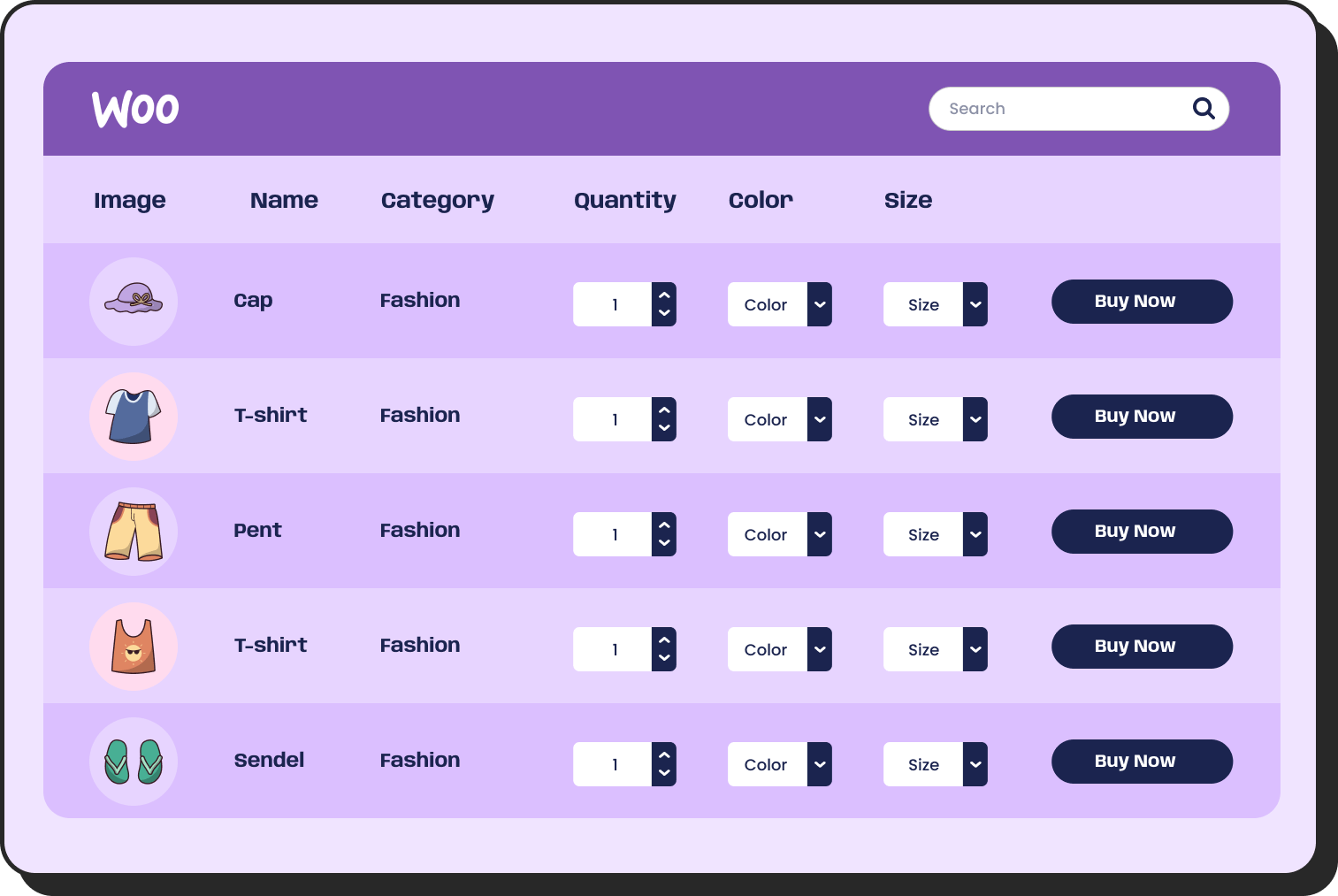
The templates cover the most common use cases: pricing tables, product lists, comparison tables, schedules, and more. Each template is already responsive. You load it, replace the data, and the mobile layout is ready.

If your data lives in a Google Sheet, Ninja Tables can pull it directly into a WordPress table and keep it in sync. You update the spreadsheet, and the table on your website updates automatically. This is particularly useful for tables that change often, like inventory lists, event schedules, or live rankings.

Principle 8: Test responsiveness while you build

Many designers build a table, publish it, then open it on a phone and find the layout broken. The fix is to test during the build, not after it.

Ninja Tables lets you preview the responsive behavior of your table directly inside the table editor. You can see how the table looks at different widths without switching devices or opening a browser inspector. This cuts the back-and-forth between editing and testing.

You can also test each responsive mode, collapsed, stackable, and movable, before deciding which one fits your data best. The visual preview shows the exact output the user will see on their device.

Ninja Tables offers multiple responsive table modes, including stackable layouts that automatically transform your tables based on screen size.

Why Ninja Tables Stands Out

Ninja Tables isn’t just another table plugin with responsive features tacked on. Mobile optimization is built into every aspect of the plugin:

  • Three responsive modes: Choose scroll, stack, or hide columns per table
  • Visual breakpoint editor: See exactly where your breakpoints trigger
  • Real device preview: Preview tables at iPhone, Android, and tablet sizes without leaving the editor
  • Performance first: Tables render efficiently on lower-powered mobile devices
  • Touch gestures: Native support for swipe, tap, and long-press interactions
  • Offline capability: Tables remain functional even with spotty mobile connections

Putting It Together

Mobile-first table design in 2026 comes down to a simple rule: decide what the user needs most, show that clearly, and give them tools to find everything else.

Ninja Tables supports all the responsive modes that make this possible. Collapsed tables keep all data accessible without clutter. Stackable tables reformat rows for small screens. Movable tables let wide data scroll naturally on touch devices. Responsive breakpoints hide less critical columns at specific screen sizes. Search, filters, and pagination keep large datasets fast and navigable.

The plugin works without code. You make decisions in a visual editor, and Ninja Tables handles the HTML output. Over 80,000 WordPress users rely on it to do exactly this.

If your tables are not built for mobile today, the steps above give you a clear path to fix that. Start with your most-viewed table. Apply a responsive mode that fits the data. Test it on a phone. Then move to the next one.

Mobile traffic will not slow down. Your tables should keep up with it.

NinjaTables Main Logo

Ninja Tables– Easiest Table Plugin in WordPress

Get in touch with Ninja Tables

Similar Posts

Add your first comment to this post