Enhancing UX with Searchable & Sortable Tables

Enhancing UX with Searchable & Sortable Tables


TLDR: Searchable and sortable tables cut user frustration by 40%. Data-heavy applications need search bars, column sorting, and smart filtering. Combine these features with clear headers, hover actions, and responsive layouts. Users find information 3x faster with proper table design. These trends matter now.

Users arrive with a question. “Who’s on the team this week?” “Which products sold the most?” “What’s available in blue color?”

A table sits there, inert, waiting for them to find the answer themselves. This is where design fails.

Most tables treat data as a display problem. They show information. They don’t help users use information. The gap between showing and helping is where frustration grows.

Here’s what happens: A user opens a table with 200 rows. No default sort. Filters are buried in a dropdown. Search field nowhere to be found. They waste 90 seconds clicking around. Then they give up or call support.

This costs real money in support tickets, user churn, and lost productivity.

The challenge: tables hold lots of data. Without search and sort features, users drown in information. They click back and leave your site. They switch to competitors.

2026 brings a shift. Users expect tables to work like search engines. They want to find data instantly. Designers who build better data displays win customer loyalty.

Good tables make data easier to visualize, digest, and sort- so people can actually use it. From where the search field sits to how results are sorted by default, every choice matters. Let’s explore how to upgrade your tables for 2026 UX trends with visitor comfort front and center.

What Users Actually Want From Tables

Users don’t read entire tables. They scan for one thing: what they’re looking for.

When you ask users about tables, they say the same things:

“I want to find information fast.” Search bars do this. A text field at the top lets users filter thousands of rows in milliseconds.

“I want to organize data my way.” Sorting does this. Users click a column header and reorder instantly. They compare numbers, dates, or names side by side.

“I want to see only what matters.” Filtering does this. Checkboxes, dropdowns, and date ranges let users narrow results by category, price, or status.

These three features work together seamlessly. When combined, they transform tables from dense walls of data into tools that users actually like.

NamePositionOfficeAgeStart dateSalary
Zorita SerranoSoftware EngineerSan Francisco562012/06/01$115,000
Zenaida FrankSoftware EngineerNew York632010/01/04$125,250
Yuri BerryChief Marketing Officer (CMO)New York402009/06/25$675,000
Vivian HarrellFinancial ControllerSan Francisco622009/02/14$452,500
Unity ButlerMarketing DesignerSan Francisco472009/12/09$85,675
Timothy MooneyOffice ManagerLondon372008/12/11$136,200
Tiger NixonSystem ArchitectEdinburgh612011/04/25$320,800
Thor WaltonDeveloperNew York612013/08/11$98,540
Tatyana FitzpatrickRegional DirectorLondon192010/03/17$385,750
Suki BurksDeveloperLondon532009/10/22$114,500
Sonya FrostSoftware EngineerEdinburgh232008/12/13$103,600
Shou ItouRegional MarketingTokyo202011/08/14$163,000
Shad DeckerRegional DirectorEdinburgh512008/11/13$183,000
Serge BaldwinData CoordinatorSingapore642012/04/09$138,575
Sakura YamamotoSupport EngineerTokyo372009/08/19$139,575
Rhona DavidsonIntegration SpecialistTokyo552010/10/14$327,900
Quinn FlynnSupport LeadEdinburgh222013/03/03$342,000
Prescott BartlettTechnical AuthorLondon272011/05/07$145,000
Paul ByrdChief Financial Officer (CFO)New York642010/06/09$725,000
Olivia LiangSupport EngineerSingapore642011/02/03$234,500
Michelle HouseIntegration SpecialistSidney372011/06/02$95,400
Michael SilvaMarketing DesignerLondon662012/11/27$198,500
Michael BruceJavascript DeveloperSingapore292011/06/27$183,000
Martena MccrayPost-Sales supportEdinburgh462011/03/09$324,050
Lael GreerSystems AdministratorLondon212009/02/27$103,500
Jonas AlexanderDeveloperSan Francisco302010/07/14$86,500
Jennifer ChangRegional DirectorSingapore282010/11/14$357,650
Jennifer AcostaJunior Javascript DeveloperEdinburgh432013/02/01$75,650
Jenette CaldwellDevelopment LeadNew York302011/09/03$345,000
Jena GainesOffice ManagerLondon302008/12/19$90,560

This is one of those tables where everything just clicks. All the features come together, and the whole view makes sense.

The Three Core User Tasks (And Why They Matter)

Nielsen Norman Group nailed this years ago, but it’s worth repeating because most teams still miss it: when users interact with a table, they’re doing one of three things:

1. Finding specific information (“Show me all overdue invoices”)
2. Comparing information across multiple records (“Stack these three plans side-by-side”)
3. Acting on data (“I need to edit these three customer records”)

Each task shapes the entire design. If finding is priority 1, your search field needs prominence. If comparison matters most? Your column headers need clarity and alignment patterns that let eyes move vertically. If users need to act? Hover states, quick-view panels, and bulk action areas become critical.

Here’s the question you should ask before designing any table: Which of these three tasks does my specific user actually need to accomplish? Most teams design for all three equally, creating bloat. Good designers identify the primary task first, then design everything else around it.

Most tables try to serve all three equally. This creates bloat. Smart designs pick one primary task, then build everything else around it.

Knowing which task matters most changes every design decision that follows.

Search in Tables: Making Data Discoverable

So, you want users to find data quickly. Not eventually. Quickly. Search is the fastest way to find one thing in a sea of data.

A search bar in your table should work instantly. As users type, the table shrinks to match rows. This real-time feedback keeps them in control.

How to create a searchable table

Place the search bar above the table, aligned left. Keep it simple: one text field with a magnifying glass icon. Make the field wide enough to read what users type.
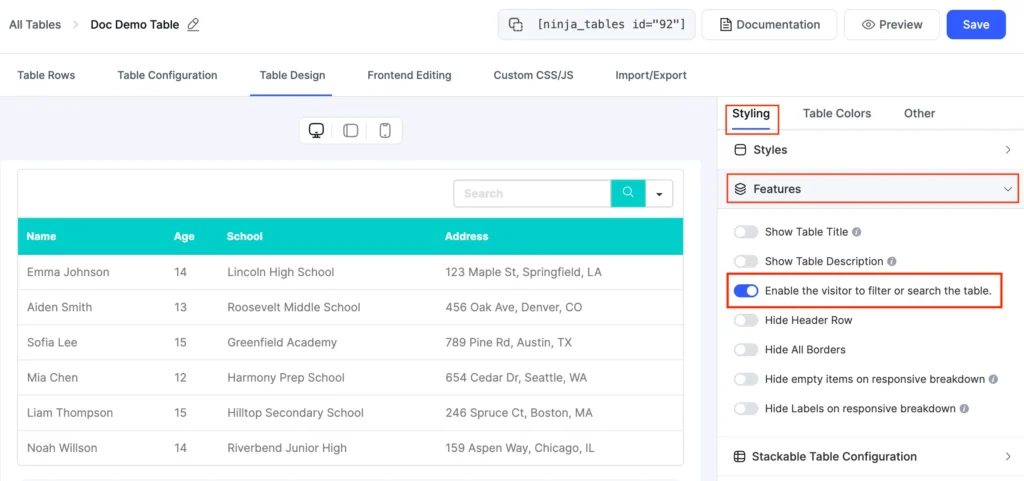
New Ui enable filter and search

Search should look across all columns. If a user searches “John,” the table shows every row with John in any column (name, email, notes). This breadth saves users from guessing which column to check.

Why? Cognitive load reduction. Users’ brains can connect “I want to filter by Status” → “Here’s the Status column” → “Here’s the filter” in one visual sweep. Separate these mentally, and you’ve added unnecessary friction.

If you want it customized or disable the search function for a specific column, that also works in Ninja tables. In such a case, filters should sit adjacent to the columns they control. Not buried in a dropdown. Not tucked into a sidebar three clicks away. Right there, next to the column header.
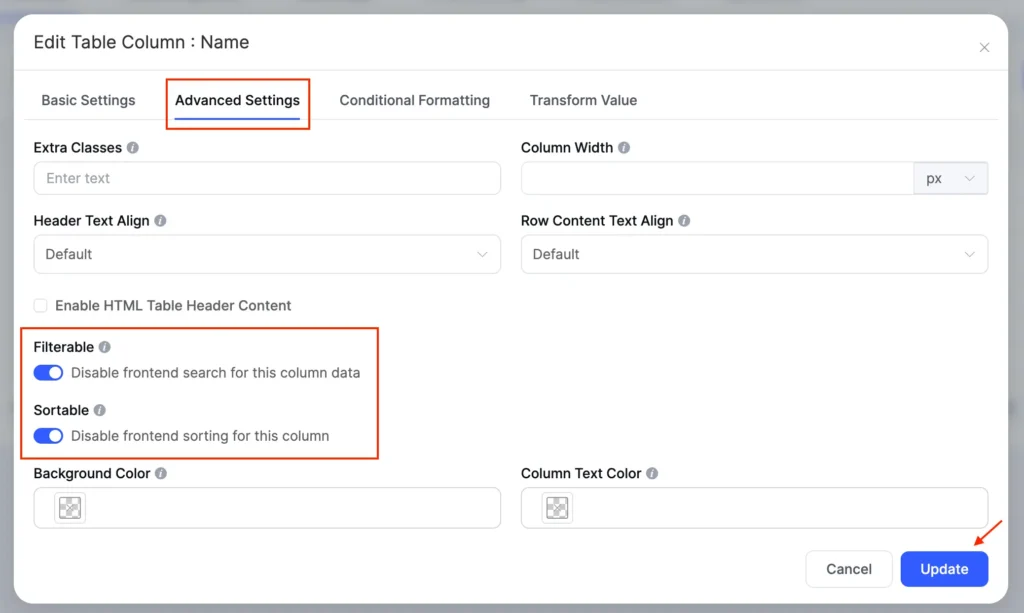
New Ui disable sorting filtering

Search Behavior: Real-Time vs. Click-to-Apply

Here’s where opinions split. Real-time (instant) filtering creates a magical feeling—users type, and the table reshuffles in milliseconds. Click-to-apply (where users hit a button to trigger search) feels more deliberate and controlled.

The answer? It depends on data weight.

  • Real-time is best when your table has fewer than 5,000 rows or the data lives on the frontend
  • Click-to-apply is better when you’re querying a database with millions of rows or complex filtering logic

Why? Because real-time on massive datasets = slow, laggy interfaces = frustrated users. Click-to-apply signals “this is a heavyweight operation” and manages user expectations.

Sidebar filters sit to the left of the table. Checkboxes, dropdowns, and sliders let users build filters step by step. This layout works well for complex data with many filter options. Many E-commerce sites use sidebar filters to show products by price, color, and rating. Admin dashboards use top bars to filter by date or status.

  • Make the search case-insensitive. Users type “JOHN” or “john” and get the same results.
  • Here’s the psychological trick: proximity is trust. If a search field lives near the table header, users intuitively connect it to the table. If it lives somewhere else—a sidebar, the top of the page—users have to consciously connect the two. That friction adds up.
TitleStatus
Md Shahjahan28-Jan-26Ninja Tables 5.2.6: More Control, Better Printing & Stronger SecuritypublishNinja Tables
Nusrat Fariha30-Jan-2615+ Use Cases of WordPress Directory Plugins for Growing WebsitespublishWordPress Plugins
Nusrat Fariha26-Jan-26AuthLab Connect 2025: Where We Connect, Celebrate, and Look AheadpublishWordPress Plugins
Jahan Liza04-Feb-26Enhancing UX with Searchable & Sortable TablespublishTips
Jahan Liza21-Jan-26Why Most Pricing Tables Confuse Visitors (And how to fix it)publishTips
Md Shahjahan25-Dec-25Ninja Tables 2025 Year In ReviewpublishNinja Tables
Nusrat Fariha15-Dec-25Personalized Marketing in Modern TimespublishWordPress Plugins
Jahan Liza05-Dec-25Sticky Headers vs Fixed Columns in Product Table: What's Better on Mobile?publishTips
Nusrat Fariha17-Nov-25Ninja Tables Fluent Integrations: What Your Site NeedspublishNinja Tables, WordPress Plugins
Nusrat Fariha13-Nov-25How to Integrate FluentCart with Ninja TablespublishNinja Tables, WordPress Plugins
Jahan Liza13-Nov-2515+ High Converting Pricing Table Design Examples for Any WebsitepublishTips
Nusrat Fariha05-Nov-25Sales Data Visualization with Tables and ChartspublishWordPress Plugins
Jahan Liza31-Oct-25Showcasing Profile: Creating a Professional Portfolio Table in WordPresspublishWordPress Plugins
Jahan Liza23-Oct-25Automate Patient Data: Fluent Forms to Ninja TablespublishNinja Tables
Nusrat Fariha14-Oct-25Meet FluentCart: Modern Solution for Modern eCommercepublishReview
Nusrat Fariha09-Oct-25Get Ready for Halloween Sales with Ninja Tables!publishNinja Tables, WooCommerce
Editorial Panel15-Oct-257 Tips to Reduce Cart Abandonment in eCommerce RetailpublishTips
Nusrat Fariha03-Oct-25Ratings and Review Tables in WordPress for SEO, UX, and TrustpublishNinja Tables
Jahan Liza07-Oct-25Ninja Tables Smart Features Save You More Time Than You ThinkpublishNinja Tables
Nusrat Fariha29-Sep-25eCommerce Customer Journey: A Complete GuidepublishTips
Jahan Liza28-Sep-25Data Tables, Display Tables, and Decision Tables: Know the DifferencepublishTips
Nusrat Fariha21-Sep-25Add a Dynamic Discount Table to Your StorepublishNinja Tables
Jahan Liza18-Sep-25Why Comparison Tables Boost Conversions During Holiday SeasonpublishTips
Md Shahjahan11-Nov-25Ninja Tables 5.2.4: FluentCart Integration & More!publishNinja Tables
Nusrat Fariha10-Sep-25Prepare for the Upcoming Holiday Sales Season (Halloween, BFCM, Christmas)publishTips
Jahan Liza08-Sep-25Infinite Scroll vs Pagination: How to Balance UX and SEOpublishTips
Editorial Panel15-Sep-25How to Build Real-Time Calculator in Elementor FormpublishTips
Jahan Liza27-Aug-25Use a Real Estate Listing Table to Get Better CommissionpublishTips
Editorial Panel22-Aug-25Visuals, Charts, and Tables for Your SEO ReportpublishNinja Tables
Nusrat Fariha26-Aug-25Quickly Create Tables in WordPress (No Coding!)publishNinja Tables
Nusrat Fariha14-Aug-25Master WooCommerce UX for Better Sales and RevenuepublishWooCommerce
Jahan Liza12-Aug-25How to Use AI in WordPress: A Complete GuidepublishTips
Nusrat Fariha07-Aug-25Ninja Charts 3.3.2: Fixes and ImprovementspublishCharts and Graphs
Jahan Liza24-Jul-25Freelance Project Management Tools: Can Tables Do It All?publishTips
Nusrat Fariha16-Jul-25Tables for Affiliate Marketing: Earn More as an AffiliatepublishNinja Tables
Md Shahjahan01-Aug-25Ninja Tables 5.2.3: Exciting New Features and ImprovementspublishNinja Tables
Jahan Liza11-Jul-25Actionable Data Table Design Tips for Better ConversionspublishTips
Jahan Liza06-Jul-25Design the Best Insurance Comparison TablepublishTips
Nusrat Fariha08-Jul-25Overcome WooCommerce Product Table Challenges Once and for All!publishWooCommerce
Editorial Panel01-Jul-25How to Customize WooCommerce Checkout Page: Step-by-Step GuidepublishWooCommerce
Nusrat Fariha24-Jun-25WP Posts Table Use Cases: Organize and Display WordPress ContentpublishNinja Tables, WordPress Plugins
Jahan Liza25-Jun-25Year-Round Seasonal Marketing CampaignspublishTips
Md Shahjahan18-Jun-25Ninja Tables 5.1.1: Data Table Updates and Drag & Drop ImprovementspublishNinja Tables
Nusrat Fariha16-Jun-25Sneak Peek into FluentCart: Your eCommerce, Your TermspublishReview, WordPress Plugins
Jahan Liza16-Jun-25How to Present Marketing Report Data Using TablespublishTips
Md Shahjahan02-Jun-25Ninja Tables 5.1.0 : Fresh New Plugin UIpublishNinja Tables
Nusrat Fariha28-May-25Your Favourite Table Plugin is Getting Revamped!publishNinja Tables
Jahan Liza29-May-25Data Management Challenges and SolutionspublishTips
Jahan Liza12-Jun-25How to Track Student Progress​ in WordPresspublishNinja Tables
Nusrat Fariha07-Jun-25Create WordPress Tables in 2 Minutes: Quick Guide for Beginners (2026)publishNinja Tables
Nusrat Fariha23-May-25Bundle Marketing: Product Bundling Ideas for BusinessespublishTips
Jahan Liza26-May-25Creating Healthcare Data Table in WordPresspublishWordPress Plugins
Nusrat Fariha01-Jun-25Schedule Table in WordPress: Manage Events and Appointments EasilypublishWordPress Plugins
Nusrat Fariha26-May-25B2B eCommerce Sales: Proven Tips for 2025 and BeyondpublishTips
Jahan Liza21-May-25Beginners Guide to WordPress Employee Directory TablepublishWordPress Plugins
Nusrat Fariha19-May-25FluentAffiliate Teaser: Because Your Affiliate Marketing Deserves Better!publishWordPress Plugins
Nusrat Fariha15-May-25Why Ninja Tables is the Best Table Plugin in WordPresspublishNinja Tables
Nusrat Fariha03-Sep-25Meet FluentAffiliate: Best WordPress Affiliate Management SolutionpublishReview
Jahan Liza13-May-25Google Sheets Integration in WordPress- Real Examples & Use CasespublishTips
Nusrat Fariha08-May-25Upgrade Your Sports Website: Add Live Score & Points TablepublishNinja Tables, Tips
Jahan Liza06-May-25Best WordPress Table Plugins for 2026publishWordPress Plugins
Nusrat Fariha28-Apr-25Grow Your Business with WordPress Tables (2026)publishNinja Tables
Jahan Liza21-Apr-25Data Visualization Use Cases and ExamplespublishNinja Tables
Jahan Liza06-Apr-25Marketing Strategy 2025: Shaped by Consumer TrendspublishWordPress Plugins
Nusrat Fariha21-Mar-25Dynamic Data Visualization Ins and OutspublishNinja Tables, WordPress Plugins
Editorial Panel12-Mar-25The Secret to eCommerce Success: Using WordPress Tables to Drive ConversionspublishWordPress Plugins
Editorial Panel24-Feb-25Location-Based Recommendations: Guiding Customers to ProductspublishTips
Jahan Liza10-Mar-25Consumer Trends 2025: What Marketers Must Know to Stay AheadpublishTips
Jahan Liza10-Feb-25Valentine’s Day Marketing Ideas with Smart Product TablespublishTips
Jahan Liza23-Jan-25Ratings and Reviews in Data TablespublishWordPress Plugins
Jahan Liza14-Jan-25Underrated Features of Ninja Tables You Should UsepublishNinja Tables
Md Shahjahan24-Dec-24A Year in Review: Ninja Tables Biggest Milestones in 2024publishNinja Tables
Mohiuddin Omran10-Dec-24What is the Digital Marketing Strategy that Tracks Users Across the Web?publishTips
Nusrat Fariha04-Dec-2411 Types of Product Tables Your Website NeedspublishWordPress Plugins
Jahan Liza03-Dec-24How to Create Product Specification Table in WordPresspublishTips
Jahan Liza25-Nov-24Interactive Data Visualization in WordPress: Tables and ChartspublishTips
Mohiuddin Omran11-Nov-24WordPress Community Plugin: Build Engaging Online Spaces EffortlesslypublishWordPress Plugins
Jahan Liza12-Nov-24Black Friday Stats, Trends and Strategies for Small BusinessespublishTips
Nusrat Fariha18-Nov-24Meet FluentCommunity: WordPress Community Plugin at Its BestpublishReview
Jahan Liza25-Oct-248 WooCommerce Store Design ExamplespublishWooCommerce
Jahan Liza24-Sep-24Top Fall Marketing Ideas to Drive Sales in 2025publishTips
Jahan Liza12-Sep-24Design The Perfect Feature Comparison Table in WordPresspublishTips
Nusrat Fariha22-Sep-24How Ninja Tables Helps Your Halloween SalespublishNinja Tables
Jahan Liza22-Aug-24Integrate WooCommerce, Google Sheets, & More with Ninja TablespublishNinja Tables
Mohiuddin Omran13-Aug-24The All-Time Olympic Medal Table with Free TemplatespublishWordPress Plugins
Jahan Liza02-Aug-24Simplify Your Decisions with Pros and Cons TablespublishTips
Mohiuddin Omran18-Jul-24What Makes a Good Website: Power List of Top WordPress PluginspublishWordPress Plugins
Nusrat Fariha01-Aug-24Upload a Table Background Image to Your WordPress TablepublishNinja Tables
Mohiuddin Omran09-Jul-24FluentBoards Review: Features, Pros, Cons, and More!publishReview
Jahan Liza08-Jul-24Creating Tables in WordPress: Everything You Should KnowpublishTips
Jahan Liza05-Jun-24Recovering Lost Sales: 10 Shopping Cart Abandonment SolutionspublishTips
Nusrat Fariha09-Jun-24Announcing Free WordPress Table Templates Page!publishWordPress Plugins
Nusrat Fariha10-May-24How to Create a Product Review Table?publishWordPress Plugins
Jahan Liza30-Apr-247+ Woocommerce Statistics and Trends Shaping Revenue in 2025publishTips, WooCommerce
Nusrat Fariha25-Apr-24Transform Value: Turn Text into HyperlinkpublishNinja Tables
Mohiuddin Omran17-Apr-24Misleading Statistics: Learn, Spot, Avoid, and Get Rid of them publishTips
Jahan Liza03-Apr-24A Guide to Comparison Tables for Products, Services, and FeaturespublishTips
Nusrat Fariha19-Mar-24Ninja Tables Features That Simplify Your LifepublishNinja Tables
Jahan Liza06-Mar-247 Techniques to Speed up WooCommerce CheckoutpublishTips, WooCommerce
Editorial Panel01-Mar-246 Best WordPress Pricing Table Plugins in 2026publishWordPress Plugins
Jahan Liza27-Feb-24Ninja Tables Turns 6!publishNinja Tables, Review
Jahan Liza28-Feb-24Color Palettes for Data VisualizationpublishTips
Nusrat Fariha09-Feb-24Best Chart Plugins in WordPress: Improve UX with Interactive ChartspublishCharts and Graphs, WordPress Plugins
Mohiuddin Omran26-Jan-24How to Make a Graph in Google SheetspublishTips
Jahan Liza15-Jan-24Export-Import Tables in WordPresspublishNinja Tables, Tips
Mohiuddin Omran10-Jan-24Best jQuery Table Plugins in 2025publishTips, WordPress Plugins
Jahan Liza28-Dec-23Mapping Tomorrow: Emerging Data Trends for 2026publishTips
Mohiuddin Omran22-Dec-23FluentSnippets Review: Facts, Features, and AlternativespublishReview, WordPress Plugins
Nusrat Fariha09-Jan-24Links in Data Tables: Dynamic Data VisualizationpublishNinja Tables
Mohiuddin Omran04-Dec-23Amazon Affiliate Program: A to Z for Amazon AssociatespublishTips
Nusrat Fariha20-Dec-23Ninja Tables in 2023: Year In ReviewpublishNinja Tables, Review
Jahan Liza23-Nov-23Conditional Formatting in WordPress TablespublishTips, WordPress Plugins
Jahan Liza07-Nov-23Guiding Data Table Examples for Great Website VisualizationpublishTips
Tanzil Ebad Chowdhury27-Oct-239 WordPress Data Visualization Plugins You Can't Overlook!publishWordPress Plugins
Jahan Liza20-Oct-23Introducing FluentBooking: WordPress Scheduling PluginpublishReview, WordPress Plugins
Jahan Liza18-Oct-23Get in The Spirit of Holiday Sales with 13 Halloween Marketing IdeaspublishTips
Mohiuddin Omran12-Oct-23Mastering the Bootstrap Table: Creating Clean, Responsive, and User-Friendly LayoutspublishTips, WordPress Plugins
Mohiuddin Omran27-Sep-23A Comprehensive Guide on How to Center a Table with CSSpublishTips
Jahan Liza07-Sep-23How to Generate Leads, Increase User Engagement, and Drive TrafficpublishTips
Nusrat Fariha24-Aug-23FOMO Marketing Ideas: Create Urgency and Drive ConversionspublishTips
Tanzil Ebad Chowdhury23-Aug-237+ Dynamic Data Types: Toolkit for Configuring Table ColumnspublishTips, WordPress Plugins
Jahan Liza21-Aug-23How to Create Stackable Tables with Ninja TablespublishNinja Tables, WordPress Plugins
Jahan Liza31-Jul-23How to Add Media to a Data TablepublishNinja Tables, WordPress Plugins
Tanzil Ebad Chowdhury27-Jul-232 Easy Ways to Merge Cells in WordPress Tables (+Pro Tips)publishNinja Tables, Tips
Nusrat Fariha20-Jul-23Simplifying Data Presentations & Common MistakespublishNinja Tables, Tips
Mohiuddin Omran18-Jul-23How to Make a Table in Google Sheets: In-depth TutorialpublishTips
Tanzil Ebad Chowdhury12-Jul-237 Types of Comparison Charts for Effective Data VisualizationpublishTips
Jahan Liza14-Jul-23Closer Look at Charts vs Tables: The Right Data VisualizationpublishComparison, Ninja Tables
Mohiuddin Omran03-Jul-23Writing Google Reviews and Displaying Reviews in WordPress TablespublishReview, Tips
Nusrat Fariha22-Jun-2311 Effective Summer Marketing Tips to Boost Your SalespublishTips
Jahan Liza19-Jun-23How To Design a Table the Right Way: Mastering Data Table DesignpublishNinja Tables, Tips
Tanzil Ebad Chowdhury15-Jun-23Responsive Table Modes in Ninja Tables | No CodingpublishNinja Tables
Md Shahjahan08-Jun-23Introducing Ninja Tables 5.0.0: Smoother, Lighter, and More PowerfulpublishNinja Tables
Nusrat Fariha02-Jun-23How To Customize Default WooCommerce ButtonpublishNinja Tables, WooCommerce
Jahan Liza07-Jun-23Limitations of WooCommerce and Best SolutionspublishNinja Tables, WooCommerce
Tanzil Ebad Chowdhury25-May-23TablePress vs Ninja Tables: Which Is Better?publishComparison
Jahan Liza22-May-23What Makes a Good Website: Checklist for Business OwnerspublishTips
Mohiuddin Omran11-May-23TablePress Review: Is It Worth Upgrading to Pro Or Not?publishComparison, WordPress Plugins
Tanzil Ebad Chowdhury08-May-23Good Data Visualization: Master the Art of Visual StorytellingpublishTips
Nusrat Fariha29-Apr-23Color Customizing WordPress TablespublishNinja Tables, WordPress Plugins
Mohiuddin Omran17-Apr-23WooCommerce Inventory Management: Why, How, WhatpublishTips, WooCommerce
Nusrat Fariha10-Apr-23Table Data Visualization: Efficiency and GuidelinespublishWordPress Plugins
Mohiuddin Omran30-Mar-23WordPress WooCommerce Tutorial: Step-by-Step GuidepublishWooCommerce
Mohiuddin Omran30-Mar-23History, Pros, Cons, and Brief Overview of WooCommercepublishWooCommerce
Nusrat Fariha23-Mar-23Optimize WooCommerce for Higher Conversion RatespublishWooCommerce
Mohiuddin Omran08-Mar-23Data Visualization Basics, Skills & TechniquespublishTips
Nusrat Fariha07-Mar-23Reviews of Ninja Tables Google Sheets IntegrationpublishWordPress Plugins
Mohiuddin Omran23-Feb-23Making a Product Comparison Table in WordPresspublishNinja Tables, WordPress Plugins
Mohiuddin Omran17-Feb-23Ninja Tables Is Turning 5!publishNinja Tables, Review
Nusrat Fariha10-Feb-23Easily Add Restaurant Reservation System to WordPresspublishTips, WordPress Plugins
Mohiuddin Omran07-Feb-23Valentine’s Day Marketing Ideas, Strategies & ExamplespublishNinja Tables, Tips
Nusrat Fariha06-Feb-23Create Charts in WordPress With a Free Charts PluginpublishNinja Tables
Nusrat Fariha02-Feb-23How To Create WP Posts TablepublishNinja Tables
Mohiuddin Omran27-Jan-23Valentine’s Ideas for Your Business to Celebrate LovepublishTips
Nusrat Fariha24-Jan-23Ninja Tables Free vs PropublishNinja Tables, WordPress Plugins
Mohiuddin Omran10-Jan-23Ways to Create a Responsive Table in WordPresspublishNinja Tables
Nusrat Fariha11-Jan-23Best WooCommerce Product Table PluginspublishWooCommerce, WordPress Plugins
Nusrat Fariha03-Jan-23How To Integrate WooCommerce With Ninja TablespublishNinja Tables, WooCommerce
Mohiuddin Omran14-Dec-22Ninja Tables 2022 Year in Review: What's New, What's next?publishNinja Tables, Review
Nusrat Fariha09-Dec-22Designing Data Tables for ChristmaspublishTips, WooCommerce
Mohiuddin Omran07-Dec-22Bad Data Visualization Examples: Fix It or Risk ItpublishTips
Mohiuddin Omran04-Jan-23Easiest Way to Make Beautiful Restaurant Menu for WebsitepublishNinja Tables, Tips
Mohiuddin Omran10-Nov-22Use SEO-Optimized Tables to Get Rich Snippets in SERPpublishTips
Nusrat Fariha09-Nov-22Ninja Tables Advanced Features ExplainedpublishNinja Tables
Mohiuddin Omran03-Nov-22wpDataTables Review: Pros, Cons, Pricing, and SubstitutepublishReview, WordPress Plugins
Mohiuddin Omran31-Oct-22Create a High-Converting Pricing Table That Engages CustomerspublishNinja Tables, Tips
Nusrat Fariha27-Oct-22Marketing Tips to Increase Sales for WordPress UserspublishTips
Mohiuddin Omran24-Oct-22How to Easily Create a League Points Table in WordPresspublishNinja Tables, Tips
Nusrat Fariha19-Oct-22Online Pricing Tables Without CodingpublishNinja Tables
Md Shahjahan13-Oct-22Ninja Tables 4.3.1: Bug Fixes And A Lot of ImprovementspublishNinja Tables
Nusrat Fariha06-Oct-22WooCommerce Halloween Sales 2025publishNinja Tables, WooCommerce
Mohiuddin Omran04-Oct-22Comparison Table Best Practices to Boost Customer ExperiencepublishNinja Tables, Tips
Mohiuddin Omran27-Sep-22Pricing Table Best Practices, Strategies, and ExamplespublishTips
Mohiuddin Omran15-Sep-22Paymattic: The Ultimate Payment and Fundraising PluginpublishReview, WordPress Plugins
Mohiuddin Omran09-Sep-22Best WooCommerce Product Table AlternativespublishComparison, WooCommerce
Mohiuddin Omran02-Sep-22wpDataTables Alternatives: Best Way to Visualize Table DatapublishComparison
Mohiuddin Omran29-Aug-22How To Create WooCommerce Product Table EffortlesslypublishNinja Tables, WooCommerce
Nusrat Fariha26-Aug-22Barn2 Plugins Vs Ninja Tables | Posts Table & WooCommerce Product TablespublishComparison, WooCommerce
Nusrat Fariha23-Aug-22Barn2 Plugins Bundle Offer or Standalone Ninja Tables?publishComparison, WooCommerce
Nusrat Fariha19-Aug-22Ninja Tables vs wpDataTables | Best Table Plugin in WordPresspublishWordPress Plugins
Mohiuddin Omran18-Aug-22Diving Into the Best Table Plugins With Google Sheets IntegrationpublishWordPress Plugins
Nusrat Fariha15-Aug-22A Beginner’s Guide to Ninja Tables Drag and Drop BuilderpublishNinja Tables
Mohiuddin Omran12-Aug-22Best TablePress Alternatives to Make Data Tables More EfficientpublishComparison
Mohiuddin Omran10-Aug-22Image Gallery Plugin for WordPress: Create Awesome GalleriespublishNinja Tables, Tips
Mohiuddin Omran06-Aug-22How to Create an Image Gallery in WordPresspublishNinja Tables, Tips
Nusrat Fariha23-Sep-22The Right Tools To Boost WooCommerce SalespublishWooCommerce, WordPress Plugins
Mohiuddin Omran29-Jul-22How to Create Responsive Tables Without Compromising UXpublishNinja Tables
Nusrat Fariha02-Aug-22Fluent Forms Data in Ninja TablespublishNinja Tables
Mohiuddin Omran27-Jul-22Product Comparison Table: Create Tables for AmazonpublishWordPress Plugins
Mohiuddin Omran22-Jul-226 Strategies to Optimize WooCommerce Product PagepublishTips, WooCommerce
Mohiuddin Omran18-Jul-22Create Online Tables Easily with Drag and Drop Table BuilderpublishNinja Tables, Tips
Nusrat Fariha25-Jul-22Best Form Plugins for WordPresspublishWordPress Plugins
Nusrat Fariha05-Jul-22Ninja Tables and WP Table Builder ComparedpublishComparison, Ninja Tables
Nusrat Fariha04-Jul-22Why Use Table Plugins | Benefits & ImportancepublishNinja Tables
Nusrat Fariha23-Jun-22Best Drag and Drop Table Plugin In WordPresspublishNinja Tables
Nusrat Fariha23-Jun-22Best Uses of Ninja Tables For WooCommercepublishNinja Tables, WooCommerce
Nusrat Fariha23-Jun-22Best Uses Of WooCommerce Table PluginspublishNinja Tables, WooCommerce
Nusrat Fariha22-Jun-22Google Sheets Integration In WordPress TablepublishNinja Tables
Nusrat Fariha22-Jun-22Best Ways To Create WordPress TablespublishNinja Tables

Ninja Tables handles filters differently. By placing them at the top instead of in a sidebar, the experience feels more natural and easier to use.

Get Ninja Tables FAST!

Sorting: Letting Users Organize Data

Sorting rearranges rows by column values. Users click a header, and the table reorders instantly.

Sorted columns should show a visual indicator. An arrow (↑ or ↓) tells users which direction the sort goes. A small triangle or icon to symbolize ascending or descending order in the header works well. This clarity prevents confusion.

Allow multi-column sorting. Advanced users may want to sort by status first, then by date. Each click adds another sort layer. This depth serves power users without confusing beginners.

Show sortable headers clearly. Use a different cursor (pointer hand), slight color change, or icon to signal that a header is clickable. Users need to know they can click.

Include a “default order” option. Add a small button or link that resets the sort to the original order. Users sometimes get lost after clicking multiple columns.
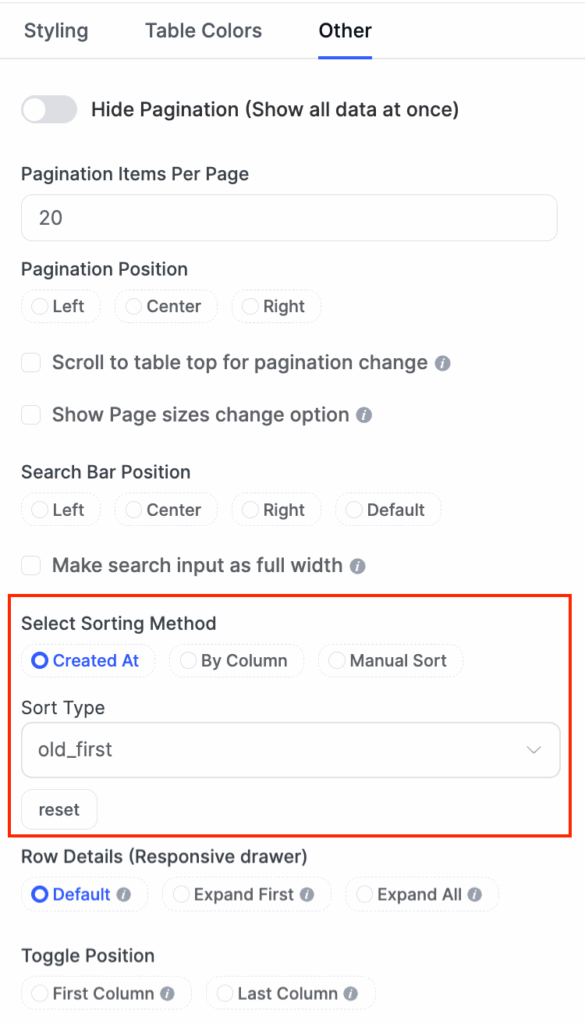
New Ui table sorting options

Please, stop sorting by the first column alphabetically. This is 2025. Alphabetical sorting is the UI equivalent of a participation trophy—it exists, but nobody actually wants it.

Instead, ask yourself: What’s the most relevant information for this context?

  • In an invoice table: Recently created (newest first)
  • In a task management table: Due date (earliest approaching)
  • In a customer table: Most recent interaction (most engaged first)
  • In a product inventory table: Sales volume (highest first)
  • In a product table: Product size, or stock volume (smaller or low stock first)

The best sort order is predictive. It anticipates what users actually need before they ask for it.

Common Mistakes to Avoid

Hiding search and sort options. Don’t tuck these into a menu. Put search prominently at the top. Sort headers should look clickable. Users need to find these features in under 2 seconds.

Sorting without a clear direction. Users click a header, and the data rearranges. But which direction? Up to down? A to Z? Show an arrow. Show state. Remove guessing.

Unresponsive filters. Users check a filter box and wait 3 seconds for the table to update. This breaks the flow. Update instantly or show a loading indicator. Instant feedback is the 2026 standard.

Too many columns at once. Don’t show 20 columns because they exist. Show 5 to 8 essential columns. Hide the rest behind “Customize Columns.” Dense tables overwhelm users.

Unclear headers. If users don’t understand what a column contains, they can’t search or sort effectively. Use plain language. “Created On” beats “Timestamp (ISO 8601).”

Quick Pro Tips for Better Performance

Table Customization

Users work differently. One person always sorts by date. Another always filters by status. A third always hides two columns. Let them save their preferences. Also, they can focus on 2 columns at a time, let them stack or hide other columns when they’re looking through those selected ones.

Sortable Columns

Make column headers clickable. Click once for ascending. Click again for descending. Click a third time to clear the sort (return to default).

Use visual feedback. Show a filled arrow (↓) for descending, an outlined arrow (↑) for ascending, or triangle up or down indicators.

Designing Table Headers That Work

Headers are the foundation of sortable tables. They tell users what each column contains and how to sort it.

Make headers bold and darker than row text. This contrast shows users where columns begin. They scan headers first, so make them stand out.

Left-align text in headers. Numbers go right-aligned in columns, but header labels should start on the left. This follows reading patterns and looks balanced.

Keep column headers fixed and visible while users scroll down through rows (Essential for tables with more than 15 rows). Without fixed headers, users scroll past the data and lose context. They forget which column is which.

Combining Search, Sort, and Filter

When all three features work together, tables become powerful.

A user arrives at your table with 1,000 product listings. They search for “blue shoes.” The table shrinks to 150 rows. They sort by “price” to see the cheapest first. They filter by “in stock” to hide sold-out items. Now they see 30 blue shoes in stock, sorted by price. They found what they wanted in 10 seconds.

This workflow is the gold standard for 2026. Tables that offer this speed and control win user satisfaction.

The key: features don’t fight each other. Search filters the visible rows. Sorting rearranges them. New filters narrow further. Each feature adds power without removing previous choices.

Responsive Table Design for Mobile

Collapsed rows stack column names and values vertically. This vertical stacking reads naturally on phones.

Expandable rows start collapsed. Users see essential columns (name, status) on small screens. Clicking a row expands it to show full details. This balance saves space and keeps information accessible.

Horizontal scroll as a last resort. If the table has many columns, let it scroll. But prioritize critical columns on the left. Keep name and status visible while other columns scroll off-screen.

Test on actual phones. A table that looks fine at laptop screen breaks at a phone screen size. Use real devices. Watch real users. Adjust based on what breaks.

2026 UX Trends for Tables

Another year, another wave of “What to expect in 2026” guides. We’re sure you’ve already scrolled through a few. Now, from our analysis, we’re seeing many design trends, but the table design or UX trend is hard to pinpoint. Still, we gathered some major trends not

Smart pagination or infinite scroll. Pagination (Page 1, 2, 3) works well. Infinite scroll works too. Choose based on your data and users. Mobile users often prefer infinite scroll. Desktop users often prefer pagination.

Visual feedback on interaction. Rows change color on hover. Sortable headers show a preview of the sort direction. Search results highlight matches. These small details make tables feel responsive and alive.

Hover Actions upon cells or rows. Reveal actions (edit, delete, export) when users hover over a row. This keeps the interface clean but makes actions discoverable. But hover doesn’t work on touch devices. Always provide an alternative. Add an actions menu or expand icon that works on all devices.

Zebra Striping is an underrated functionality. Alternate row colors—subtle, not garish. Something like alternating white and light gray (#f9f9f9). Why? Because your eyes are lazy. Zebra striping gives your eyes a “landing pad” that helps you track. But here’s the caveat: if your table has only 3–4 columns, zebra striping is overkill. The wider the table, the more you need it.

Conditional formatting adds more value. Mark significant values, indicators, data, or information, if you’re sure that’s the basic thing people search for primarily. Create your base foundation on this, then combine the rest of the advanced features around that. It’ll enhance users readbility, on-page time, and eventually the clarity, which will eventually lead to conversion.

Conclusion

Searchable and sortable tables are not folklore anymore. There are the ultimate toolkit for any display mode that shows data.

Users expect tables to work like search tools. They want instant results. They want to organize data their way. They want to hide the noise and see the signal.

Whether you’re building from scratch or refining an existing table, the principles stay constant: understand your users’ primary task, remove friction, test relentlessly, and prioritize accessibility that’s built-in, not bolted on.

And if you want to skip the technical complexity? Tools like Ninja Tables handle the heavy lifting. But even with a tool, the strategic thinking- what should sort first, where filters belong, whether search should be real-time, that’s still on you. And that’s where this guide’s value lies.

The trend for 2026 is clear: tables are getting smarter, faster, and more personal. Build yours to match.

NinjaTables Main Logo

Ninja Tables– Easiest Table Plugin in WordPress

Get in touch with Ninja Tables

Similar Posts

Add your first comment to this post