Best Uses of Ninja Tables For WooCommerce


features of table plugins for WooCommerce

Your customers want your WooCommerce shop so organized that they don’t need to click or scroll much. The default WooCommerce grid layout makes it difficult since all products have separate blocks. That’s why you need table plugins for WooCommerce business.

You can’t create a product table that’s supposed to show products in a tabular format with the default WooCommerce plugin. But it’s integration with a table plugin changes the game!

Presents all the necessary details of a particular product in a single row, so it’s much easier to follow.

Ninja Tables is such a plugin that integrates with WooCommerce to help create awesome customizable and SEO-friendly product tables!

ImageNameCategoryPriceChoose
Blue Hoodie (Zipper)Blue Hoodie (Zipper)Hoodies Original price was: $40.00.Current price is: $35.00.
HatHatHat Original price was: $20.00.Current price is: $15.00.
T ShirtT ShirtHalf sleeve$45.00
T-Shirt with LogoT-Shirt with LogoTshirts Original price was: $10.00.Current price is: $8.00.
Beanie with LogoBeanie with LogoAccessories Original price was: $20.00.Current price is: $18.00.
T-ShirtT-ShirtTshirts$18.00
Long Sleeve TeeLong Sleeve TeeTshirts$25.00
PoloPoloTshirts$20.00
Hoodie with LogoHoodie with LogoHoodies$45.00
Hoodie with PocketHoodie with PocketHoodies Original price was: $45.00.Current price is: $35.00.
Hoodie with ZipperHoodie with ZipperHoodies$45.00
BeanieBeanieAccessories Original price was: $20.00.Current price is: $18.00.
BeltBeltAccessories Original price was: $65.00.Current price is: $55.00.
CapCapAccessories Original price was: $18.00.Current price is: $16.00.
SunglassesSunglassesAccessories$90.00
Tank TopTank TopTanktop Original price was: $45.00.Current price is: $40.00.

This is how a product table looks.

Intrigued, right?

Grid-style vs table format

First of all, here’s how a WooCommerce store looks in the grid style.

WooCommerce product grid formtat
Default WooCommerce Product Grid Format

We’ve used dummy data as an example.

As you can see, each product has separate blocks with only some details.

  • Image
  • Name
  • Price
  • “Add To Cart” button

Customers can’t see their cart and can’t select multiple amounts of the same product from here.

However, a table-style product presentation gives you everything you need in one place.

WooCommerce product tables online
WooCommerce Product Table Format

Here’s what the table columns show.

  • Image
  • Name
  • Category
  • Price
  • Quantity
  • Buy (Add to cart button)

Needless to say, this dummy table is made with Ninja Tables.

But this is not the only use of this table plugin.

From product organizing to table designing, everything is easy as a pie when it’s Ninja Tables!

Get Ninja Tables FAST!

Table plugin for WooCommerce: Ninja Tables

It’s not just the looks that matter.

If you’re using a table plugin to showcase your Woo products, your customers’ satisfaction is the most important thing.

Best table plugins for WooCommerce should have some unmissable features to customize a product table.

We’ll go through them one by one. But you can also check out a few demo tables.

Coloring and designing the table

One of the best uses of Ninja Tables is the color customization option.

Throw bright colors in the table row, column, texts, header, footer, border, background, and even search bar.

You can play with the color palette all you want because Ninja Tables “Design” tab offers unlimited colors!

ImageNameCategoryPriceQuantityBuy
Blue Hoodie (Zipper)Blue Hoodie (Zipper)Hoodies Original price was: $40.00.Current price is: $35.00.
Hoodie with LogoHoodie with LogoHoodies$45.00
Hoodie with PocketHoodie with PocketHoodies Original price was: $45.00.Current price is: $35.00.
Hoodie with ZipperHoodie with ZipperHoodies$45.00

Color customized WooCommerce product table

You can pick among 14 different combinations in the “Predefined Schemes” tab. But “Custom Scheme” gives you full control of color customization.

The “Table Design” tab has lots of other options like bordered table, hover row, hide, sticky header, pagination, etc.

Here’s another example of color customized product table.

ImageNameCategoryPriceChoose
Blue Hoodie (Zipper)Blue Hoodie (Zipper)Hoodies Original price was: $40.00.Current price is: $35.00.
HatHatHat Original price was: $20.00.Current price is: $15.00.
T ShirtT ShirtHalf sleeve$45.00
T-Shirt with LogoT-Shirt with LogoTshirts Original price was: $10.00.Current price is: $8.00.
Beanie with LogoBeanie with LogoAccessories Original price was: $20.00.Current price is: $18.00.
T-ShirtT-ShirtTshirts$18.00
Long Sleeve TeeLong Sleeve TeeTshirts$25.00
PoloPoloTshirts$20.00
Hoodie with LogoHoodie with LogoHoodies$45.00
Hoodie with PocketHoodie with PocketHoodies Original price was: $45.00.Current price is: $35.00.
Hoodie with ZipperHoodie with ZipperHoodies$45.00
BeanieBeanieAccessories Original price was: $20.00.Current price is: $18.00.
BeltBeltAccessories Original price was: $65.00.Current price is: $55.00.
CapCapAccessories Original price was: $18.00.Current price is: $16.00.
SunglassesSunglassesAccessories$90.00
Tank TopTank TopTanktop Original price was: $45.00.Current price is: $40.00.

Customize default WooCommerce features

When you color a product table, the default buttons like “Add to cart,” “View Cart,” and “Checkout” stay the same purple color.

But Ninja Tables gives you the freedom to change the colors of everything!

You just need a little CSS code trick for some and simple text-changing for others.

Buy button color

By default, WooCommerce “Add to cart” button is purple and white.

Change the button colors using this code –

.nt_button_woo {
background: ____ !important;
color: ____ !important;
}

Insert the RGB color code or color name in the blank spaces and change the button color.

ImageNameCategoryPriceQuantityBuy
T-Shirt with LogoT-Shirt with LogoTshirts Original price was: $10.00.Current price is: $8.00.
T-ShirtT-ShirtTshirts$18.00
Long Sleeve TeeLong Sleeve TeeTshirts$25.00
PoloPoloTshirts$20.00

We’ve used orange as the button background and white for the button text color.

Wondering why the button looks different? Scroll to see.

Buy button text

Change the “Add to cart” button text from the column without coding.

change WooCommerce buy button
Change the “Add to cart” Button Text

Maybe make the buy button more catchy with texts that trigger FOMO!

Customize the default WooCommerce Add to Cart button however you want.

Now, moving onto the checkout button changes.

Cart and checkout buttons

Like the buy button, you don’t need coding to change the “View Cart” and “Checkout” buttons.

WooCommerce checkout
Default Checkout Button

Import-export

Nobody wants to repeat the same stuff. Maybe you already have a product table ready, but you want to show the table on another website.

No need to create a table from scratch again. Ninja Tables will export and import a CSV or a JSON file of the table for you.

Learn more on table data import.

Single-click contact

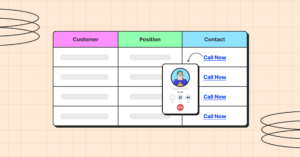
This feature is necessary for WooCommerce product sellers. Customers get to contact the sellers right from the table- via call or email.

Ninja Tables’ “Transform Value” feature lets you turn plain text into hyperlinks with a simple HTML code and auto-generated shortcodes.

Add a new “Call Now” column to the product table first and drop the code in the Transform Value window.
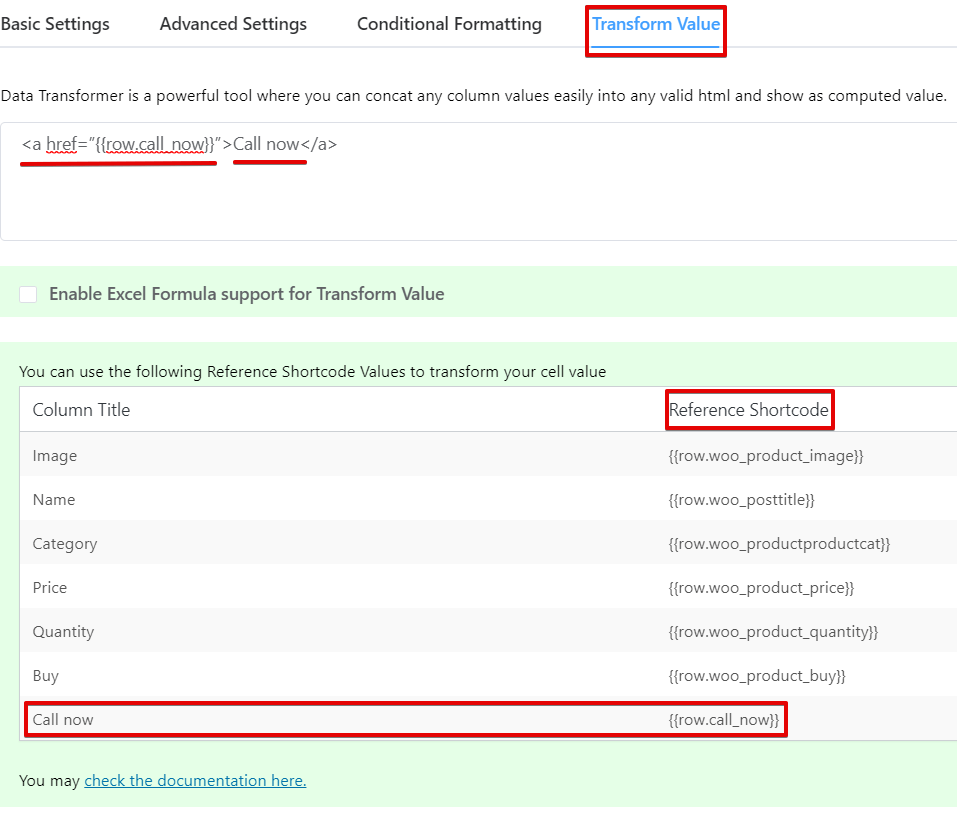
Ninja Tables Value Transformation
Transform Text Value to Links

<a href=”{{row.call_now}}”>Call Now</a>

Of course, the table cells need the contact numbers of each seller first. The auto-generated shortcode will fetch the numbers into the code, turn them into clickable links, and prompt a call directly from the table when you click.

turn texts into hyperlinks
Click Contact from Table

Here’s an interactive dummy table where you can click “Send Email” button and contact from the table.

Value transformation feature of Ninja Tables saves you a lot of time indeed!

Changing table background for different occasions

This part of Ninja Tables lets you have all the fun since designing and decorating are already quite fun in the table plugin.

Simply upload a background image to match the occasion’s vibe.

But it’s a workaround you can use with a little coding tweak.

#footable_parent_NT_ID .foo-table{
background-image: url(Preferred image link from dashboard);
}
.foo-table tbody tr td{
background: rgb(255 255 255 / 60%) !important;
font-size: 30px
}

ImageNameCategoryPriceQuantityBuy
Pumpkin Spice (Sweet)Pumpkin Spice (Sweet)Decor$20.00
White Tea & Wisteria Scent (Calm)White Tea & Wisteria Scent (Calm)Decor$12.00
Magnolia Scent (Fresh)Magnolia Scent (Fresh)Decor Original price was: $15.00.Current price is: $13.00.
Orange-Marigold Scent (Fresh)Orange-Marigold Scent (Fresh)Decor Original price was: $6.00.Current price is: $4.00.
Coffee candle (Sweet)Coffee candle (Sweet)Decor Original price was: $10.00.Current price is: $8.00.

We’ve added some fall vibes to this WooCommerce fall products table.

Change the colors and text sizes to match the background image or control the background image opacity.

Apply conditions to highlight specific cells

Getting customers’ attention is the top priority for WooCommerce product sellers. Other than coloring the table and background images, highlighting specific table cells help with that.

And this feature comes in handy for the products you want people to focus on more. The highlighted cell can be price or reviews.
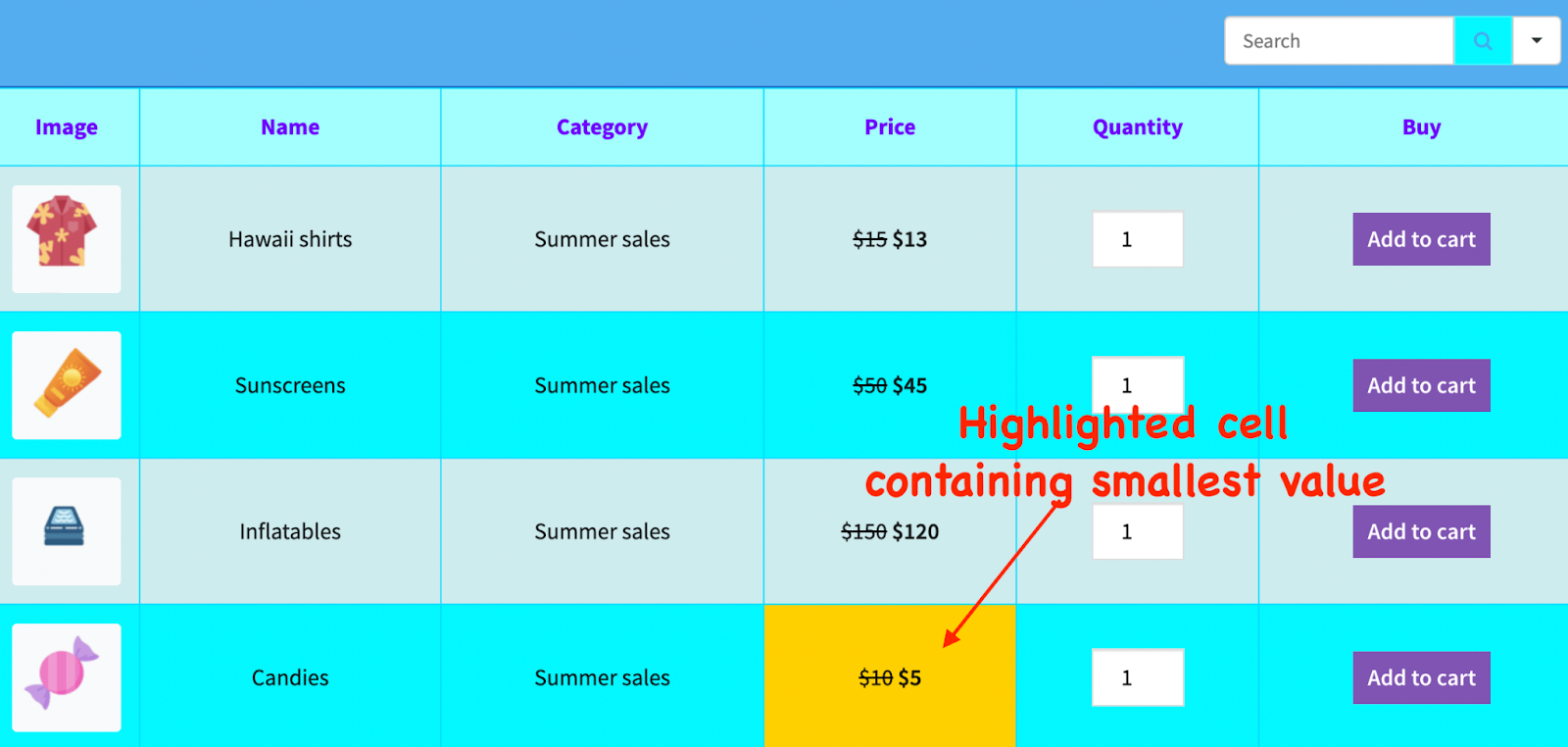
apply conditions to table cells
Apply Conditions to Table Cells

Custom filters

No matter how much time you give customers for sale, there will always be someone who waits till the last minute!

Use Ninja Tables’ custom filter feature to let last-minute buyers search for what they want just by filtering the product table.
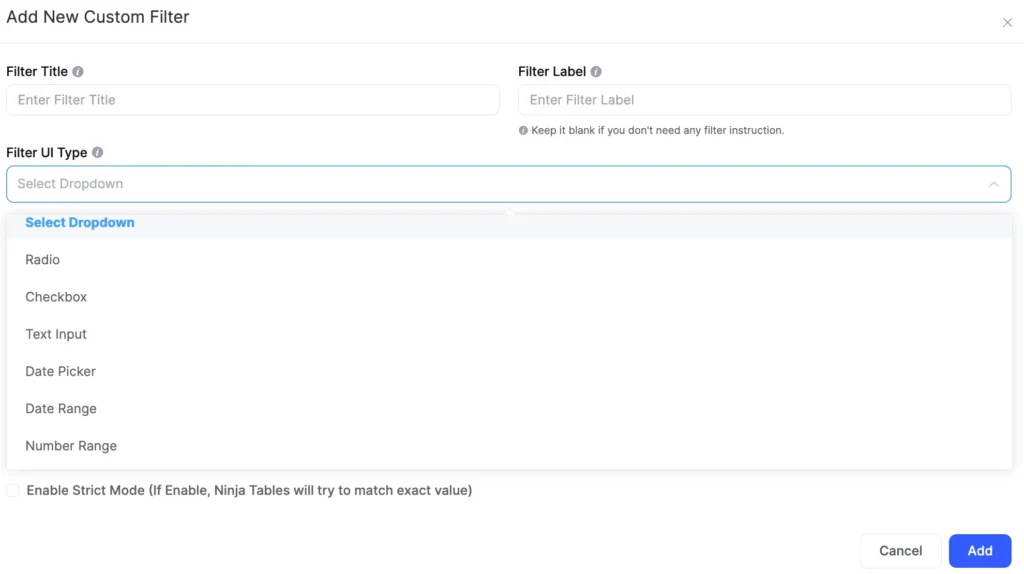
add filter to table data
Filter Table Data

Wanna see how the filter works? Team Ninja Tables uses this function for blog archive. You can also try the template.


ImageTitleStatusPost Type
LizaEnterprise Scale Tables in WordPress: How Ninja Tables Handles EverythingEnterprise Scale Tables in WordPress: How Ninja Tables Handles Everythingpublish26-Feb-26postWordPress Plugins
Nusrat FarihaWhat Makes a Comparison Page Feel Trustworthy?What Makes a Comparison Page Feel Trustworthy?publish25-Feb-26postComparison, Tips
LizaMobile-First Table Design Principles for 2026Mobile-First Table Design Principles for 2026publish18-Feb-26postTips
Nusrat FarihaWhy Most Product Comparison Pages Don't ConvertWhy Most Product Comparison Pages Don't Convertpublish17-Feb-26postTips
Nusrat FarihaProduct Tables for WordPress Stores: Turn Browsers Into BuyersProduct Tables for WordPress Stores: Turn Browsers Into Buyerspublish10-Feb-26postWordPress Plugins
LizaEnhancing UX with Searchable & Sortable TablesEnhancing UX with Searchable & Sortable Tablespublish04-Feb-26postTips
Nusrat Fariha15+ Use Cases of WordPress Directory Plugins for Growing Websites15+ Use Cases of WordPress Directory Plugins for Growing Websitespublish30-Jan-26postWordPress Plugins
Md ShahjahanNinja Tables 5.2.6: More Control, Better Printing & Stronger SecurityNinja Tables 5.2.6: More Control, Better Printing & Stronger Securitypublish28-Jan-26postNinja Tables
Nusrat FarihaAuthLab Connect 2025: Where We Connect, Celebrate, and Look AheadAuthLab Connect 2025: Where We Connect, Celebrate, and Look Aheadpublish26-Jan-26postWordPress Plugins
LizaWhy Most Pricing Tables Confuse Visitors (And how to fix it)Why Most Pricing Tables Confuse Visitors (And how to fix it)publish21-Jan-26postTips
Md ShahjahanNinja Tables 2025 Year In ReviewNinja Tables 2025 Year In Reviewpublish25-Dec-25postNinja Tables
Nusrat FarihaPersonalized Marketing in Modern TimesPersonalized Marketing in Modern Timespublish15-Dec-25postWordPress Plugins
LizaSticky Headers vs Fixed Columns in Product Table: What's Better on Mobile?Sticky Headers vs Fixed Columns in Product Table: What's Better on Mobile?publish05-Dec-25postTips
Nusrat FarihaNinja Tables Fluent Integrations: What Your Site NeedsNinja Tables Fluent Integrations: What Your Site Needspublish17-Nov-25postNinja Tables, WordPress Plugins
Nusrat FarihaHow to Integrate FluentCart with Ninja TablesHow to Integrate FluentCart with Ninja Tablespublish13-Nov-25postNinja Tables, WordPress Plugins
Liza15+ High Converting Pricing Table Design Examples for Any Website15+ High Converting Pricing Table Design Examples for Any Websitepublish13-Nov-25postTips
Md ShahjahanNinja Tables 5.2.4: FluentCart Integration & More!Ninja Tables 5.2.4: FluentCart Integration & More!publish11-Nov-25postNinja Tables
Nusrat FarihaSales Data Visualization with Tables and ChartsSales Data Visualization with Tables and Chartspublish05-Nov-25postWordPress Plugins
LizaShowcasing Profile: Creating a Professional Portfolio Table in WordPressShowcasing Profile: Creating a Professional Portfolio Table in WordPresspublish31-Oct-25postWordPress Plugins
LizaAutomate Patient Data: Fluent Forms to Ninja TablesAutomate Patient Data: Fluent Forms to Ninja Tablespublish23-Oct-25postNinja Tables
Editorial Panel7 Tips to Reduce Cart Abandonment in eCommerce Retail7 Tips to Reduce Cart Abandonment in eCommerce Retailpublish15-Oct-25postTips
Nusrat FarihaMeet FluentCart: Modern Solution for Modern eCommerceMeet FluentCart: Modern Solution for Modern eCommercepublish14-Oct-25postReview
Nusrat FarihaGet Ready for Halloween Sales with Ninja Tables!Get Ready for Halloween Sales with Ninja Tables!publish09-Oct-25postNinja Tables, WooCommerce
LizaNinja Tables Smart Features Save You More Time Than You ThinkNinja Tables Smart Features Save You More Time Than You Thinkpublish07-Oct-25postNinja Tables
Nusrat FarihaRatings and Review Tables in WordPress for SEO, UX, and TrustRatings and Review Tables in WordPress for SEO, UX, and Trustpublish03-Oct-25postNinja Tables
Nusrat FarihaeCommerce Customer Journey: A Complete GuideeCommerce Customer Journey: A Complete Guidepublish29-Sep-25postTips
LizaData Tables, Display Tables, and Decision Tables: Know the DifferenceData Tables, Display Tables, and Decision Tables: Know the Differencepublish28-Sep-25postTips
Nusrat FarihaAdd a Dynamic Discount Table to Your StoreAdd a Dynamic Discount Table to Your Storepublish21-Sep-25postNinja Tables
LizaWhy Comparison Tables Boost Conversions During Holiday SeasonWhy Comparison Tables Boost Conversions During Holiday Seasonpublish18-Sep-25postTips
Editorial PanelHow to Build Real-Time Calculator in Elementor FormHow to Build Real-Time Calculator in Elementor Formpublish15-Sep-25postTips
Nusrat FarihaPrepare for the Upcoming Holiday Sales Season (Halloween, BFCM, Christmas)Prepare for the Upcoming Holiday Sales Season (Halloween, BFCM, Christmas)publish10-Sep-25postTips
LizaInfinite Scroll vs Pagination: How to Balance UX and SEOInfinite Scroll vs Pagination: How to Balance UX and SEOpublish08-Sep-25postTips
Nusrat FarihaMeet FluentAffiliate: Best WordPress Affiliate Management SolutionMeet FluentAffiliate: Best WordPress Affiliate Management Solutionpublish03-Sep-25postReview
LizaUse a Real Estate Listing Table to Get Better CommissionUse a Real Estate Listing Table to Get Better Commissionpublish27-Aug-25postTips
Nusrat FarihaQuickly Create Tables in WordPress (No Coding!)Quickly Create Tables in WordPress (No Coding!)publish26-Aug-25postNinja Tables
Editorial PanelVisuals, Charts, and Tables for Your SEO ReportVisuals, Charts, and Tables for Your SEO Reportpublish22-Aug-25postNinja Tables
Nusrat FarihaMaster WooCommerce UX for Better Sales and RevenueMaster WooCommerce UX for Better Sales and Revenuepublish14-Aug-25postWooCommerce
LizaHow to Use AI in WordPress: A Complete GuideHow to Use AI in WordPress: A Complete Guidepublish12-Aug-25postTips
Nusrat FarihaNinja Charts 3.3.2: Fixes and ImprovementsNinja Charts 3.3.2: Fixes and Improvementspublish07-Aug-25postCharts and Graphs
Md ShahjahanNinja Tables 5.2.3: Exciting New Features and ImprovementsNinja Tables 5.2.3: Exciting New Features and Improvementspublish01-Aug-25postNinja Tables
LizaFreelance Project Management Tools: Can Tables Do It All?Freelance Project Management Tools: Can Tables Do It All?publish24-Jul-25postTips
Nusrat FarihaTables for Affiliate Marketing: Earn More as an AffiliateTables for Affiliate Marketing: Earn More as an Affiliatepublish16-Jul-25postNinja Tables
LizaActionable Data Table Design Tips for Better ConversionsActionable Data Table Design Tips for Better Conversionspublish11-Jul-25postTips
Nusrat FarihaOvercome WooCommerce Product Table Challenges Once and for All!Overcome WooCommerce Product Table Challenges Once and for All!publish08-Jul-25postWooCommerce
LizaDesign the Best Insurance Comparison TableDesign the Best Insurance Comparison Tablepublish06-Jul-25postTips
Editorial PanelHow to Customize WooCommerce Checkout Page: Step-by-Step GuideHow to Customize WooCommerce Checkout Page: Step-by-Step Guidepublish01-Jul-25postWooCommerce
LizaYear-Round Seasonal Marketing CampaignsYear-Round Seasonal Marketing Campaignspublish25-Jun-25postTips
Nusrat FarihaWP Posts Table Use Cases: Organize and Display WordPress ContentWP Posts Table Use Cases: Organize and Display WordPress Contentpublish24-Jun-25postNinja Tables, WordPress Plugins
Md ShahjahanNinja Tables 5.1.1: Data Table Updates and Drag & Drop ImprovementsNinja Tables 5.1.1: Data Table Updates and Drag & Drop Improvementspublish18-Jun-25postNinja Tables
LizaHow to Present Marketing Report Data Using TablesHow to Present Marketing Report Data Using Tablespublish16-Jun-25postTips
Nusrat FarihaSneak Peek into FluentCart: Your eCommerce, Your TermsSneak Peek into FluentCart: Your eCommerce, Your Termspublish16-Jun-25postReview, WordPress Plugins
LizaHow to Track Student Progress​ in WordPressHow to Track Student Progress​ in WordPresspublish12-Jun-25postNinja Tables
Nusrat FarihaCreate WordPress Tables in 2 Minutes: Quick Guide for Beginners (2026)Create WordPress Tables in 2 Minutes: Quick Guide for Beginners (2026)publish07-Jun-25postNinja Tables
Md ShahjahanNinja Tables 5.1.0 : Fresh New Plugin UINinja Tables 5.1.0 : Fresh New Plugin UIpublish02-Jun-25postNinja Tables
Nusrat FarihaSchedule Table in WordPress: Manage Events and Appointments EasilySchedule Table in WordPress: Manage Events and Appointments Easilypublish01-Jun-25postWordPress Plugins
LizaData Management Challenges and SolutionsData Management Challenges and Solutionspublish29-May-25postTips
Nusrat FarihaYour Favourite Table Plugin is Getting Revamped!Your Favourite Table Plugin is Getting Revamped!publish28-May-25postNinja Tables
Nusrat FarihaB2B eCommerce Sales: Proven Tips for 2025 and BeyondB2B eCommerce Sales: Proven Tips for 2025 and Beyondpublish26-May-25postTips
LizaCreating Healthcare Data Table in WordPressCreating Healthcare Data Table in WordPresspublish26-May-25postWordPress Plugins
Nusrat FarihaBundle Marketing: Product Bundling Ideas for BusinessesBundle Marketing: Product Bundling Ideas for Businessespublish23-May-25postTips
LizaBeginners Guide to WordPress Employee Directory TableBeginners Guide to WordPress Employee Directory Tablepublish21-May-25postWordPress Plugins
Nusrat FarihaFluentAffiliate Teaser: Because Your Affiliate Marketing Deserves Better!FluentAffiliate Teaser: Because Your Affiliate Marketing Deserves Better!publish19-May-25postWordPress Plugins
Nusrat FarihaWhy Ninja Tables is the Best Table Plugin in WordPressWhy Ninja Tables is the Best Table Plugin in WordPresspublish15-May-25postNinja Tables
LizaGoogle Sheets Integration in WordPress- Real Examples & Use CasesGoogle Sheets Integration in WordPress- Real Examples & Use Casespublish13-May-25postTips
Nusrat FarihaUpgrade Your Sports Website: Add Live Score & Points TableUpgrade Your Sports Website: Add Live Score & Points Tablepublish08-May-25postNinja Tables, Tips
LizaBest WordPress Table Plugins for 2026Best WordPress Table Plugins for 2026publish06-May-25postWordPress Plugins
Nusrat FarihaGrow Your Business with WordPress Tables (2026)Grow Your Business with WordPress Tables (2026)publish28-Apr-25postNinja Tables
LizaData Visualization Use Cases and ExamplesData Visualization Use Cases and Examplespublish21-Apr-25postNinja Tables
LizaMarketing Strategy 2025: Shaped by Consumer TrendsMarketing Strategy 2025: Shaped by Consumer Trendspublish06-Apr-25postWordPress Plugins
Nusrat FarihaDynamic Data Visualization Ins and OutsDynamic Data Visualization Ins and Outspublish21-Mar-25postNinja Tables, WordPress Plugins
Editorial PanelThe Secret to eCommerce Success: Using WordPress Tables to Drive ConversionsThe Secret to eCommerce Success: Using WordPress Tables to Drive Conversionspublish12-Mar-25postWordPress Plugins
LizaConsumer Trends 2025: What Marketers Must Know to Stay AheadConsumer Trends 2025: What Marketers Must Know to Stay Aheadpublish10-Mar-25postTips
Editorial PanelLocation-Based Recommendations: Guiding Customers to ProductsLocation-Based Recommendations: Guiding Customers to Productspublish24-Feb-25postTips
LizaValentine’s Day Marketing Ideas with Smart Product TablesValentine’s Day Marketing Ideas with Smart Product Tablespublish10-Feb-25postTips
LizaRatings and Reviews in Data TablesRatings and Reviews in Data Tablespublish23-Jan-25postWordPress Plugins
LizaUnderrated Features of Ninja Tables You Should UseUnderrated Features of Ninja Tables You Should Usepublish14-Jan-25postNinja Tables
Md ShahjahanA Year in Review: Ninja Tables Biggest Milestones in 2024A Year in Review: Ninja Tables Biggest Milestones in 2024publish24-Dec-24postNinja Tables
Mohiuddin OmranWhat is the Digital Marketing Strategy that Tracks Users Across the Web?What is the Digital Marketing Strategy that Tracks Users Across the Web?publish10-Dec-24postTips
Nusrat Fariha11 Types of Product Tables Your Website Needs11 Types of Product Tables Your Website Needspublish04-Dec-24postWordPress Plugins
LizaHow to Create Product Specification Table in WordPressHow to Create Product Specification Table in WordPresspublish03-Dec-24postTips
LizaInteractive Data Visualization in WordPress: Tables and ChartsInteractive Data Visualization in WordPress: Tables and Chartspublish25-Nov-24postTips
Nusrat FarihaMeet FluentCommunity: WordPress Community Plugin at Its BestMeet FluentCommunity: WordPress Community Plugin at Its Bestpublish18-Nov-24postReview
LizaBlack Friday Stats, Trends and Strategies for Small BusinessesBlack Friday Stats, Trends and Strategies for Small Businessespublish12-Nov-24postTips
Mohiuddin OmranWordPress Community Plugin: Build Engaging Online Spaces EffortlesslyWordPress Community Plugin: Build Engaging Online Spaces Effortlesslypublish11-Nov-24postWordPress Plugins
Liza8 WooCommerce Store Design Examples8 WooCommerce Store Design Examplespublish25-Oct-24postWooCommerce
LizaTop Fall Marketing Ideas to Drive Sales in 2025Top Fall Marketing Ideas to Drive Sales in 2025publish24-Sep-24postTips
Nusrat FarihaHow Ninja Tables Helps Your Halloween SalesHow Ninja Tables Helps Your Halloween Salespublish22-Sep-24postNinja Tables
LizaDesign The Perfect Feature Comparison Table in WordPressDesign The Perfect Feature Comparison Table in WordPresspublish12-Sep-24postTips
LizaIntegrate WooCommerce, Google Sheets, & More with Ninja TablesIntegrate WooCommerce, Google Sheets, & More with Ninja Tablespublish22-Aug-24postNinja Tables
Mohiuddin OmranThe All-Time Olympic Medal Table with Free TemplatesThe All-Time Olympic Medal Table with Free Templatespublish13-Aug-24postWordPress Plugins
LizaSimplify Your Decisions with Pros and Cons TablesSimplify Your Decisions with Pros and Cons Tablespublish02-Aug-24postTips
Nusrat FarihaUpload a Table Background Image to Your WordPress TableUpload a Table Background Image to Your WordPress Tablepublish01-Aug-24postNinja Tables
Mohiuddin OmranWhat Makes a Good Website: Power List of Top WordPress PluginsWhat Makes a Good Website: Power List of Top WordPress Pluginspublish18-Jul-24postWordPress Plugins
Mohiuddin OmranFluentBoards Review: Features, Pros, Cons, and More!FluentBoards Review: Features, Pros, Cons, and More!publish09-Jul-24postReview
LizaCreating Tables in WordPress: Everything You Should KnowCreating Tables in WordPress: Everything You Should Knowpublish08-Jul-24postTips
Nusrat FarihaAnnouncing Free WordPress Table Templates Page!Announcing Free WordPress Table Templates Page!publish09-Jun-24postWordPress Plugins
LizaRecovering Lost Sales: 10 Shopping Cart Abandonment SolutionsRecovering Lost Sales: 10 Shopping Cart Abandonment Solutionspublish05-Jun-24postTips
Nusrat FarihaHow to Create a Product Review Table?How to Create a Product Review Table?publish10-May-24postWordPress Plugins
Liza7+ Woocommerce Statistics and Trends Shaping Revenue in 20257+ Woocommerce Statistics and Trends Shaping Revenue in 2025publish30-Apr-24postTips, WooCommerce
Nusrat FarihaTransform Value: Turn Text into HyperlinkTransform Value: Turn Text into Hyperlinkpublish25-Apr-24postNinja Tables
Mohiuddin OmranMisleading Statistics: Learn, Spot, Avoid, and Get Rid of them Misleading Statistics: Learn, Spot, Avoid, and Get Rid of them publish17-Apr-24postTips
LizaA Guide to Comparison Tables for Products, Services, and FeaturesA Guide to Comparison Tables for Products, Services, and Featurespublish03-Apr-24postTips
Nusrat FarihaNinja Tables Features That Simplify Your LifeNinja Tables Features That Simplify Your Lifepublish19-Mar-24postNinja Tables
Liza7 Techniques to Speed up WooCommerce Checkout7 Techniques to Speed up WooCommerce Checkoutpublish06-Mar-24postTips, WooCommerce
Editorial Panel6 Best WordPress Pricing Table Plugins in 20266 Best WordPress Pricing Table Plugins in 2026publish01-Mar-24postWordPress Plugins
LizaColor Palettes for Data VisualizationColor Palettes for Data Visualizationpublish28-Feb-24postTips
LizaNinja Tables Turns 6!Ninja Tables Turns 6!publish27-Feb-24postNinja Tables, Review
Nusrat FarihaBest Chart Plugins in WordPress: Improve UX with Interactive ChartsBest Chart Plugins in WordPress: Improve UX with Interactive Chartspublish09-Feb-24postCharts and Graphs, WordPress Plugins
Mohiuddin OmranHow to Make a Graph in Google SheetsHow to Make a Graph in Google Sheetspublish26-Jan-24postTips
LizaExport-Import Tables in WordPressExport-Import Tables in WordPresspublish15-Jan-24postNinja Tables, Tips
Mohiuddin OmranBest jQuery Table Plugins in 2025Best jQuery Table Plugins in 2025publish10-Jan-24postTips, WordPress Plugins
Nusrat FarihaLinks in Data Tables: Dynamic Data VisualizationLinks in Data Tables: Dynamic Data Visualizationpublish09-Jan-24postNinja Tables
LizaMapping Tomorrow: Emerging Data Trends for 2026Mapping Tomorrow: Emerging Data Trends for 2026publish28-Dec-23postTips
Mohiuddin OmranFluentSnippets Review: Facts, Features, and AlternativesFluentSnippets Review: Facts, Features, and Alternativespublish22-Dec-23postReview, WordPress Plugins
Nusrat FarihaNinja Tables in 2023: Year In ReviewNinja Tables in 2023: Year In Reviewpublish20-Dec-23postNinja Tables, Review
Mohiuddin OmranAmazon Affiliate Program: A to Z for Amazon AssociatesAmazon Affiliate Program: A to Z for Amazon Associatespublish04-Dec-23postTips
LizaConditional Formatting in WordPress TablesConditional Formatting in WordPress Tablespublish23-Nov-23postTips, WordPress Plugins
LizaGuiding Data Table Examples for Great Website VisualizationGuiding Data Table Examples for Great Website Visualizationpublish07-Nov-23postTips
Tanzil Ebad Chowdhury9 WordPress Data Visualization Plugins You Can't Overlook!9 WordPress Data Visualization Plugins You Can't Overlook!publish27-Oct-23postWordPress Plugins
LizaIntroducing FluentBooking: WordPress Scheduling PluginIntroducing FluentBooking: WordPress Scheduling Pluginpublish20-Oct-23postReview, WordPress Plugins
LizaGet in The Spirit of Holiday Sales with 13 Halloween Marketing IdeasGet in The Spirit of Holiday Sales with 13 Halloween Marketing Ideaspublish18-Oct-23postTips
Mohiuddin OmranMastering the Bootstrap Table: Creating Clean, Responsive, and User-Friendly LayoutsMastering the Bootstrap Table: Creating Clean, Responsive, and User-Friendly Layoutspublish12-Oct-23postTips, WordPress Plugins
Mohiuddin OmranA Comprehensive Guide on How to Center a Table with CSSA Comprehensive Guide on How to Center a Table with CSSpublish27-Sep-23postTips
LizaHow to Generate Leads, Increase User Engagement, and Drive TrafficHow to Generate Leads, Increase User Engagement, and Drive Trafficpublish07-Sep-23postTips
Nusrat FarihaFOMO Marketing Ideas: Create Urgency and Drive ConversionsFOMO Marketing Ideas: Create Urgency and Drive Conversionspublish24-Aug-23postTips
Tanzil Ebad Chowdhury7+ Dynamic Data Types: Toolkit for Configuring Table Columns7+ Dynamic Data Types: Toolkit for Configuring Table Columnspublish23-Aug-23postTips, WordPress Plugins
LizaHow to Create Stackable Tables with Ninja TablesHow to Create Stackable Tables with Ninja Tablespublish21-Aug-23postNinja Tables, WordPress Plugins
LizaHow to Add Media to a Data TableHow to Add Media to a Data Tablepublish31-Jul-23postNinja Tables, WordPress Plugins
Tanzil Ebad Chowdhury2 Easy Ways to Merge Cells in WordPress Tables (+Pro Tips)2 Easy Ways to Merge Cells in WordPress Tables (+Pro Tips)publish27-Jul-23postNinja Tables, Tips
Nusrat FarihaSimplifying Data Presentations & Common MistakesSimplifying Data Presentations & Common Mistakespublish20-Jul-23postNinja Tables, Tips
Mohiuddin OmranHow to Make a Table in Google Sheets: In-depth TutorialHow to Make a Table in Google Sheets: In-depth Tutorialpublish18-Jul-23postTips
LizaCloser Look at Charts vs Tables: The Right Data VisualizationCloser Look at Charts vs Tables: The Right Data Visualizationpublish14-Jul-23postComparison, Ninja Tables
Tanzil Ebad Chowdhury7 Types of Comparison Charts for Effective Data Visualization7 Types of Comparison Charts for Effective Data Visualizationpublish12-Jul-23postTips
Mohiuddin OmranWriting Google Reviews and Displaying Reviews in WordPress TablesWriting Google Reviews and Displaying Reviews in WordPress Tablespublish03-Jul-23postReview, Tips
Nusrat Fariha11 Effective Summer Marketing Tips to Boost Your Sales11 Effective Summer Marketing Tips to Boost Your Salespublish22-Jun-23postTips
LizaHow To Design a Table the Right Way: Mastering Data Table DesignHow To Design a Table the Right Way: Mastering Data Table Designpublish19-Jun-23postNinja Tables, Tips
Tanzil Ebad ChowdhuryResponsive Table Modes in Ninja Tables | No CodingResponsive Table Modes in Ninja Tables | No Codingpublish15-Jun-23postNinja Tables
Md ShahjahanIntroducing Ninja Tables 5.0.0: Smoother, Lighter, and More PowerfulIntroducing Ninja Tables 5.0.0: Smoother, Lighter, and More Powerfulpublish08-Jun-23postNinja Tables
LizaLimitations of WooCommerce and Best SolutionsLimitations of WooCommerce and Best Solutionspublish07-Jun-23postNinja Tables, WooCommerce
Nusrat FarihaHow To Customize Default WooCommerce ButtonHow To Customize Default WooCommerce Buttonpublish02-Jun-23postNinja Tables, WooCommerce
Tanzil Ebad ChowdhuryTablePress vs Ninja Tables: Which Is Better?TablePress vs Ninja Tables: Which Is Better?publish25-May-23postComparison
LizaWhat Makes a Good Website: Checklist for Business OwnersWhat Makes a Good Website: Checklist for Business Ownerspublish22-May-23postTips
Mohiuddin OmranTablePress Review: Is It Worth Upgrading to Pro Or Not?TablePress Review: Is It Worth Upgrading to Pro Or Not?publish11-May-23postComparison, WordPress Plugins
Tanzil Ebad ChowdhuryGood Data Visualization: Master the Art of Visual StorytellingGood Data Visualization: Master the Art of Visual Storytellingpublish08-May-23postTips
Nusrat FarihaColor Customizing WordPress TablesColor Customizing WordPress Tablespublish29-Apr-23postNinja Tables, WordPress Plugins
Mohiuddin OmranWooCommerce Inventory Management: Why, How, WhatWooCommerce Inventory Management: Why, How, Whatpublish17-Apr-23postTips, WooCommerce
Nusrat FarihaTable Data Visualization: Efficiency and GuidelinesTable Data Visualization: Efficiency and Guidelinespublish10-Apr-23postWordPress Plugins
Mohiuddin OmranWordPress WooCommerce Tutorial: Step-by-Step GuideWordPress WooCommerce Tutorial: Step-by-Step Guidepublish30-Mar-23postWooCommerce
Mohiuddin OmranHistory, Pros, Cons, and Brief Overview of WooCommerceHistory, Pros, Cons, and Brief Overview of WooCommercepublish30-Mar-23postWooCommerce
Nusrat FarihaOptimize WooCommerce for Higher Conversion RatesOptimize WooCommerce for Higher Conversion Ratespublish23-Mar-23postWooCommerce
Mohiuddin OmranData Visualization Basics, Skills & TechniquesData Visualization Basics, Skills & Techniquespublish08-Mar-23postTips
Nusrat FarihaReviews of Ninja Tables Google Sheets IntegrationReviews of Ninja Tables Google Sheets Integrationpublish07-Mar-23postWordPress Plugins
Mohiuddin OmranMaking a Product Comparison Table in WordPressMaking a Product Comparison Table in WordPresspublish23-Feb-23postNinja Tables, WordPress Plugins
Mohiuddin OmranNinja Tables Is Turning 5!Ninja Tables Is Turning 5!publish17-Feb-23postNinja Tables, Review
Nusrat FarihaEasily Add Restaurant Reservation System to WordPressEasily Add Restaurant Reservation System to WordPresspublish10-Feb-23postTips, WordPress Plugins
Mohiuddin OmranValentine’s Day Marketing Ideas, Strategies & ExamplesValentine’s Day Marketing Ideas, Strategies & Examplespublish07-Feb-23postNinja Tables, Tips
Nusrat FarihaCreate Charts in WordPress With a Free Charts PluginCreate Charts in WordPress With a Free Charts Pluginpublish06-Feb-23postNinja Tables
Nusrat FarihaHow To Create WP Posts TableHow To Create WP Posts Tablepublish02-Feb-23postNinja Tables
Mohiuddin OmranValentine’s Ideas for Your Business to Celebrate LoveValentine’s Ideas for Your Business to Celebrate Lovepublish27-Jan-23postTips
Nusrat FarihaNinja Tables Free vs ProNinja Tables Free vs Propublish24-Jan-23postNinja Tables, WordPress Plugins
Nusrat FarihaBest WooCommerce Product Table PluginsBest WooCommerce Product Table Pluginspublish11-Jan-23postWooCommerce, WordPress Plugins
Mohiuddin OmranWays to Create a Responsive Table in WordPressWays to Create a Responsive Table in WordPresspublish10-Jan-23postNinja Tables
Mohiuddin OmranEasiest Way to Make Beautiful Restaurant Menu for WebsiteEasiest Way to Make Beautiful Restaurant Menu for Websitepublish04-Jan-23postNinja Tables, Tips
Nusrat FarihaHow To Integrate WooCommerce With Ninja TablesHow To Integrate WooCommerce With Ninja Tablespublish03-Jan-23postNinja Tables, WooCommerce
Mohiuddin OmranNinja Tables 2022 Year in Review: What's New, What's next?Ninja Tables 2022 Year in Review: What's New, What's next?publish14-Dec-22postNinja Tables, Review
Nusrat FarihaDesigning Data Tables for ChristmasDesigning Data Tables for Christmaspublish09-Dec-22postTips, WooCommerce
Mohiuddin OmranBad Data Visualization Examples: Fix It or Risk ItBad Data Visualization Examples: Fix It or Risk Itpublish07-Dec-22postTips
Mohiuddin OmranUse SEO-Optimized Tables to Get Rich Snippets in SERPUse SEO-Optimized Tables to Get Rich Snippets in SERPpublish10-Nov-22postTips
Nusrat FarihaNinja Tables Advanced Features ExplainedNinja Tables Advanced Features Explainedpublish09-Nov-22postNinja Tables
Mohiuddin OmranwpDataTables Review: Pros, Cons, Pricing, and SubstitutewpDataTables Review: Pros, Cons, Pricing, and Substitutepublish03-Nov-22postReview, WordPress Plugins
Mohiuddin OmranCreate a High-Converting Pricing Table That Engages CustomersCreate a High-Converting Pricing Table That Engages Customerspublish31-Oct-22postNinja Tables, Tips
Nusrat FarihaMarketing Tips to Increase Sales for WordPress UsersMarketing Tips to Increase Sales for WordPress Userspublish27-Oct-22postTips
Mohiuddin OmranHow to Easily Create a League Points Table in WordPressHow to Easily Create a League Points Table in WordPresspublish24-Oct-22postNinja Tables, Tips
Nusrat FarihaOnline Pricing Tables Without CodingOnline Pricing Tables Without Codingpublish19-Oct-22postNinja Tables
Md ShahjahanNinja Tables 4.3.1: Bug Fixes And A Lot of ImprovementsNinja Tables 4.3.1: Bug Fixes And A Lot of Improvementspublish13-Oct-22postNinja Tables
Nusrat FarihaWooCommerce Halloween Sales 2026WooCommerce Halloween Sales 2026publish06-Oct-22postNinja Tables, WooCommerce
Mohiuddin OmranComparison Table Best Practices to Boost Customer ExperienceComparison Table Best Practices to Boost Customer Experiencepublish04-Oct-22postNinja Tables, Tips
Mohiuddin OmranPricing Table Best Practices, Strategies, and ExamplesPricing Table Best Practices, Strategies, and Examplespublish27-Sep-22postTips
Nusrat FarihaThe Right Tools To Boost WooCommerce SalesThe Right Tools To Boost WooCommerce Salespublish23-Sep-22postWooCommerce, WordPress Plugins
Mohiuddin OmranPaymattic: The Ultimate Payment and Fundraising PluginPaymattic: The Ultimate Payment and Fundraising Pluginpublish15-Sep-22postReview, WordPress Plugins
Mohiuddin OmranBest WooCommerce Product Table AlternativesBest WooCommerce Product Table Alternativespublish09-Sep-22postComparison, WooCommerce
Mohiuddin OmranwpDataTables Alternatives: Best Way to Visualize Table DatawpDataTables Alternatives: Best Way to Visualize Table Datapublish02-Sep-22postComparison
Mohiuddin OmranHow To Create WooCommerce Product Table EffortlesslyHow To Create WooCommerce Product Table Effortlesslypublish29-Aug-22postNinja Tables, WooCommerce
Nusrat FarihaBarn2 Plugins Vs Ninja Tables | Posts Table & WooCommerce Product TablesBarn2 Plugins Vs Ninja Tables | Posts Table & WooCommerce Product Tablespublish26-Aug-22postComparison, WooCommerce
Nusrat FarihaBarn2 Plugins Bundle Offer or Standalone Ninja Tables?Barn2 Plugins Bundle Offer or Standalone Ninja Tables?publish23-Aug-22postComparison, WooCommerce
Nusrat FarihaNinja Tables vs wpDataTables | Best Table Plugin in WordPressNinja Tables vs wpDataTables | Best Table Plugin in WordPresspublish19-Aug-22postWordPress Plugins
Mohiuddin OmranDiving Into the Best Table Plugins With Google Sheets IntegrationDiving Into the Best Table Plugins With Google Sheets Integrationpublish18-Aug-22postWordPress Plugins
Nusrat FarihaA Beginner’s Guide to Ninja Tables Drag and Drop BuilderA Beginner’s Guide to Ninja Tables Drag and Drop Builderpublish15-Aug-22postNinja Tables
Mohiuddin OmranBest TablePress Alternatives to Make Data Tables More EfficientBest TablePress Alternatives to Make Data Tables More Efficientpublish12-Aug-22postComparison
Mohiuddin OmranImage Gallery Plugin for WordPress: Create Awesome  GalleriesImage Gallery Plugin for WordPress: Create Awesome Galleriespublish10-Aug-22postNinja Tables, Tips
Mohiuddin OmranHow to Create an Image Gallery in WordPressHow to Create an Image Gallery in WordPresspublish06-Aug-22postNinja Tables, Tips
Nusrat FarihaFluent Forms Data in Ninja TablesFluent Forms Data in Ninja Tablespublish02-Aug-22postNinja Tables
Mohiuddin OmranHow to Create Responsive Tables Without Compromising UXHow to Create Responsive Tables Without Compromising UXpublish29-Jul-22postNinja Tables
Mohiuddin OmranProduct Comparison Table: Create Tables for AmazonProduct Comparison Table: Create Tables for Amazonpublish27-Jul-22postWordPress Plugins
Nusrat FarihaBest Form Plugins for WordPressBest Form Plugins for WordPresspublish25-Jul-22postWordPress Plugins
Mohiuddin Omran6 Strategies to Optimize WooCommerce Product Page6 Strategies to Optimize WooCommerce Product Pagepublish22-Jul-22postTips, WooCommerce
Mohiuddin OmranCreate Online Tables Easily with Drag and Drop Table BuilderCreate Online Tables Easily with Drag and Drop Table Builderpublish18-Jul-22postNinja Tables, Tips
Nusrat FarihaNinja Tables and WP Table Builder ComparedNinja Tables and WP Table Builder Comparedpublish05-Jul-22postComparison, Ninja Tables
Nusrat FarihaWhy Use Table Plugins | Benefits & ImportanceWhy Use Table Plugins | Benefits & Importancepublish04-Jul-22postNinja Tables
Nusrat FarihaBest Drag and Drop Table Plugin In WordPressBest Drag and Drop Table Plugin In WordPresspublish23-Jun-22postNinja Tables
Nusrat FarihaBest Uses of Ninja Tables For WooCommerceBest Uses of Ninja Tables For WooCommercepublish23-Jun-22postNinja Tables, WooCommerce
Nusrat FarihaBest Uses Of WooCommerce Table PluginsBest Uses Of WooCommerce Table Pluginspublish23-Jun-22postNinja Tables, WooCommerce
Nusrat FarihaGoogle Sheets Integration In WordPress TableGoogle Sheets Integration In WordPress Tablepublish22-Jun-22postNinja Tables
Nusrat FarihaBest Ways To Create WordPress TablesBest Ways To Create WordPress Tablespublish22-Jun-22postNinja Tables

Responsiveness

Ensuring maximum table responsiveness to fit any device ensures a user-friendly layout.

Not everyone uses a desktop to scroll and buy online. So, you need to make the product tables responsive to all screen sizes.

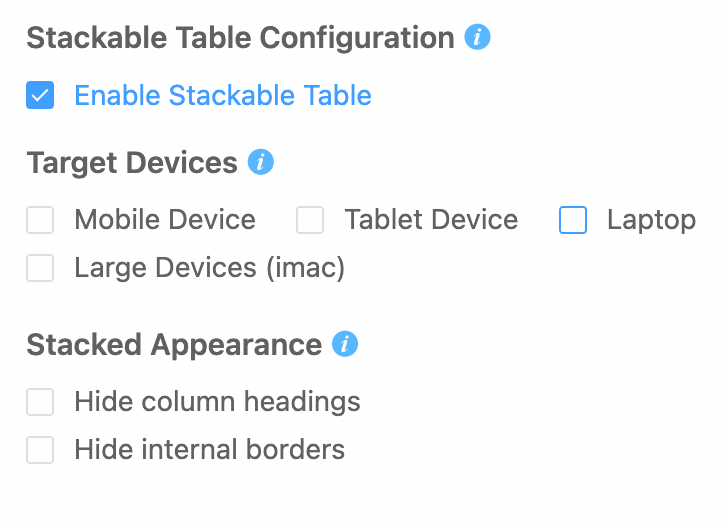
Ninja Tables also comes with a “Stackable Table Configuration” that makes table rows stack on top of another, creating separate tables for each product.

Ninja Tables responsiveness
Make Ninja Tables Responsive to All Devices

Enable the checkboxes and make a mobile responsive table.

Here’s an IPL points table that has the responsive breakpoint option enabled. Click on the “+” icon and see hidden data expand.

IPLTop 5!
Click "+" to Expand
PositionClubMWLNRRPtsLed byBestLast 3
1Gujarat_Titans_LogoGT1183+0.79316Shubman GillODI batter check check remove
2Royal_Challengers_BengaluruRCB1183+0.48216Rajat PatidarRight-handed top order batter, off-spinner remove check check
3Punjab_Kings_LogoPBKS1173+0.37615Shreyas IyerRight-handed middle-order batter check remove remove-outline
4Mumbai_Indians_LogoMI1275+1.15614Hardik PandyaAll-rounder, right-handed middle order batsman, fast-medium bowler check check check
5Delhi_CapitalsDC1164+0.36213KL RahulRight-handed wicket-keeper batter remove check remove

Custom CSS/JS

This feature might be for advanced users and experts in coding. But we’ve already shown you some easy CSS tricks to customize Ninja Tables.

Go to the “Custom CSS/JS” window and paste or write the codes you want for the respective table id.

Unlimited columns and data

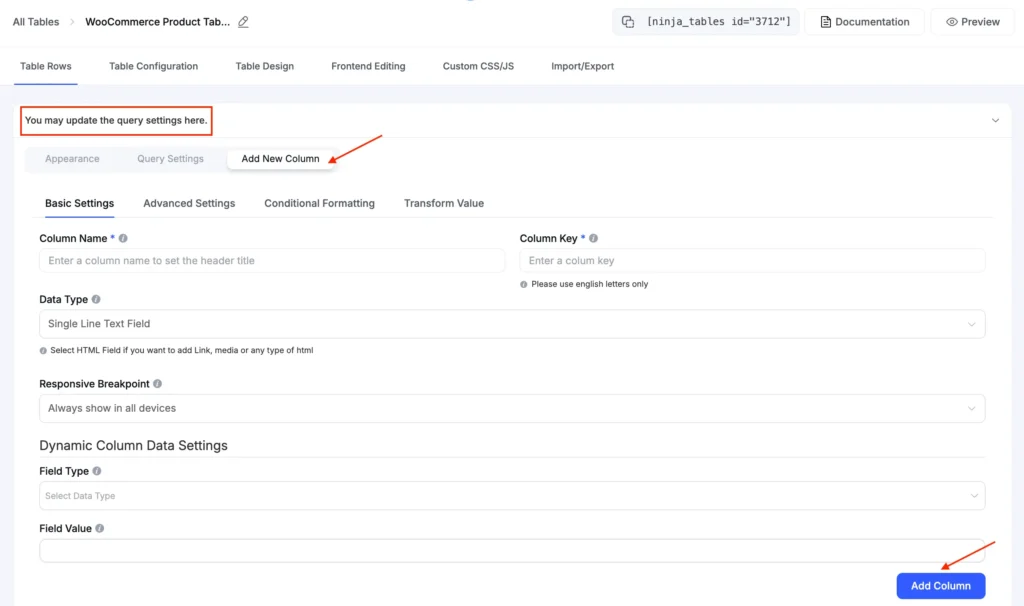
Add as many rows, data, and columns as you want in Ninja Tables WooCommerce product table.

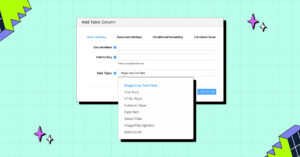
Click the “Add New Column” tab and customize it with the other tabs that come along with the table features.

Unlimited columns in Ninja Tables
Add Unlimited Columns to WooCommerce Tables

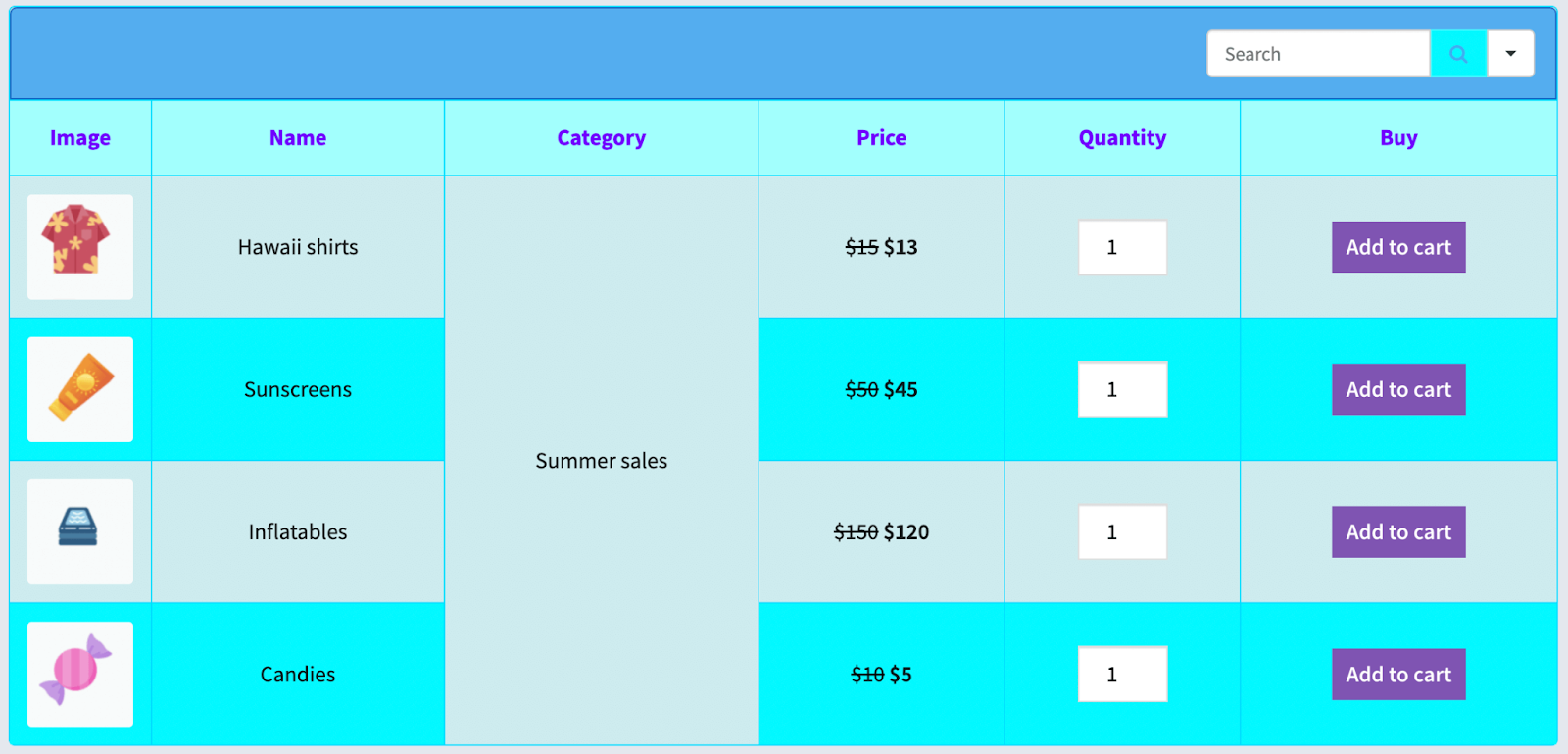
Merge cells

A table with lots of data might give customers lots of details about a product, but sometimes multiple cells with the same data seem repetitive.

You can merge adjacent cells in Ninja Tables (rowspan or colspan) that contain the same data.

merge table cells containing same value
Join Multiple Adjacent Cells into One

Bulk actions

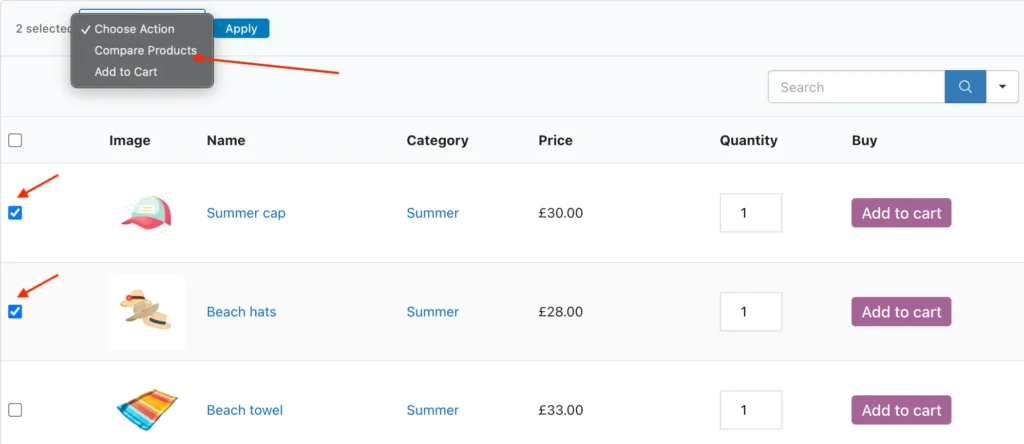
Save your customers’ time by turning on some bulk options like bulk add to cart and bulk select products to compare.

The newest version of Ninja Tables comes with these features.

You can try it from a Woo table frontend.

Bulk compare WooCommerce 2

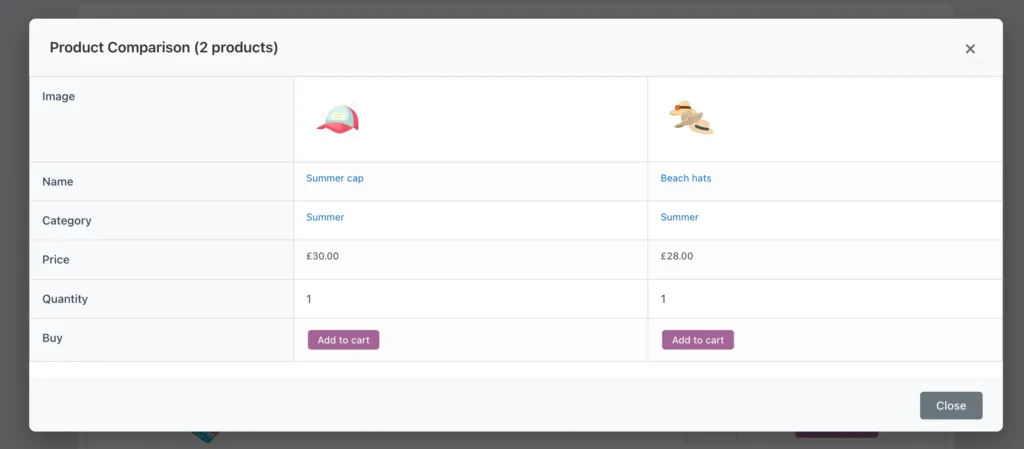
Add multiple products to cart or select multiple to compare in a separate popup table.

It makes purchase decision easier.

Integration with form plugins

WordPress forms and table plugin integrations are useful features for any business, let alone WooCommerce.

Ninja Tables integrates with Fluent Forms and opens many doors for online business.

This integration lets you-

  • Create tables with form entries
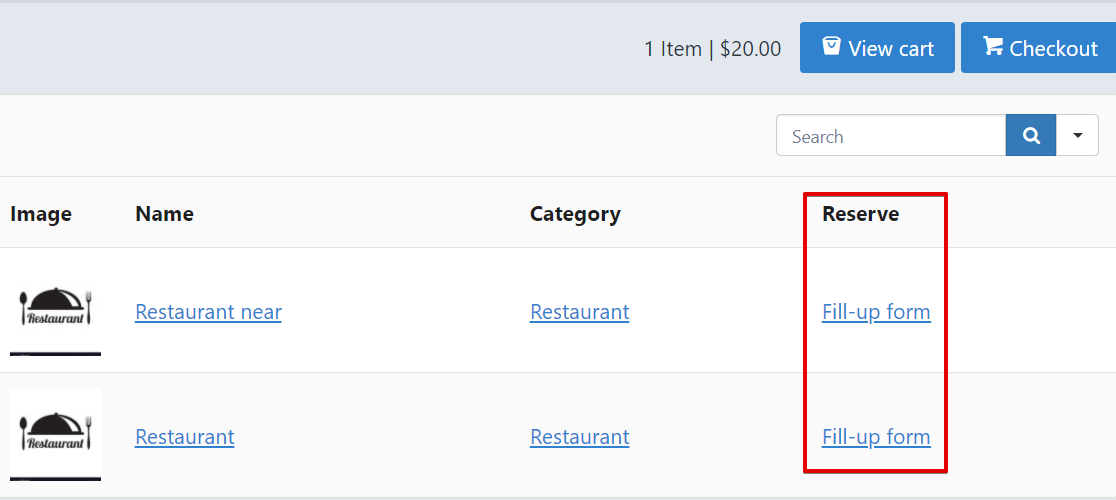
  • Embed forms in the product table

A WooCommerce shop might need the latter of the two so that customers can fill up a form directly from the product table.

Embed Fluent Forms in WordPress table
Forms in WordPress Tables

Learn about connecting Ninja Tables with Fluent Forms.

WooCommerce product review

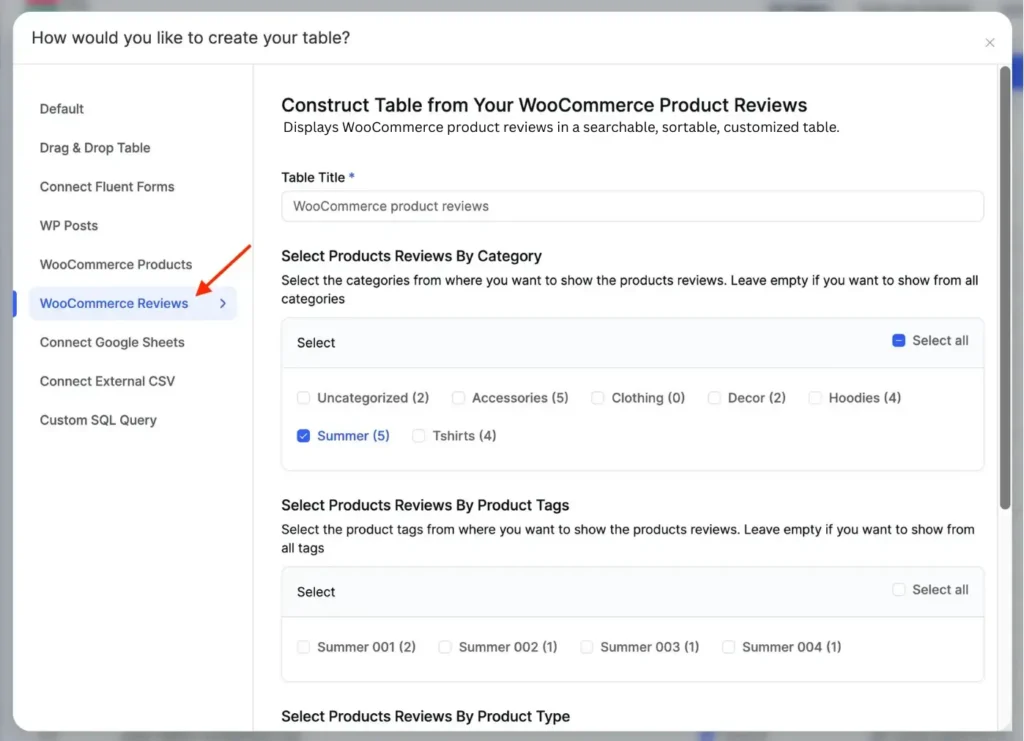
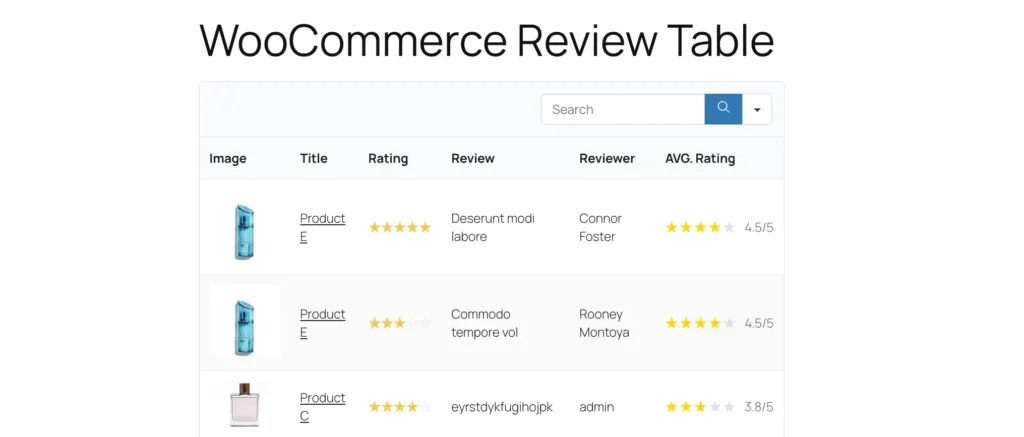
Ninja Tables is basically a plugin that organizes your product catalogue in smart table format. But now you can also select real product reviews and choose to display them on your Woo website.
WooCommerce review table option

Try this feature with your dummy products and collect reviews. When you select WooCommerce Reviews from the table creation menu, you’ll be able to pick the product/reviews to showcase.

woocommerce-product-review-table

Product comparison

Another new addition to this integration is bulk comparing Woo products in the frontend. Site admin can control the bulk options at the backend.

The controls are under “Table Rows” tab in query settings. You only select the “Show Bulk Actions” checkbox.

Bulk compare WooCommerce 2

Once enabled, customers can easily compare one or more Woo products (not more than 5) listed in one table.
Bulk compare WooCommerce 3

How does Ninja Tables help WooCommerce?

A tabular format of data presentation goes easy on the eyes.

Besides, it’s best to grab customers’ attention with a clean and well-arranged product table that has EVERYTHING organized!

That’s why Ninja Tables is the perfect product table plugin for you if you’re running a WooCommerce online store.

You can show all the details of products in one row. For example, image, name, price, stock, quantity, reviews, sale time, a short description. Not to mention buy button, ratings, forms, and many more information.

Then again, this plugin gives you the flexibility to customize every feature!

Get Ninja Tables FAST!

Conclusion

Table plugins for WooCommerce businesses are responsible for user-friendly and customer-friendly layouts. Ninja Tables checks all the boxes!

Get the free version from WordPress.org and try out some features. Unfortunately, WooCommerce isn’t available in the free version.

After discussing all the features above, we don’t think you need more time to decide about getting the pro version!

The price range is within your reach and gives you many customization options too.

Ninja Tables price (USD)
Save $$$ with Special Discount
Annual
Lifetime
Single site $79
Single site $309
Agency $129
(Upto 20 websites)
Agency $499
(20 sites)
Unlimited sites $239
Unlimited sites $749

Use this plugin to make your customers happy and boost WooCommerce sales.

Get in touch with Ninja Tables

NinjaTables Main Logo

Ninja Tables– Easiest Table Plugin in WordPress

Similar Posts

8 Comments

Mohiuddin Omran

Hello Revo,
Thanks for reaching out here. I am not sure from your query, what you actually want.
If you want to showcase your product stock amount beside the stock status, you have to do it from your WooCommerce Product dashboard. The table you embed will show everything you edit in the product dashboard.
For more extended support please open a ticket here https://wpmanageninja.com/support-tickets/